Go to fetco.com for the latest versions of all information Page 9 P167 March 2018
Saving changes and exiting PROGRAMMING
The brewer will save changes only from the “F” menu. DO NOT reboot brewer or toggle ON/OFF-exit as below.
DO NOT attempt to save by rebooting (turning power OFF then ON). All changes made will be discarded and brewer will remain in the existing default settings
TO EXIT PROGRAMMING & HOW TO SAVE CONTROL SETTING CHANGES
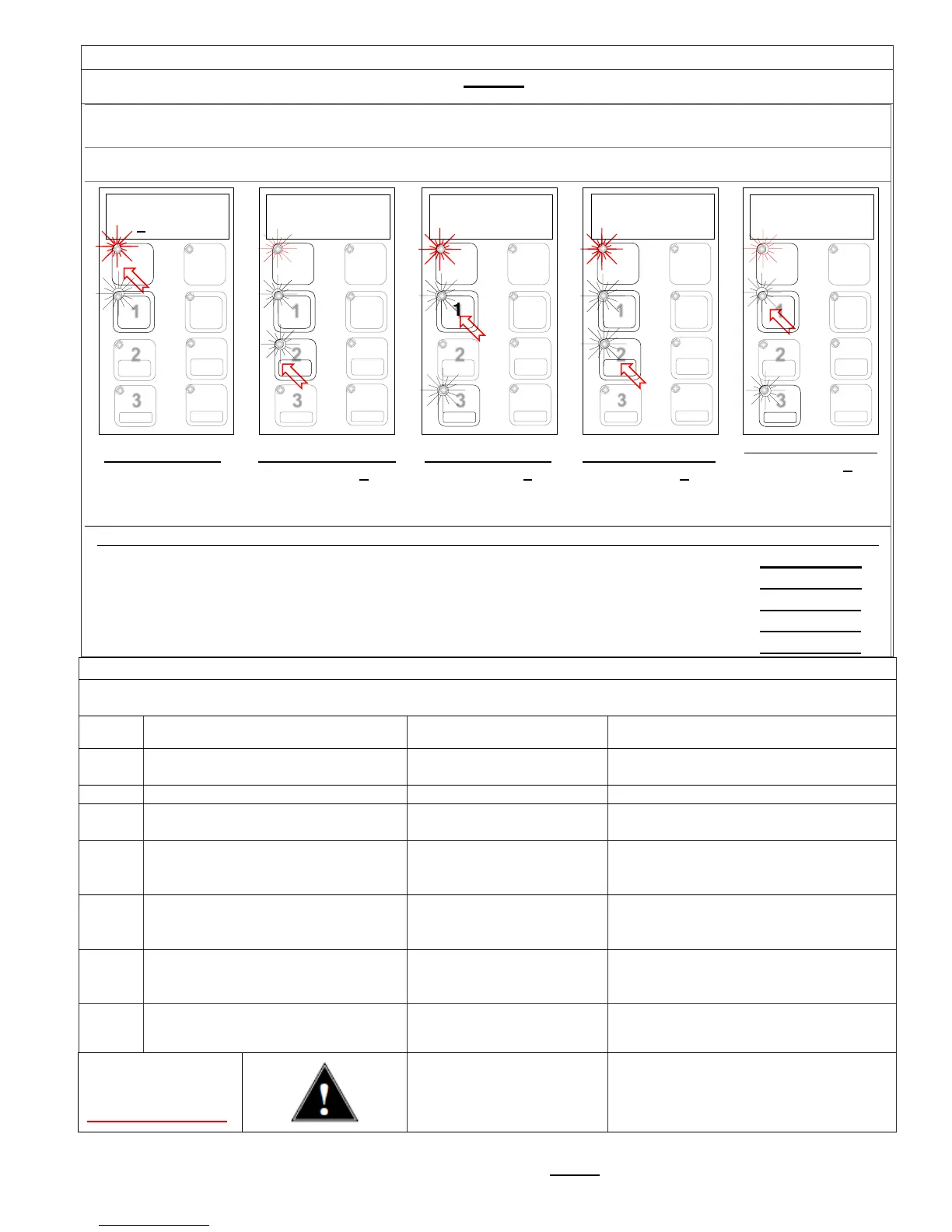
HOW TO SAVE CHANGES AND EXIT-The brewer is in PROGAMMING mode.
You may exit programming at any time. After programmed settings are saved, the brewer exits PROGRAMMING
mode and returns to regular brew operations. Settings are saved only when brewer returns to OPERATING MODE
From any screen-
Press STOP button
until the EXIT (“F”)
screen appears
From the “F” screen
Press button 2 to
toggle to the EXIT-
YES screen
From EXIT screen
Press button 1 to
toggle to the SAVE
screen
From SAVE screen
Press button 2, to
toggle to the SAVE-
YES screen
Press button 1 to
SAVE your changes
and EXIT to
NOTE:
User Settings will be erased and overwritten to factory default settings by the following five programming changes
1) When setting or changing units of display for the tank temperature (F Fahrenheit or C Celsius). (SETTING B4)
2) When setting or changing units of display for the volume (G gallons, L liters). (SETTING B5)
3) When setting brewer model The software sets equipment to brewer defaults (SETTING E2)
4) When resetting (Reloading) DEFAULTS (SETTING E5)
5) When loading from USB (Reloads to defaults ) (SETTING E7)
DO NOT CLEAR ERROR CODES UNTIL ERROR IS IDENTIFIED AND/OR CORRECTED
Contact specialized personnel for error codes
Code Description Possible Cause Corrective Action
001
Software error-error on start up or
corrupted software
Improper start-up or
shutdown
Restart , if still fault: reload software
Short-circuit in temperature probe
051 Open temperature probe.
Bad probe connection, or
probe failure.
Check all connections. Replace probe
if necessary.
100
Initial fill time took longer than
Water supply flow rate is
too low.
Watch for short potting during brew
cycle. Investigate cause of low flow
rate. (Clogged water filter...)
101
Tank did not refill within expected
Water supply flow rate is
too low.
Watch for short potting during brew
cycle. Investigate cause of low flow
rate. (Clogged water filter…)
201
Heater open, high limit thermostat,
or Solid State Relay (SSR) fault
Failure of: heating element,
SSR, high Limit or low
Check and replace heating elements if
necessary.
255 Touch pad error
Usually from longer than 2
min contact. Or faulty
Restart , if still fault: reload software.
If mechanical: reassemble correctly
NO
BSKT
Insert Brew Basket
place
This is a
Insert brew basket into brewer rails to
enable brewer
- F
NO +


 To Next Page