34/50
GB
6 COMPRESSOR MAINTENANCE
1
3
2
4
5
6
1
6.1.2 Replacing the oil filter cartridge
Read all indicated in Section 6.1 before starting any maintenance jobs.
Replace the oil filter cartridge after the first 2500 hours and in any event each time the oil is changed.
Open the front panel.
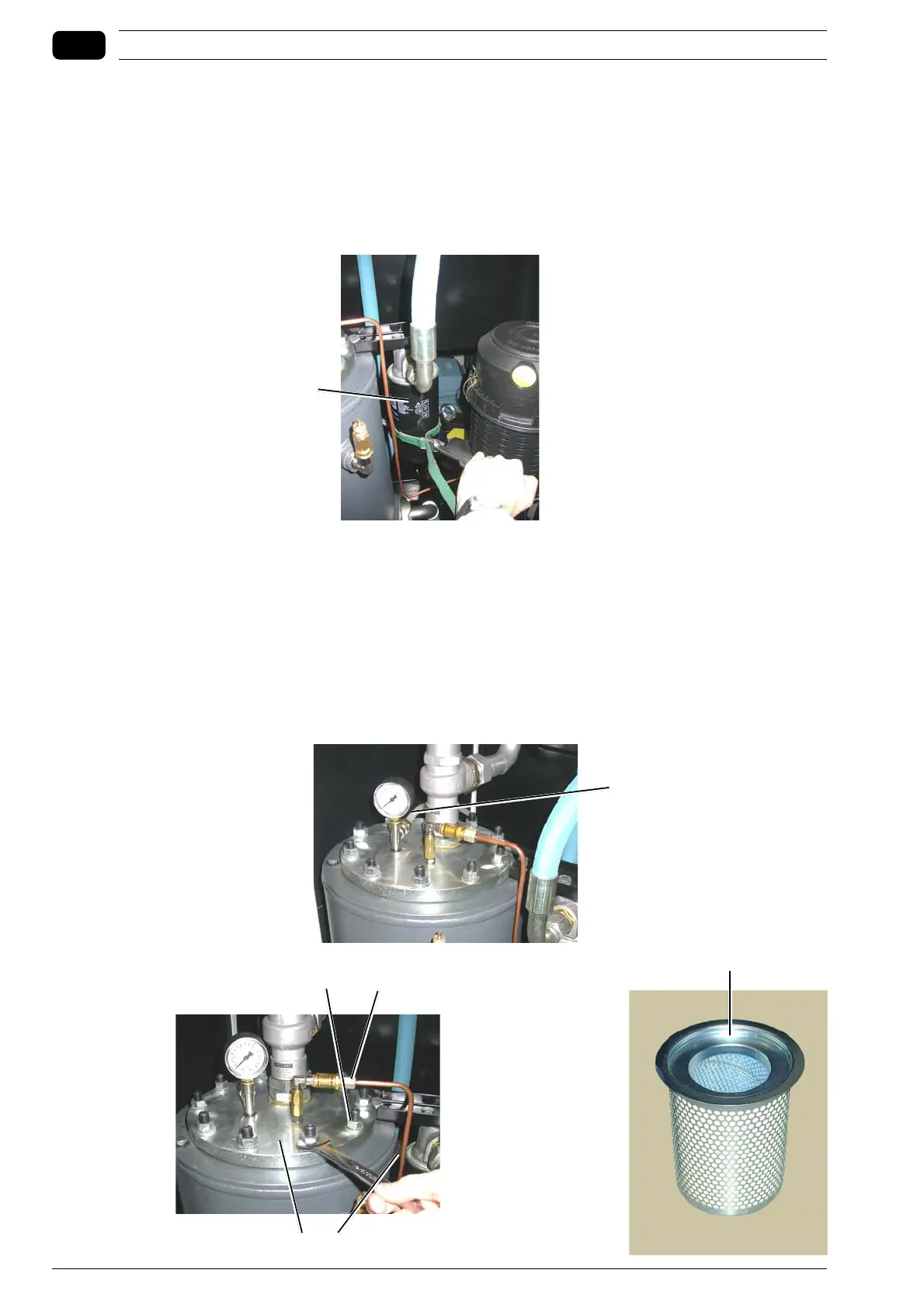
Disassemble filter cartridge 1, using a chain spanner and replace with a new one.
Lubricate the sealing gasket before screwing the filter cartridge tight.
Manually tighten the new filter cartridge.
6.1.3 Replacing the filter cartridge of the oil separator
Read all indicated in Section 6.1 before starting any maintenance jobs.
Open the front panel to gain access to inside the compressor.
Disconnect the compressed air hoses from the hose fittings 1.
Loosen nut 3 and disconnect pipe 2.
Unscrew the nuts 4 and lift the cover 5 to access inside the separator tank.
Replace the old filter with a new one 6.
Follow the procedure in reverse order to fit the parts disassembled back in place.



 To Next Page