33/50
GB
COMPRESSOR MAINTENANCE 6
4
1
3
2
6.1.1 Changing the oil
Read all the information provided in Section 6.1 before proceeding with any maintenance jobs.
Check the oil level after 500 hours of use and then every 5000 hours and in event once a year.
Open the front panel to access the internal parts of the compressor.
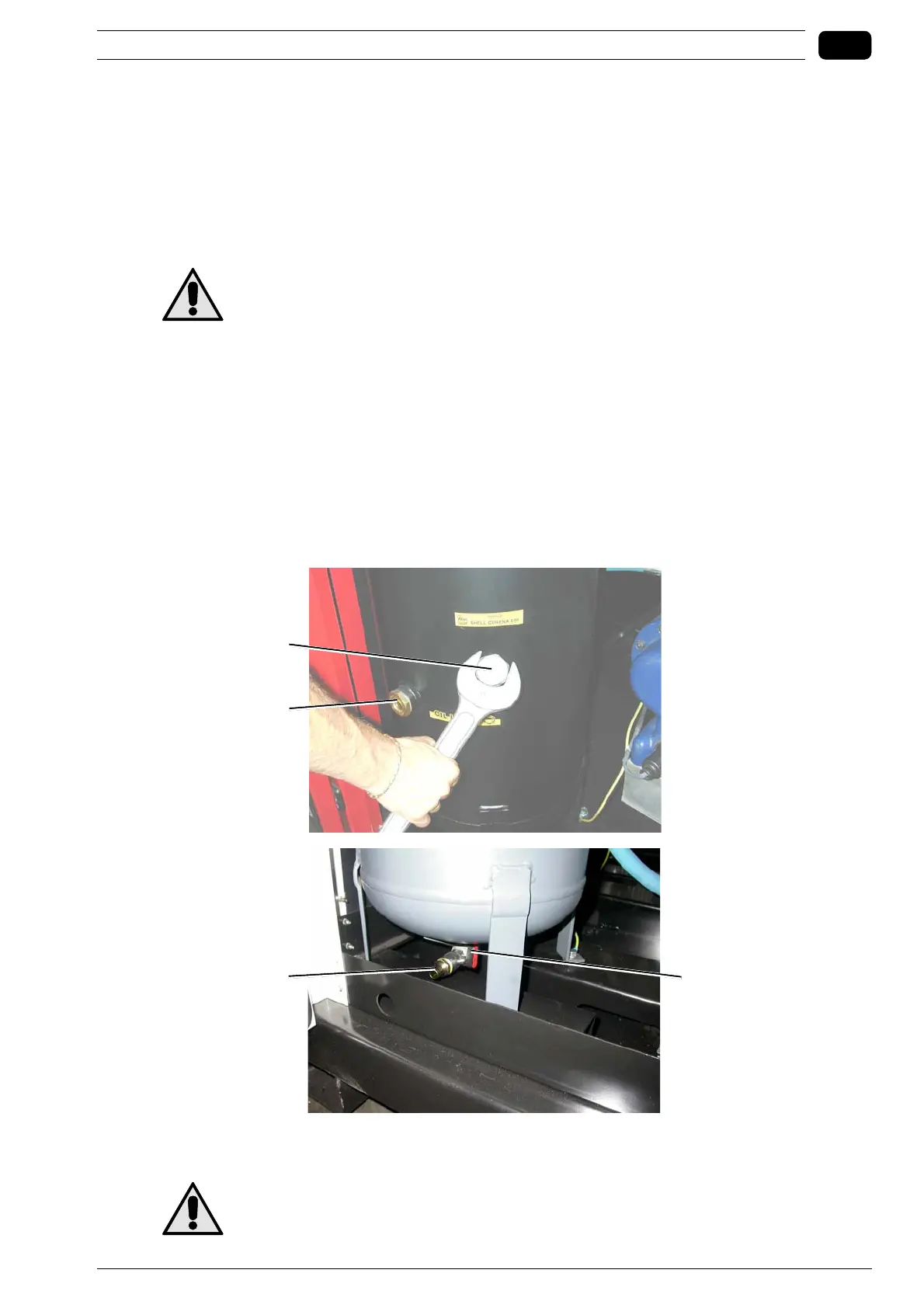
Unscrew cap 1 on the separator tank.
Take cap 2 off.
Screw the fitting with tail piece 3 (supplied with the compressor).
As the knurled fitting 1 is turned oil starts to seep out from the screw unit, therefore
use a hose and container to collect the oil.
Once all the oil has been drained remove the knurled fitting 3 and screw cap 2 manually.
Top up with oil to half way up inspection glass 4, then screw cap 1 back on and close the compressor.
Once the oil and oil filter have been changed leave the compressor to run for roughly 5 minutes then turn
it off and check the oil level again.
Check the oil level once a month. Ensure it is half way up inspection glass 4.
Never mix different types of oil, therefore always ensure that the circuit is completely empty
before filling-up with oil. Each time the oil is changed the filter is also to be replaced.



 To Next Page