94 Capron - 04-17 - CAP-0017-01EN
Appliances
10
After being switched off, the display in the control unit may remain active for
several minutes since the heater is still running.
Operating buttons The operating buttons have the following functions:
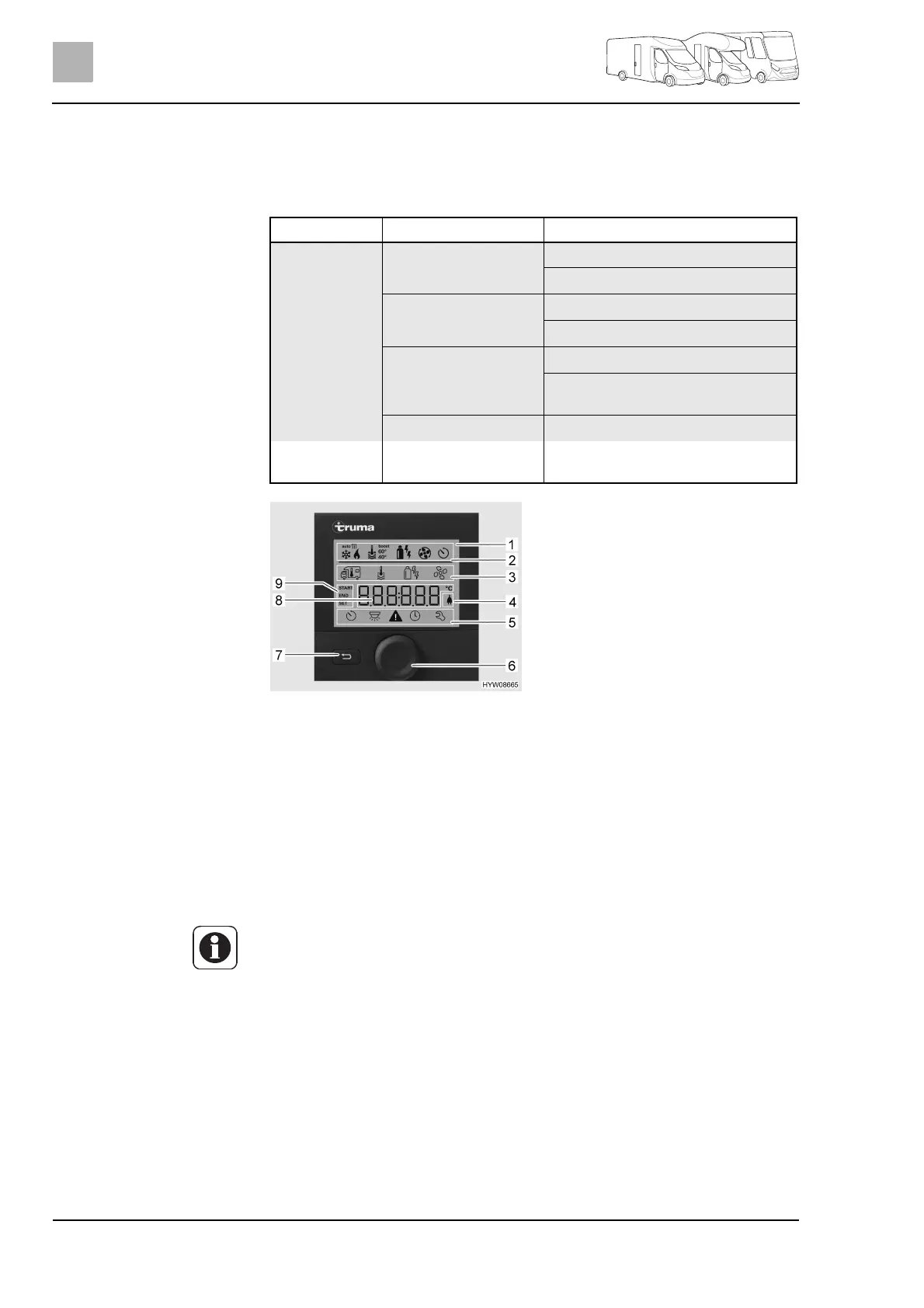
Display The display is divided into four sections:
z Status line (Fig. 82,2)
z Upper menu line (Fig. 82,3)
z Display area (Fig. 82,8)
z Lower menu line (Fig. 82,5)
Switching operating unit on/
off:
Press and hold the rotary push button (Fig. 82,6) for approx. 3 seconds.
Both menu lines (Fig. 82,3 and Fig. 82,5) are displayed. The first symbol
flashes.
Carrying out settings:
Turn rotary push button (Fig. 82,6) until the required menu symbol flashes.
Press rotary push button.
Turn rotary push button until the required value is displayed.
Press rotary push button to save the value set. If you do not wish to change
the value originally set: Press back button (Fig. 82,7).
Button Button operation Function
Rotary push
button
(Fig. 81,2)
Turn to the right Menu is run through from left to right
Values are increased
Turn to the left Menu is run through from right to left
Values are decreased
Press briefly Selected value is saved
Menu item is selected for changing
values (selected menu item flashes)
Press (3 seconds) Switch on or switch off
Back button
(Fig. 81,3)
Press Return from a menu item without
saving values
Fig. 82 Operating unit with displays
1 Display
2 Status line
3 Upper menu line
4 Display line voltage 240 V
5 Lower menu line
6 Rotary push button
7 Back button
8 Settings and values display area
9Timer display
Z Switching the operating mode on/off means switching between stand-by
and setting mode. In stand-by mode, the display alternates between the
room temperature and the time that have been set.



 To Next Page