ProtoNode Startup Guide Page 16 of 25
ProtoCessor 1991 Tarob Court Milpitas, California 95035 USA Web: www.protocessor.com
Tel: (408) 964 4444 Fax: (408) 262-2269 Toll Free: 888-509-1970 X141 email: support@protocessor.com
Appendix A.3. LED Diagnostics for Modbus RTU Communications between the ProtoNode and the OEM
Product
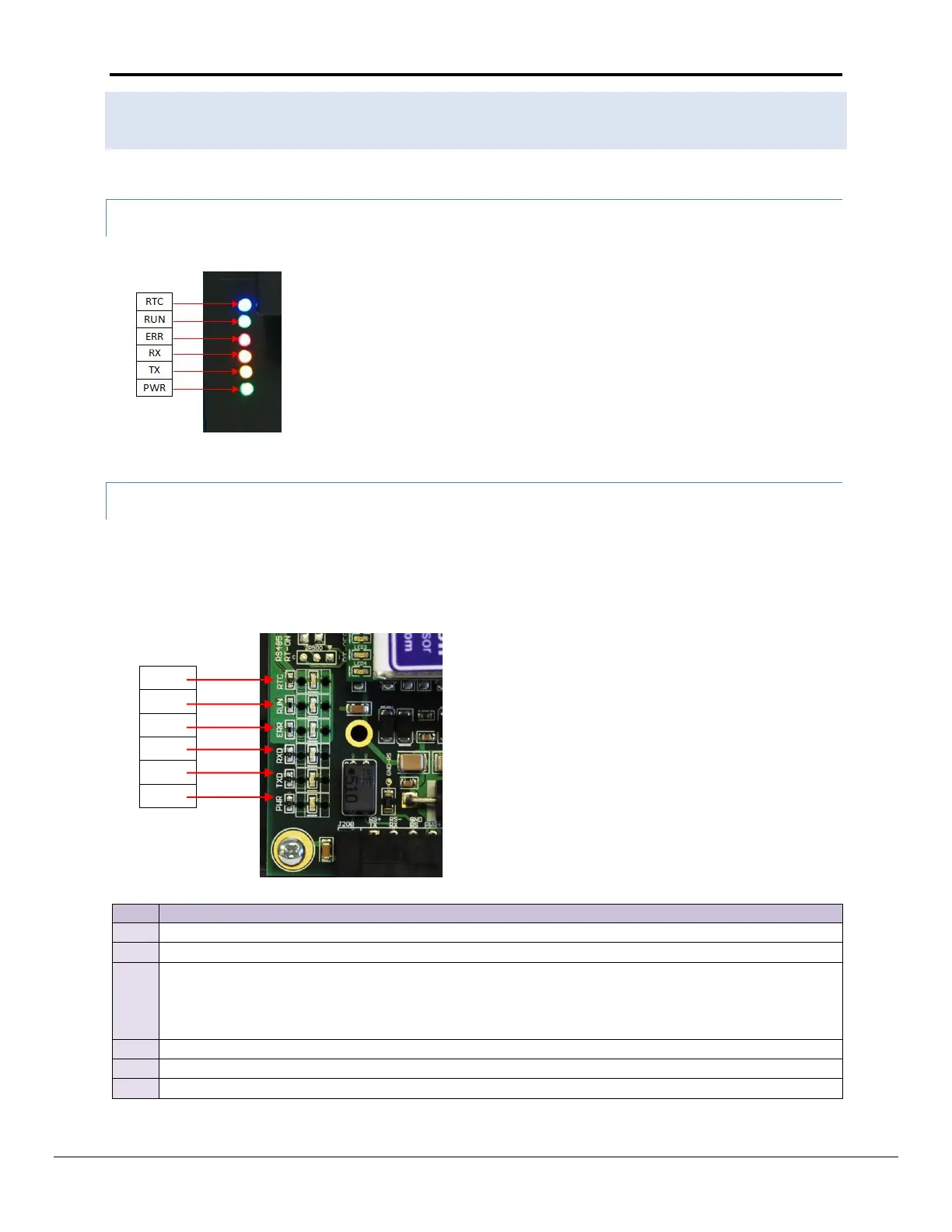
Please see the diagram below for LED Locations
A.3.1 ProtoNode RER LEDs
A.3.2 ProtoNode LER Main Board LEDs
Note: The lid on top of the ProtoNode has to be removed in order to see the LED’s. Pull on the lid while
holding the on to the 6 pin Phoenix connector. Please do not hold the wall mount tabs as these are
designed to break off if not required!
The RUN LED will start flashing 20 seconds after power indicating normal operation.
The SYS ERR LED will go on solid 15 seconds after power up. It will turn off after 5 seconds. A steady red
light will indicate there is a system error on the ProtoNode LER. If this occurs, immediately report the
related “system error” shown in the error screen of the RUI interface to FieldServer Technologies for
evaluation.
The RX LED will flash when a message is received on the socket port.
The TX LED will flash when a message is sent on the socket port.
This is the power light and should show steady green at all times when the ProtoNode LER is powered.



 To Next Page