Generic ProtoNode Startup Guide Page 9 of 25
ProtoCessor 1991 Tarob Court Milpitas, California 95035 USA Web: www.protocessor.com
Tel: (408) 964 4444 Fax: (408) 262-2269 Toll Free: 888-509-1970 X141 email: support@protocessor.com
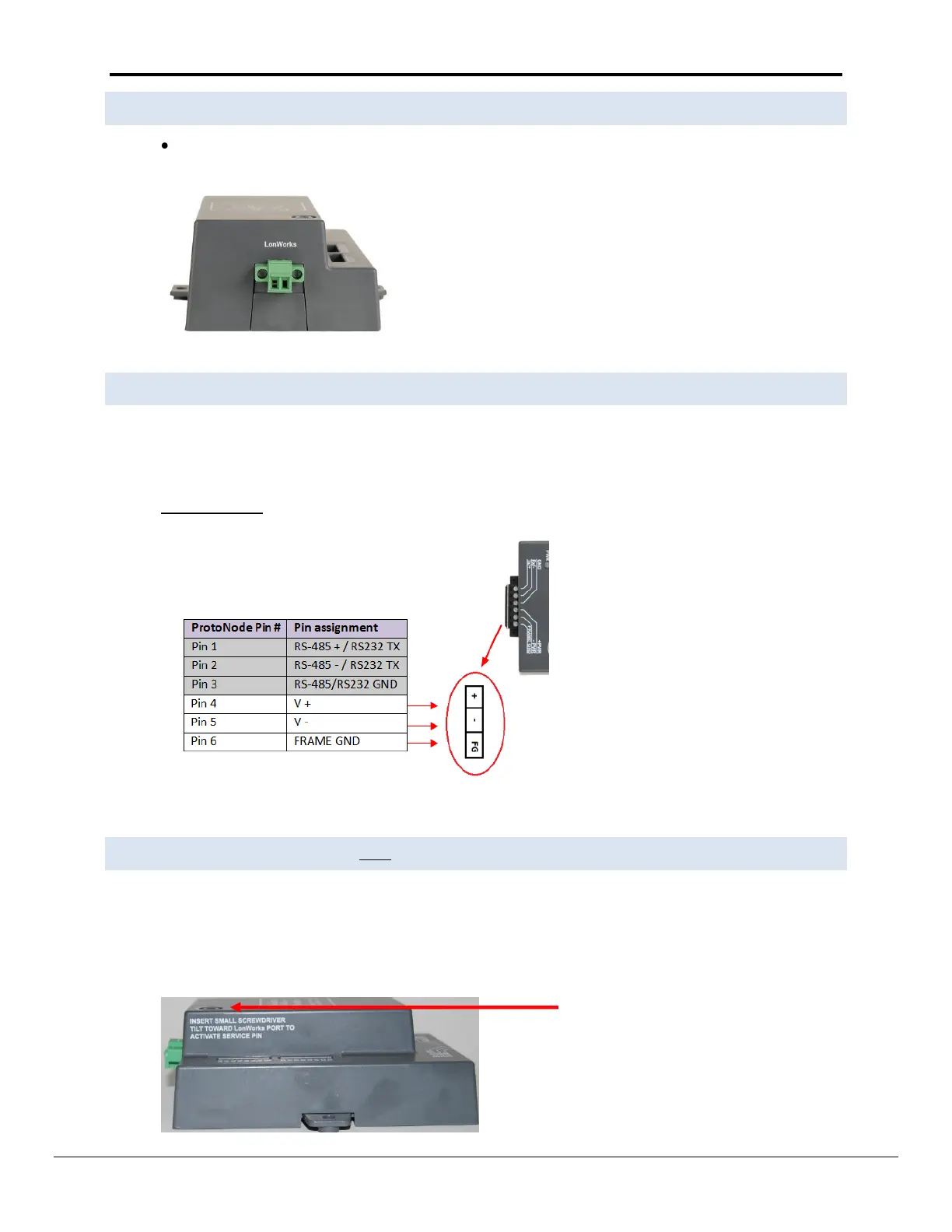
3.4 Wiring the ProtoNode LER Field Port to a LonWorks network
Connect the ProtoNode to the field network with the LonWorks terminal using a twisted pair non-
shielded cable. LonWorks has no polarity.
3.5 Power-Up the ProtoNode RER or LER
Apply power to the device. Ensure that the power supply used complies with the specifications provided in
Appendix C.1. Ensure that the cable is grounded using the “Frame-GND” terminal. The ProtoNode is
factory set for 9-30VDC or 12-24 VAC.
Voltage Pinouts
3.6 Commissioning the ProtoNode-LER on a LonWorks network
Commissioning may only be performed by the LonWorks administrator.
To commission the ProtoNode LER LonWorks port, insert a small screwdriver in the commissioning hole on
the face of the LER’s enclosure to access the Service Pin. See the illustration on the ProtoNode LER as to
which way to toggle the screw driver during commissioning.



 To Next Page