Installation and Operation Manual FVA-IP Camera
10 P/N 06-523 (Rev. 6) Revision Date: June, 2019
2.7.2 TypicalConfigurations
NOTE:Bydefault,theEthernetconnectionisfactory‐presetforafixedIPconfiguration.IfyourorganizationusesDHCP,
donotconnectthecameratothenetworkuntiltheNetworksetup has been completed. Refer to section 3.5 for
details.
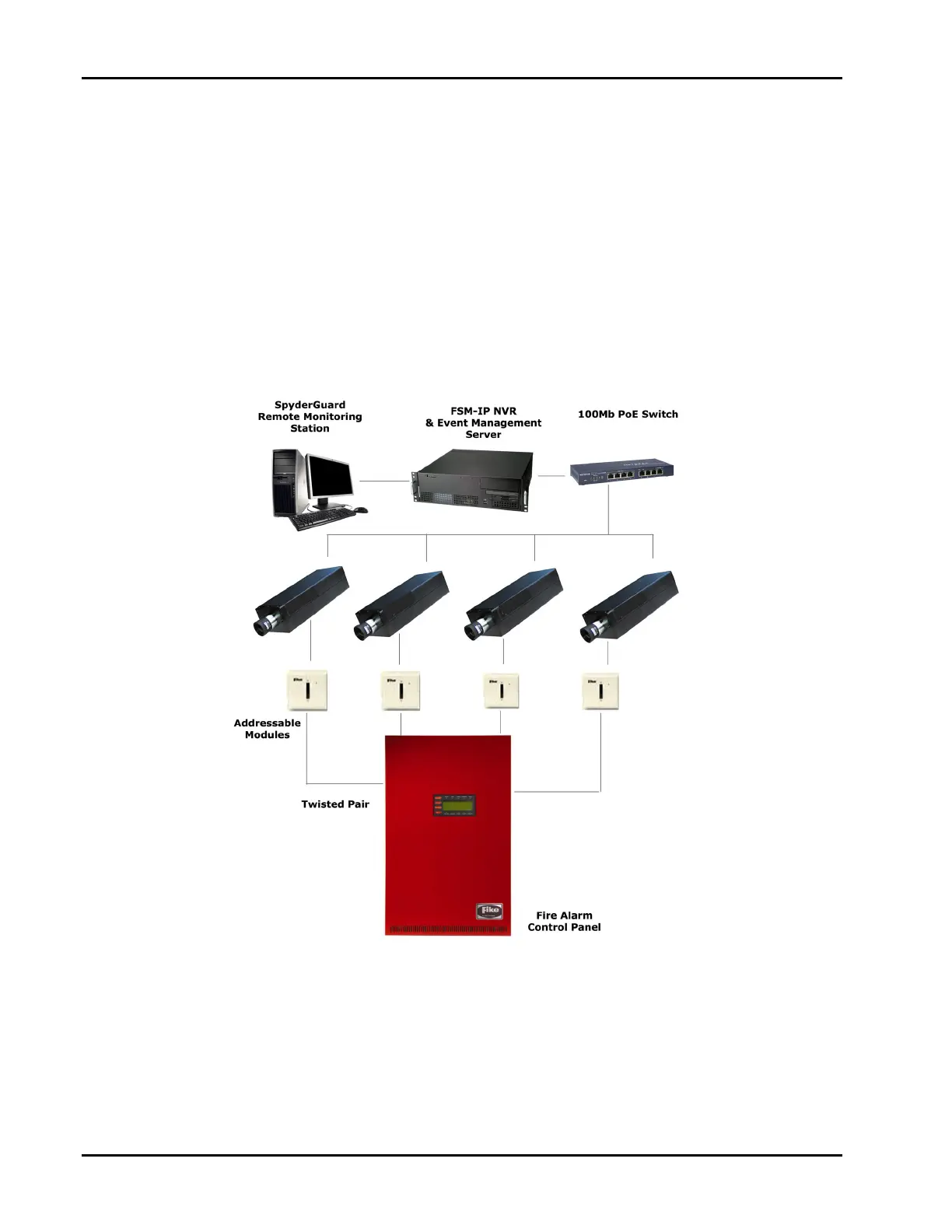
The typical Fike Video Analytics setup will be similar to the one shown in Figure 4 and includes the following
components: FVA‐IP Camera(s) connected by CAT‐5 cable to a network hub or LAN, connecting the monitoring
workstation running the Fike Video Analytics video management software and the FSM‐IP NVR. In addition, dry
contactconnectionsareprovidedoneeachFVA‐IPcamerasothesystemcanbetiedintoaFMapprovedFACP.ABNC
connectionisprovidedso a coax connection canbeusedwithlegacysystems..AppendixBprovidesadiagramfor
identifyingandattachingthedrycontactoutputs.
Figure4‐TypicalFikeVideoAnalyticsNetworksetupforsmallinstallation:FVA‐IPCameras,VideoManagement
system;Networkhub/LAN;Guardstation;Internet.
NOTE:Thissectionprovidesinformationforconfiguringabasicsystem.Formoreinformation,contactyourIT
representativeorsystemadministrator.


 To Next Page