FVA-IP Camera Installation and Operation Manual
Revision Date: June, 2019 P/N 06-523 (Rev. 5) 15
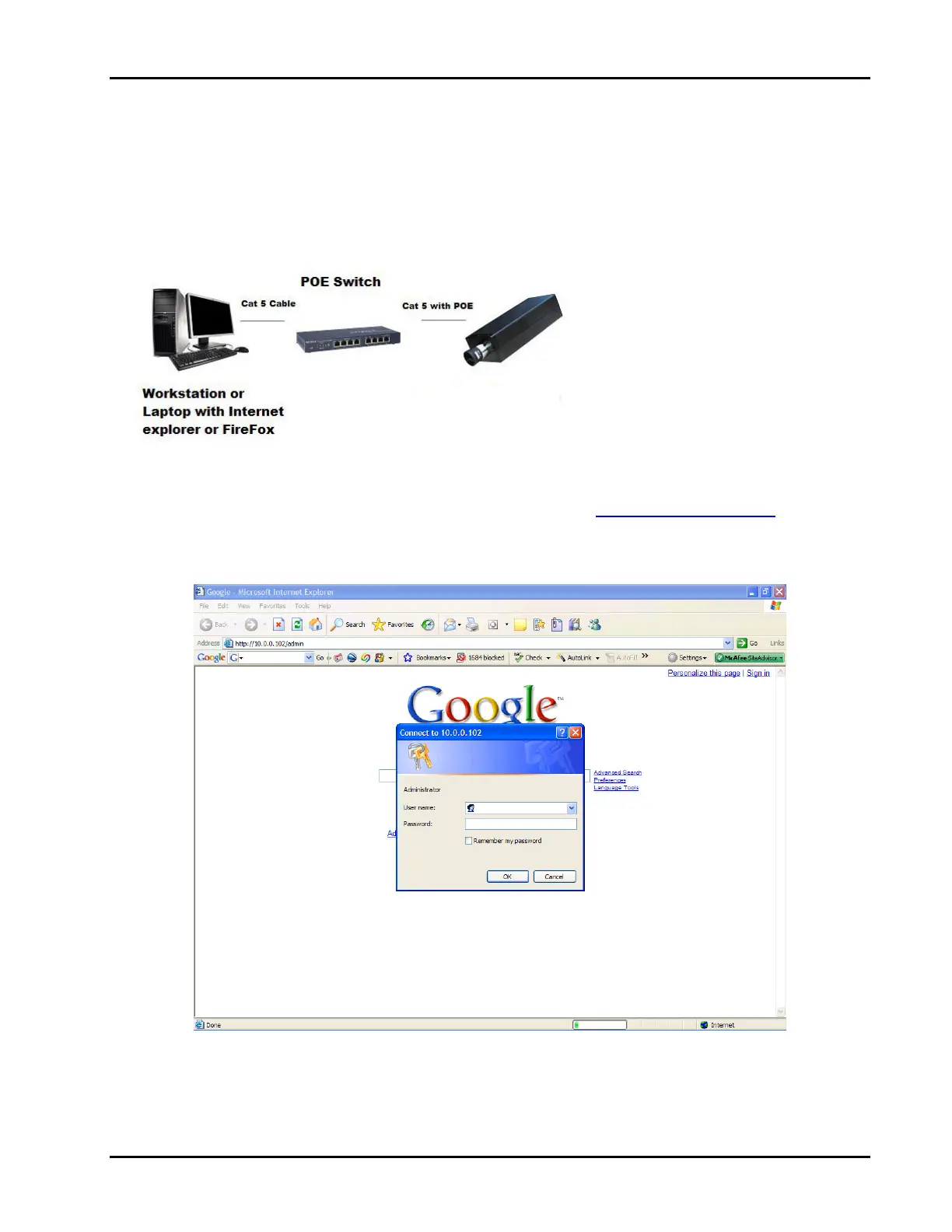
ConnecteitheranEthernetCAT‐5cablewithPOE,12or24VDCcamerapowersupplytotheappropriatepower
contactsontherearoftheFVA‐IPcamera.
NOTE:Powerwith12‐24VDC(UL),12VDC(FM)fromULlistedClass2powersupplyforsecurityorfireshouldbeused.
POEmaybeusedassupplementaltothelisted12or24voltpowersupply.
ConnecttheEthernetcabletoahubandattachthelaptoporworkstationusedtoconfigurethecameratothehub.
3.3 IPCameraCommunications
Openthepreferredinternetbrowser(FireFoxorInternetExplorer)andtypehttp://192.168.0.100/adminintheaddress
bar.Iftheconnectionissuccessfulyouwillbepromptedforausernameandpassword,Figure7.Thefactorydefault
usernameandpasswordareadminandaxonx,respectively.
Fig7–Requiredusername(admin)andpassword(axonx)toestablishconnectiontotheFVA‐IPcamera.
FV
-IP Camera to
be configured
(192.168.0.100)


 To Next Page