Installation and Operation Manual FVA-IP Camera
14 P/N 06-523 (Rev. 6) Revision Date: June, 2019
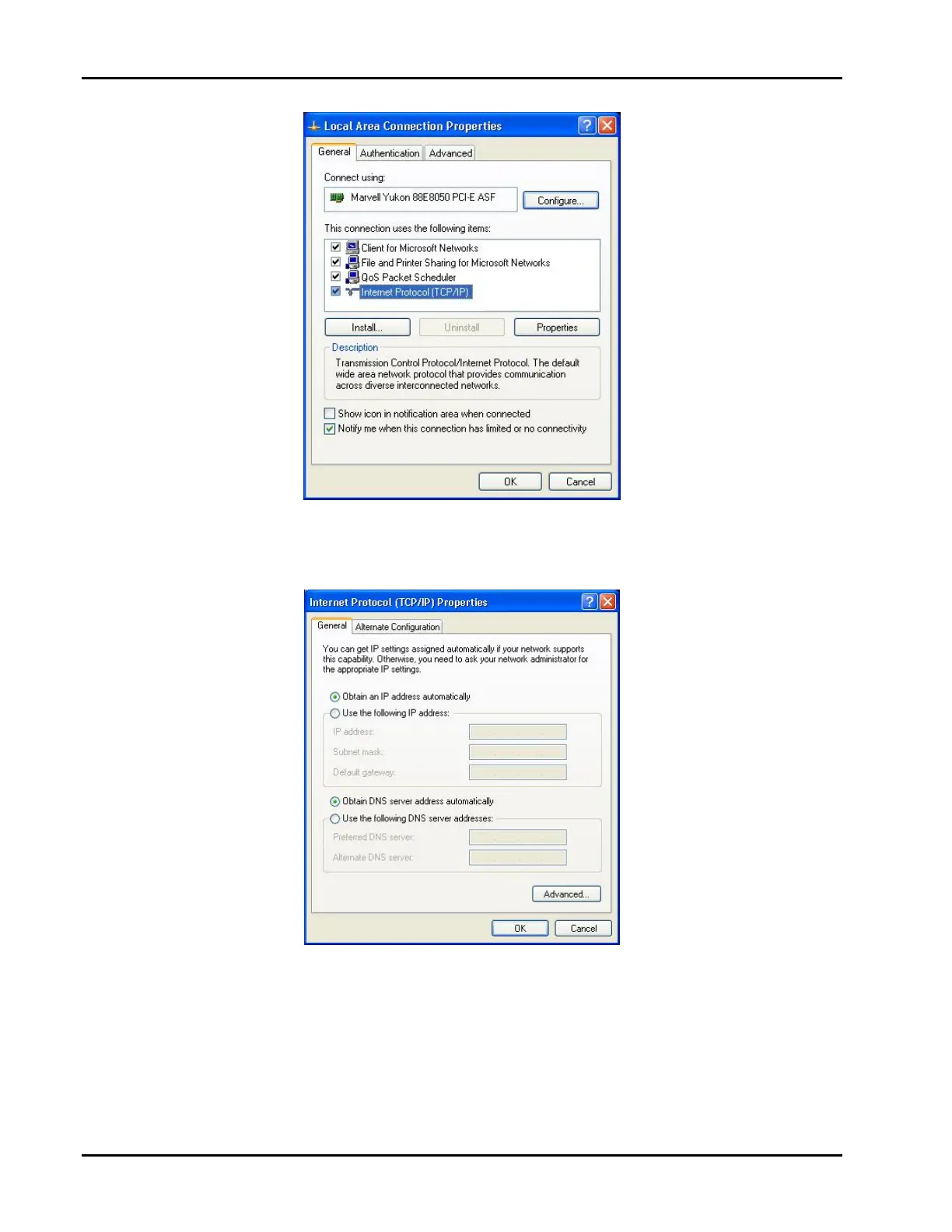
4. SelectInternetProtocol(TCP/IP)andclickthePropertiesbutton.TheInternetProtocol(TCP/IP)Properties
dialogboxopensattheGeneraltab.
5. SelectUsethefollowingIPAddressandentertheIPaddressinthecorrectrange(192.168.0.1to
192.168.0.256,subnetmask255.255.255.0.
6. ConnectthecomputertoaHUBandtheIPcameratothesameHUBusingCAT‐5cables.
YouarenowreadytopowerupandconnecttotheIPCamera.Notethecamerasbydefaultaresetto
192.168.0.100soyoucannotusethisaddressfortheNVRoryouwillcreateanIPaddressconflict.


 To Next Page