13
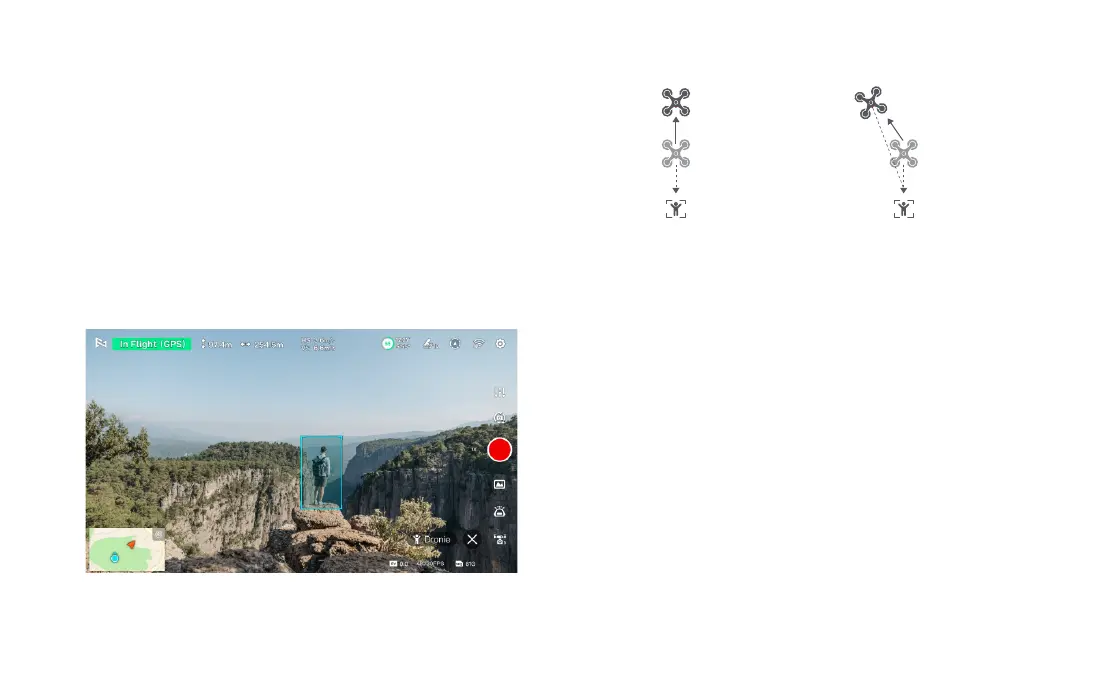
Dronie
The user can select Dronie,including Rocket and Invert,in the App. In Rocket
mode, the drone flies upward with the camera pointing downward at the subject
to shoot a video. In Invert mode, the drone flies backward and upward with the
camera locking at the subject to shoot a video.
• Select the target by framing it.
• Set the flight speed and altitude.
• Click on "GO" to execute. The drone will automatically calculate the flight time and
adjust its position. After a 3-second countdown, the drone will start capturing the
desired shots.
During selfie flight, click on the "X" button to exit the selfie flight.
pitch: -90°
target
fly vertically upward
0°< pitch<90°
target
fly backwards and upwards
Rocket Invert
Course Lock
Users can select the Course Lock mode in the app. The drone will move forward
in the current heading direction and lock the direction. By using the joystick, users
can change the heading direction and adjust the shooting angle, while the forward
direction remains unchanged. Click on the "X" button to exit the Course Lock mode.
Tripod Mode
Users can select the Tripod mode in the app. The maximum flight speed of the
drone is 1m/s, and the maximum rotation speed is 60 degrees/s. In Tripod mode,
the sensitivity of the drone is reduced, resulting in a more stable and smooth
shooting experience. Click on the "X" button to exit the Tripod mode.
Aerial Mode
Users can select the Aerial mode in the app. In Aerial mode, the braking distance
of the drone increases, and the rotation angular velocity is limited, resulting in
smoother and more controlled movements. This mode provides a more stable
and fluid shooting experience. Click on the "X" button to exit the Aerial mode.



 To Next Page