14
Delete User
Only an administrator can perform user deletion at the terminal.
To delete user(s):
Step 1: Press Menu > User Mgt > All User > User ID
Step 2: Key in User ID > Press OK Button > Select Delete
Step 3: Select Delete User, User Role, Fingerprint or Password
Step 4: Press OK Button to delete > Select OK to confirm deletion > ESC to exit.
Display Option
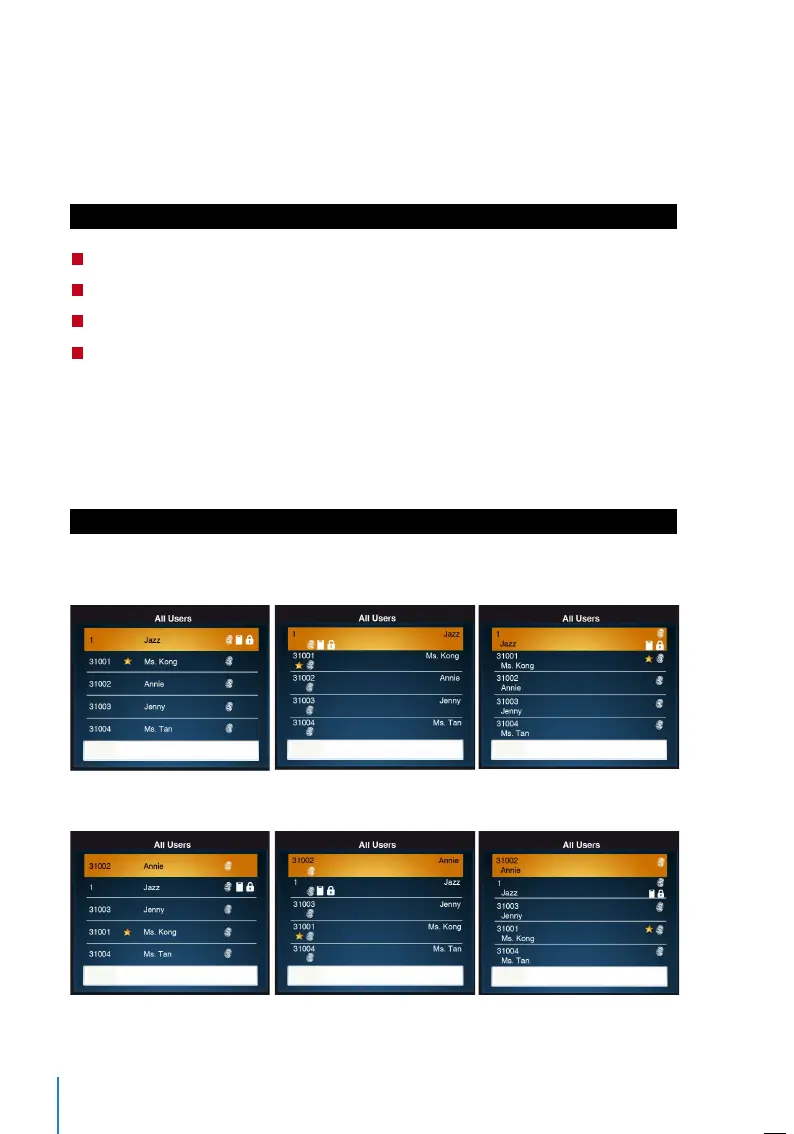
Users can choose the display style of their credentials either to be in. Single Line, Multi-
ple Line, Mixed Line, Single Line & Sort by Name, Multiple Line & Sort by Name and Mixed
Line & Sort by Name.
The different types of display are shown below:
Press Menu > User Mgt > Display Style > Select the type of Display > ESC to Exit
SINGLE LINE MULTIPLE LINE MIXED LINE
SINGLE LINE & SORT BY NAME MULTIPLE LINE & SORT BY NAME MIXED LINE & SORT BY NAME


 To Next Page