English - 16 -
Customer Helpline 0845 459 5282
Connecting to a Wired Network (optional)
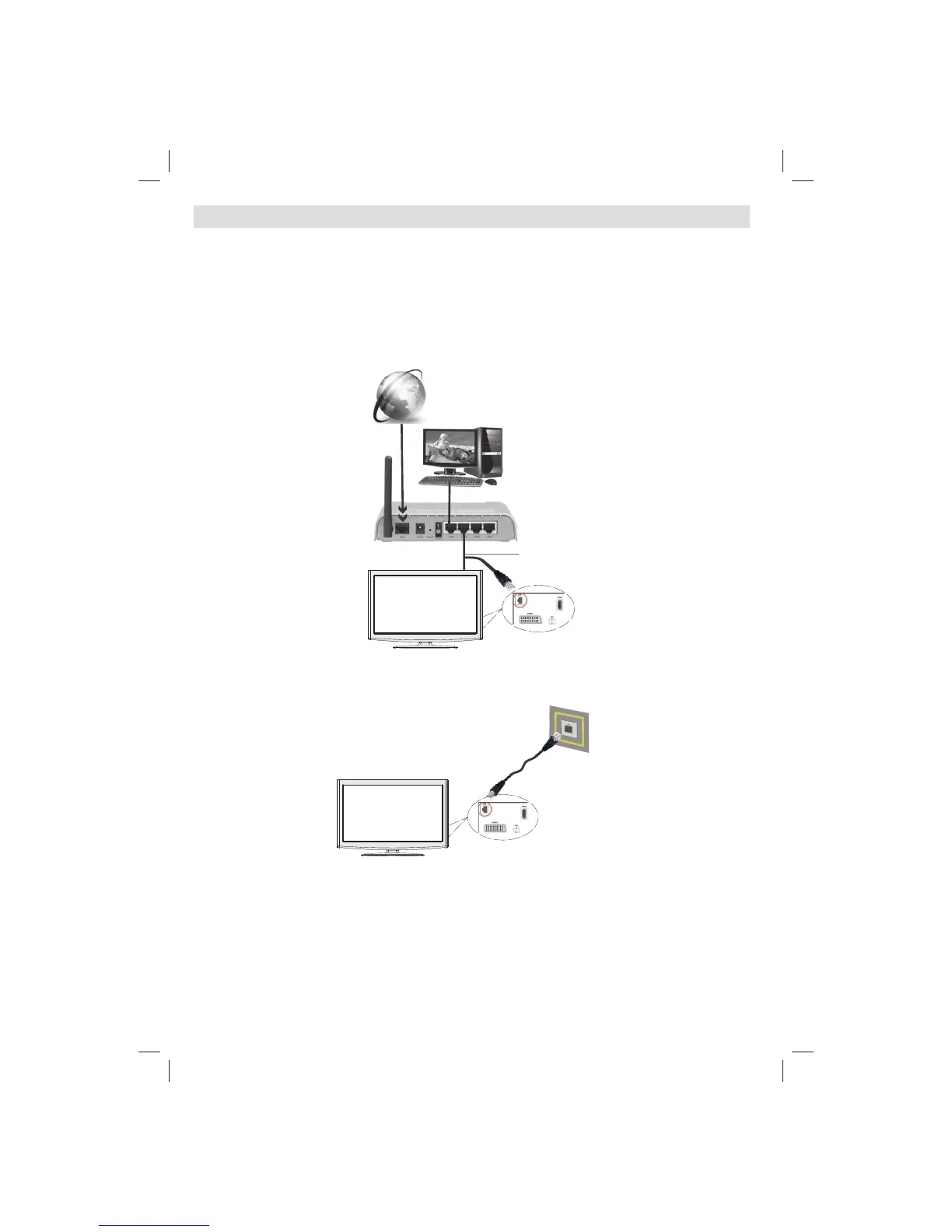
For connecting to a wired LAN network, you should perform the following steps:
Connect a broadband ISP connection ethernet cable to the ETHERNET INPUT of your modem.•
Ensure that Nero Media Home software is installed to your PC. (for DLNA function) •
Afterwards, you should connect your PC to the one of your modem’s LAN connectors (e.g. LAN 1) by using •
a proper LAN cable.
Use another LAN output of your modem (e.g. LAN 2) to enable the connection to your TV. You can add •
your TV to your LAN by connecting the LAN port at the rear of your TV to your modem’s LAN connector as
illustrated below.
PC with Nero
Media Home
software installed
Lan(Ethernet cable)
Broadband ISP
Connection
Rear of TV
You might be able to connect your TV to your LAN network depending on your network’s confi guration. In •
such a case, use an ethernet cable to connect your TV directly to the network wall outlet.
The modem port
on the wall
Rear of TV
01_[GB]_MB70_5112UK_IDTV_T_DLNA_MMH_IPLAYER_32965LED_GOLD11_10077102_50209143.indd 1601_[GB]_MB70_5112UK_IDTV_T_DLNA_MMH_IPLAYER_32965LED_GOLD11_10077102_50209143.indd 16 06.01.2012 10:57:2306.01.2012 10:57:23




 To Next Page