English - 8 -
Customer Helpline 0845 459 5282
Remote Control Buttons
P-
P+
SOURCE
INTERNET
GHI
PQRS
SCREEN
MENU
EPG
BACK
1
4
7
-
V+
V
SWAP
ABC DEF
JKL MNO
TUV WXYZ
LANG
SUBTITLE
INFO
PRESETS
FAV S LEEP
TEXT
EXIT
2
3
5
6
8
9
0
TITLE
ROOT
ZOOM
REPEAT
YB T N1MUTO YBTN2MUTOMULTIMEDIA
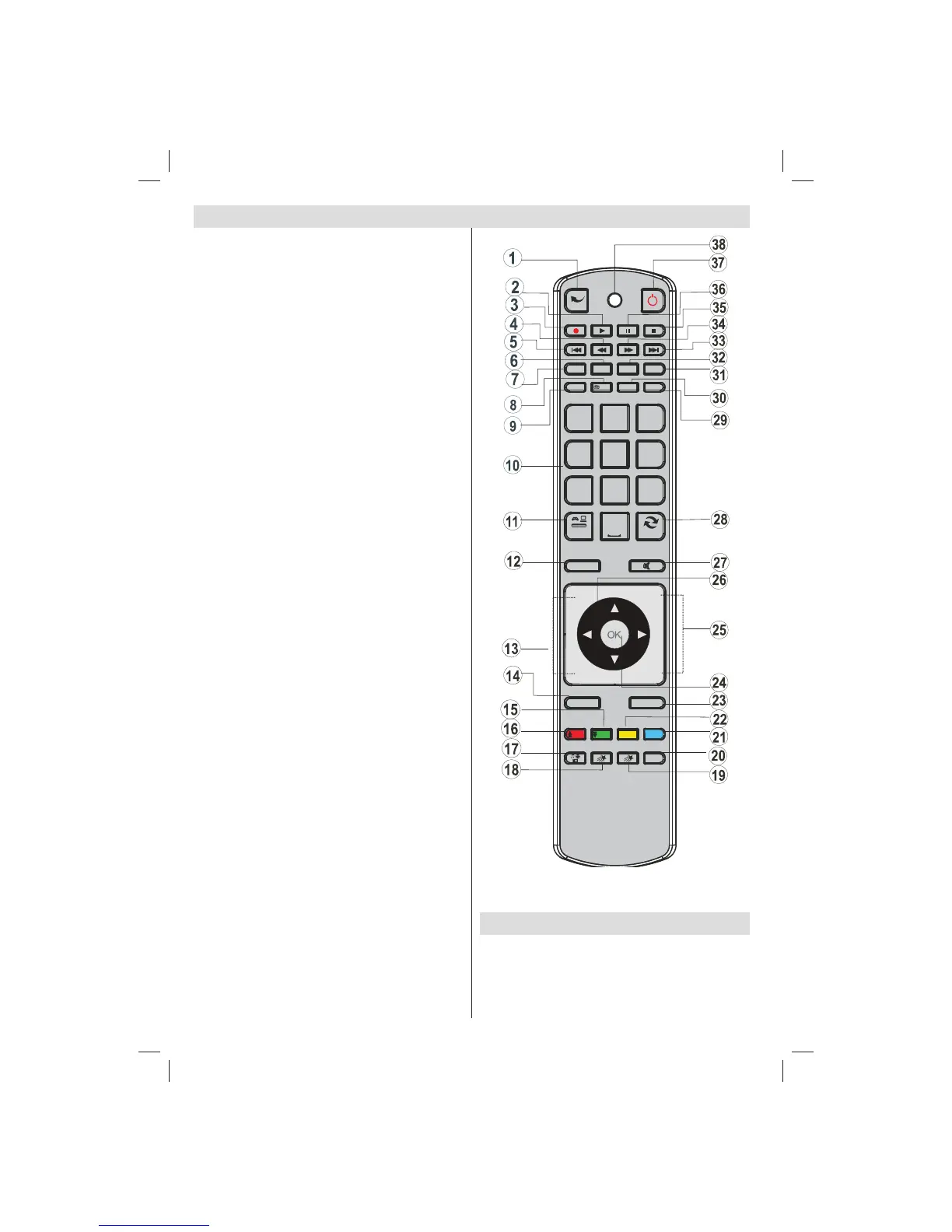
Activate Portal mode (*)1.
Play (in Media Browser mode) 2.
Programme recording3.
Fast rewind (in Media Browser mode)4.
No function5.
Mono/Stereo - Dual I-II / Current Language (*) / 6.
Play preview (in Media Browser mode)
Image size 7.
Teletext / Mix8.
Electronic Programme Guide9.
Numeric buttons10.
AV / Source11.
Menu on/off 12.
Programme Down - Page up / Programme Up - 13.
Page down
Back to previous menu 14.
Green button15.
Red button16.
Media Browser17.
My Button 1(**)18.
My Button 2(**)19.
Info / Reveal (in TXT mode)20.
Blue button21.
Yellow button22.
Exit (in DTV mode) / Return / Index page (in TXT 23.
mode)
OK / Select / Hold (in TXT mode) / Channel List24.
Volume up / down25.
Navigation buttons26.
Mute27.
Previous programme / Now (in EPG mode)28.
Sleep timer29.
Favourite mode selection30.
Picture mode selecion / Changes picture mode 31.
(in Media Browser video mode)
Subtitle on-off / TXT subtitle (analogue TV mode) 32.
/ Subtitle (in Media Browser mode).
No function33.
Fast forward (in Media Browser mode)34.
Stop (in Media Browser mode)35.
Pause / Timeshift recording36.
Standby37.
Operation LED light38.
(*) Please refer to Portal TV section to learn how
to use remote control while in portal TV function.
(**)USING MY BUTTON 1&2
When on a desired source, channel or link, press
MY BUTTON 1 or 2 for fi ve seconds, until the “MY
BUTTON IS SET” message is displayed on the
screen. This confi rms that the selected MY BUTTON
is now associated with the selected function.
01_[GB]_MB70_5112UK_IDTV_T_DLNA_MMH_IPLAYER_32965LED_GOLD11_10077102_50209143.indd 801_[GB]_MB70_5112UK_IDTV_T_DLNA_MMH_IPLAYER_32965LED_GOLD11_10077102_50209143.indd 8 06.01.2012 10:57:1206.01.2012 10:57:12




 To Next Page