English - 32 -
Customer Helpline 0845 459 5282
Note: Equalizer menu settings can be changed
manually only when the Equalizer Mode is in User.
Balance: This setting is used for emphasizing left or
right speaker balance.
Headphone: Sets headphone volume.
Sound Mode: You can select Mono, Stereo, Dual I
or Dual II mode, only if the selected channel supports
that mode.
AVL: Automatic Volume Limiting (AVL) function sets the
sound to obtain fi xed output level between programmes
(For instance, volume level of advertisements tend to
be louder than programmes).
Digital Out: Sets digital out audio type.
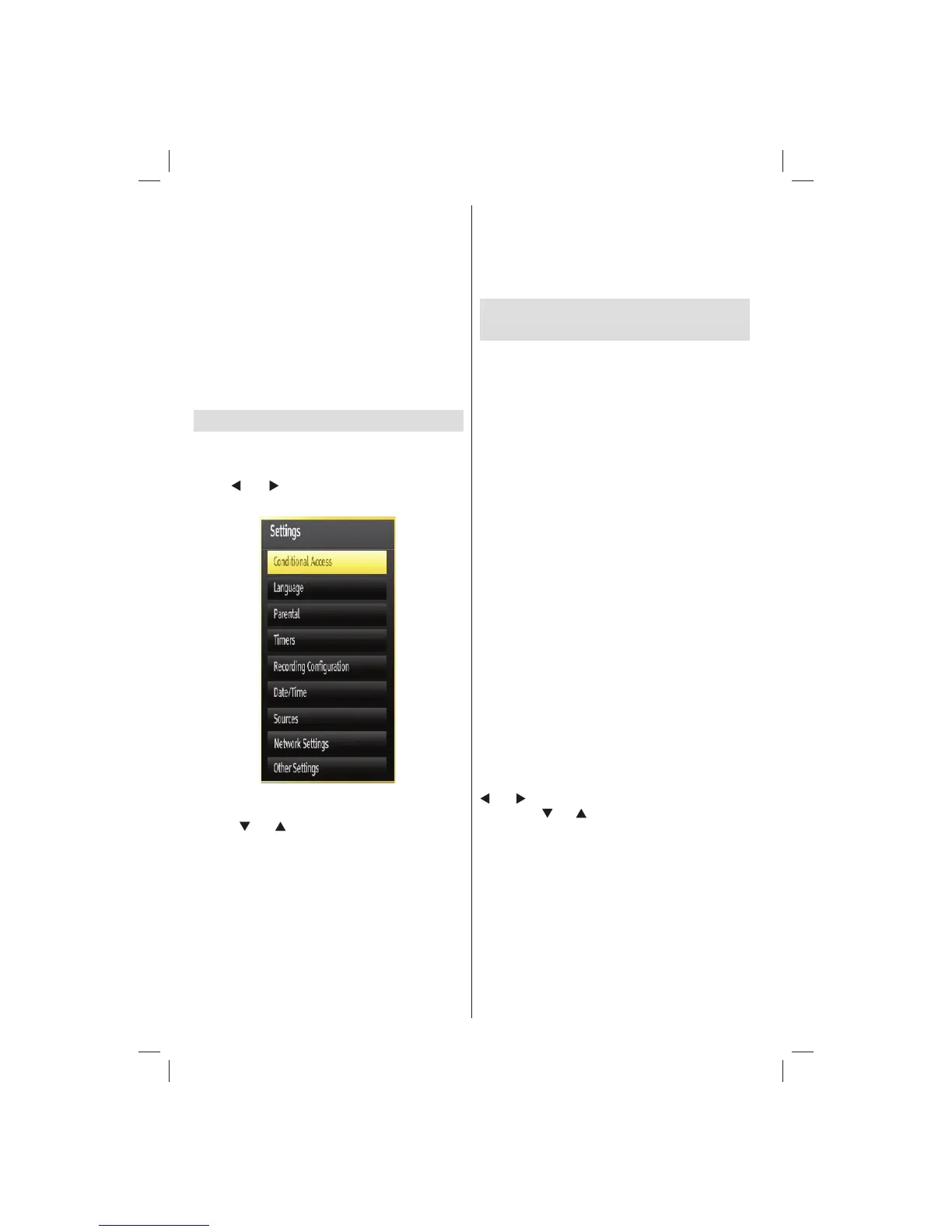
Confi guring Your TV’s Settings
Detailed settings can be configured to suit your
personal preferences.
Press “MENU” button and select Settings icon by
using “
” or “ ” button. Press OK button to view
Settings menu.
Operating Settings Menu Items
Press “• ” or “ ” button to highlight a menu item.
Press • OK button to select an item.
Press “• MENU” button to exit.
Settings Menu Items
Conditional Access: Controls conditional access
modules when available.
Language: Confi gures language settings.
Parental: Confi gures parental settings.
Timers: Sets timers for selected programmes.
Date/Time: Sets date and time.
Sources: Enables or disables selected source
options.
Network Settings: Displays Network Settings
screen.
Other Settings: Displays other setting options of
the TV set.
Using a Conditional Access
Module (not supplied)
IMPORTANT: Insert or remove the CI module only
when the TV is SWITCHED OFF.
In order to watch certain digital channels, a •
conditional access module (CAM) can be necessary.
This module must be inserted in the CI slot of your
TV.
Obtain the Conditional Access Module (CAM) and •
the viewing card by subscribing to a pay channel
company, then insert those to the TV using the
following procedure.
Insert the CAM and then the viewing card to the •
slot that is located in the terminal cover at the rear
side of the TV.
The CAM should be correctly inserted, it is •
impossible to insert fully if reversed. The CAM or
the TV terminal may be damaged if the CAM is
forcefully inserted.
Connect the TV to the mains supply, switch on
and then wait for few moments until the card is
activated.
When no module is inserted, “• No Common
Interface module detected” message appears on
the screen.
Refer to the module instruction manual for details •
of the settings.
Viewing Conditional Access Menu (*)
(*) These menu settings may change depending on
the service provider.
Press “MENU” button and select the icon by using “
” or “ ” button. Press OK button to view Settings
menu. Use “ ” or “ ” button to highlight Conditional
Access and press OK to view menu items.
01_[GB]_MB70_5112UK_IDTV_T_DLNA_MMH_IPLAYER_32965LED_GOLD11_10077102_50209143.indd 3201_[GB]_MB70_5112UK_IDTV_T_DLNA_MMH_IPLAYER_32965LED_GOLD11_10077102_50209143.indd 32 06.01.2012 10:57:3006.01.2012 10:57:30




 To Next Page