English - 25 -
Customer Helpline 0845 459 5282
Rotate (Up/Down buttons): Rotates the image using
up/down buttons.
Loop/Shuffl e (GREEN button): Press once to disable
Loop. Press again to disable both Loop and Shuffl e.
Press once more to enable only Shuffl e. Press again
to enable all. You can follow the disabled functions
with the change of the icons.
BACK: Back to fi le list.
INFO: Displays help screen.
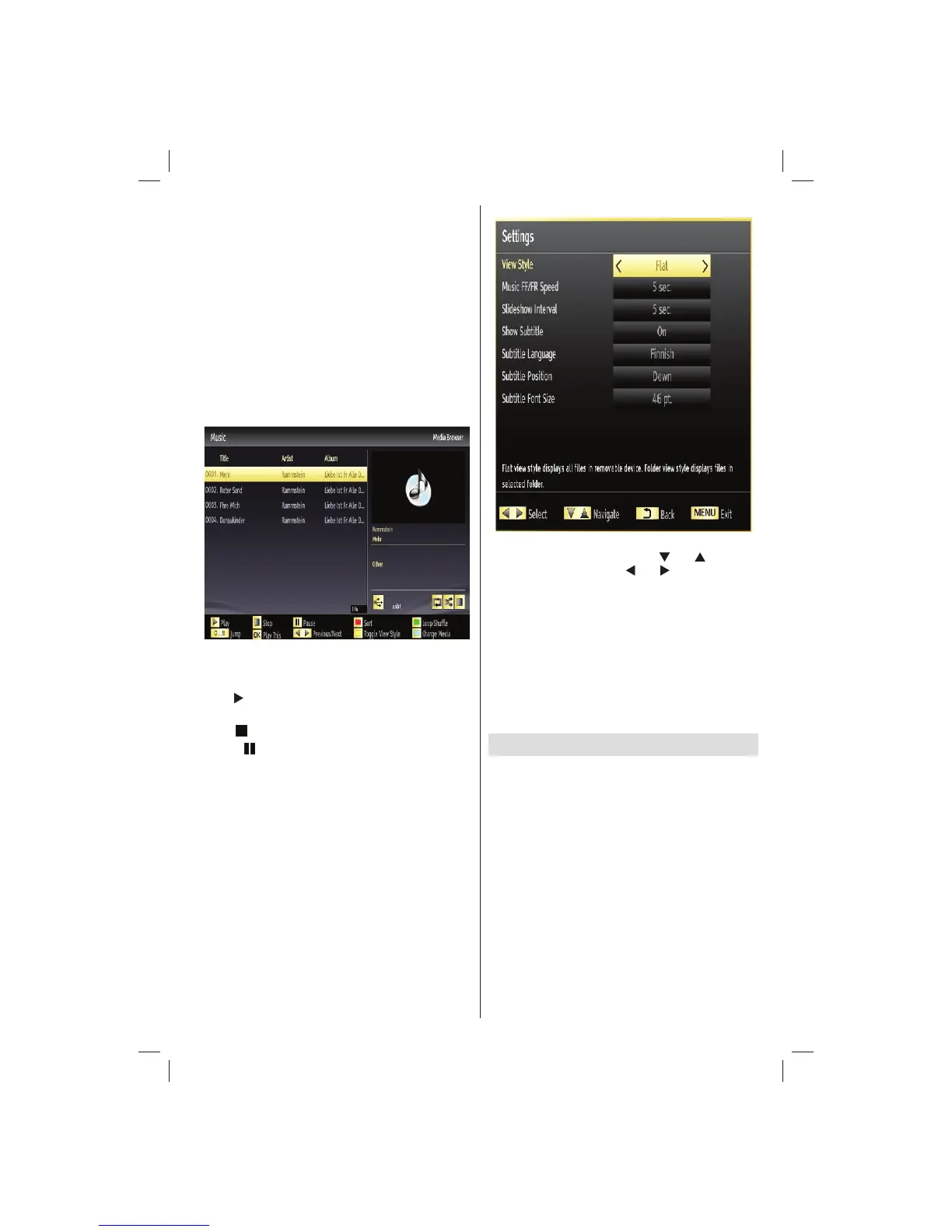
Playing Music via USB
When you select Music from the main options,
available audio fi les will be fi ltered and listed on this
screen.
0..9 (Jump): When you press a digit button displays
textual fi le search.
Play This (OK button) : Plays the selected fi le.
Play (
button) : Plays all media fi les starting with
the selected one.
Stop (
button): Stops playback.
Pause (
button): Pauses the selected playback.
Previous/Next (Left/Right buttons): Jumps to
previous or next fi le to play.
FAV: Sorts fi les by Title, Artist or Album.
INFO: Changes fi lter options.
Loop/Shuffl e (BLUE button): Press once to disable
Loop. Press again to disable both Loop and Shuffl e.
Press once more to enable only Shuffl e. Press again
to enable all. You can follow the disabled functions
with the change of the icons.
Media Browser Settings
You can set your Media Browser preferences by
using the Settings dialog. Press “ ” or “ ” button to
highlight an item and use “ ” or “ ” button to set.
View Style: Sets default browsing mode.
Slide Show Interval: Sets slide show interval time.
Show Subtitle: Sets subtitle enabling preference.
Subtitle Language: Sets supported subtitle
language.
Subtitle Position: Sets subtitle position as up or
down.
Subtitle Font Size: Sets subtitle font size (max.
54pt).
Viewing Internet Services
If you press the ‘internet’ button on the remote control
the internet portal will appear on screen. From here
you can access catch-up TV services such as BBC
iPlayer, as well as Video on Demand services and
access social networks. Use the direction buttons on
the remote control to move the cursor and press the
‘OK’ button to select the desired service.
Note : See Appendix 1 for detailed information on
portal services and Appendix 2 for BBC iPlayer
information.
Note : There can be a delay in access to the internet
portal immediately following turning the TV on. This
is due to the TV connecting to your internet and is part
of normal operation.
01_[GB]_MB70_5112UK_IDTV_T_DLNA_MMH_IPLAYER_32965LED_GOLD11_10077102_50209143.indd 2501_[GB]_MB70_5112UK_IDTV_T_DLNA_MMH_IPLAYER_32965LED_GOLD11_10077102_50209143.indd 25 06.01.2012 10:57:2706.01.2012 10:57:27




 To Next Page