24
5.2.12 SYSTEM SETUP MENU
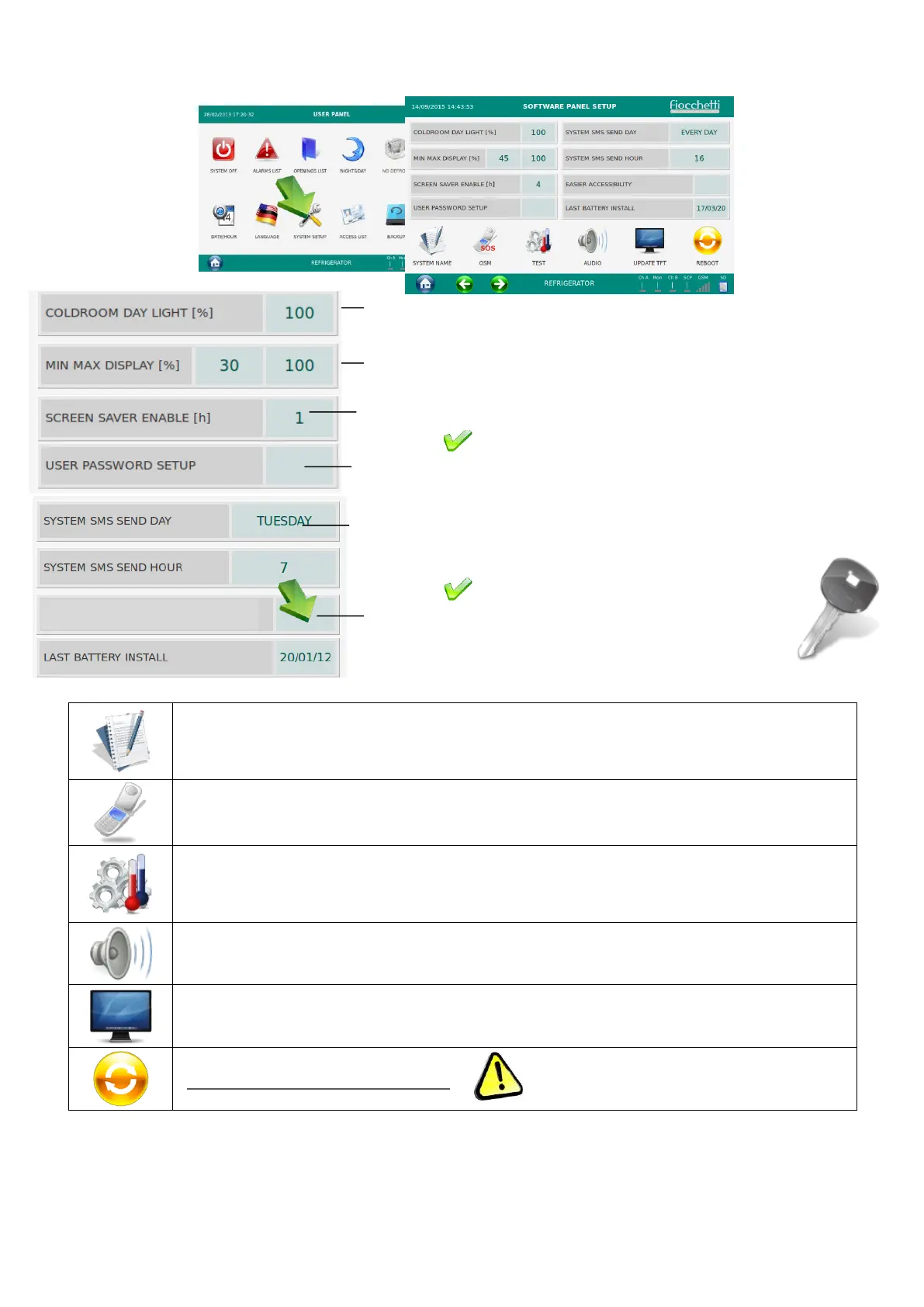
In this menu the user has the possibility to customize some specific functions of the
equipment.
It enables to give a name to the equipment to be then visualized in the Home
page.
It enables to enter a GSM number to send SOS SMS automatically in case of a
system failure (Only if additional GSM module is installed).
It enables to access to a menu specifically designed to run tests on the
equipment. Please see par.5.2.12.2 For more detailed info.
It enables to activate or disable the equipment audio.
(make a reboot only if necessary)
To modify the internal light brightness (from 0 to 100%)
To modify the brightness of the display (MAX during the
equipment functioning and MIN during the N&D and screen
saver)
Activate or deactivate the “USER PASSWORD SETUP” (To
activate and deactivate, PSW: 0000). The “generic user” then is
password is 1234. In order to change it, see Par. 5.2.12.1
To activate Screen Saver each (h) hours (from 1 to12h or Never)
To setup day and hour for the system SMS
(Only if GSM Communicator 2011 is installed)
Activate feature “EASIER ACCESSIBILITY” to
diplay bigger icons in homepage for door opening
and light switching


 To Next Page