- 7 -
Amber
(Fault)
Constant
Amber
(Fault)
Red
(Alarm)
Red
(Alarm)
Amber
(Fault)
• FLASHING FAULT (Amber LED)
The Detector is receiving a low signal (<100%) and is attempting to increase the infrared power output.
• OFF
The Detector has optimised the infrared power and receiver gain for the current orientation of the Detector
and Prism(s). This does not mean that the Detector to Prism(s) alignment is at its optimum
, i.e. if the
power is too high, a misaligned Detector may be receiving a fringe reflection from another object.
• ALTERNATING ALARM/FAULT (Flickering Red/Amber LED)
This state can sometimes occur. It means that the infrared power is stepping between optimum settings
(treat this state as OFF
).
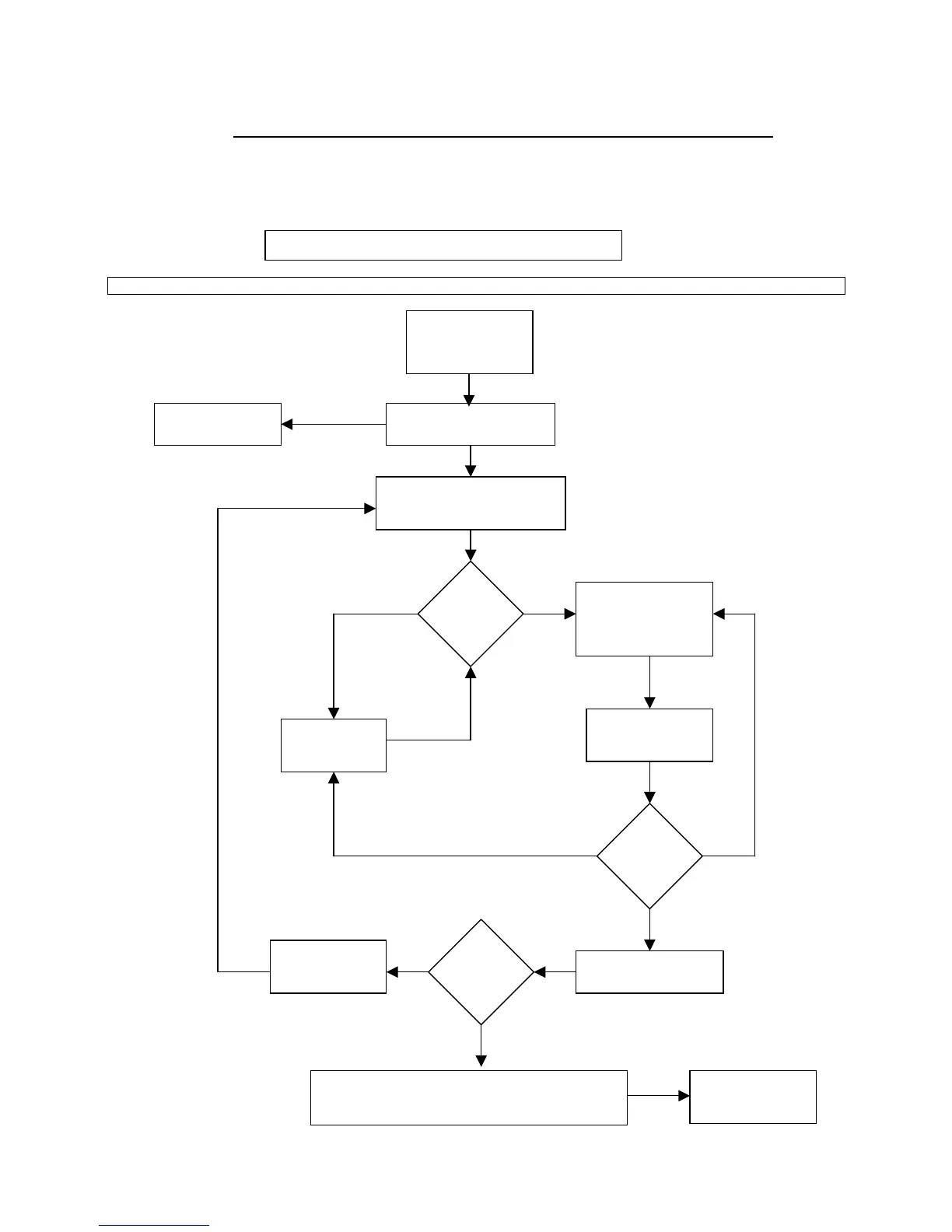
6.3. Alignment Process Flow Diagram.
Continue to flow diagram for procedure.
Wait until both LED’s stop
flashing (up to 30 seconds)
Return To Prism
Targeting Mode
Slowly turn the
thumbwheel in the
same direction
Reverse the
direction of the
thumbwheel
Exit Alignment
Mode and enter
operating mode
Select alignment
mode AMBER LED
will illuminate for
5 seconds
LED
Flashing ?
Turn a thumbwheel in one
direction and observe the LED’s
For optimum alignment, mechanical deflection
of the beam in all four planes should cause the
Am


 To Next Page