© Copyright 2001-2021 schertechnik GmbH | Klaus-Fischer-Straße 1 | 72178 Waldachtal
25
ROBOTICS TXT 4.0 CONTROLLER
schertechnik TXT Operating manual_EN | 10. November 2021, 9:18 PM
CONNECTING THE TXT 4.0 CONTROLLER VIA A USB CABLE
› Connect a mini-USB cable to the PC and Controller TXT 4.0
› Plug the power supply into the outlet (or connect the Battery Pack)
› Plug the DC plug of the power supply into the 9 V IN input port (5) on the Controller
› Turn on the Controller using the on / off switch (11). Hold the switch down for approx. 3 seconds until the display
is illuminated
CONNECTING THE TXT 4.0 CONTROLLER WITH A PC VIA WI-FI
VIA THE ROUTER
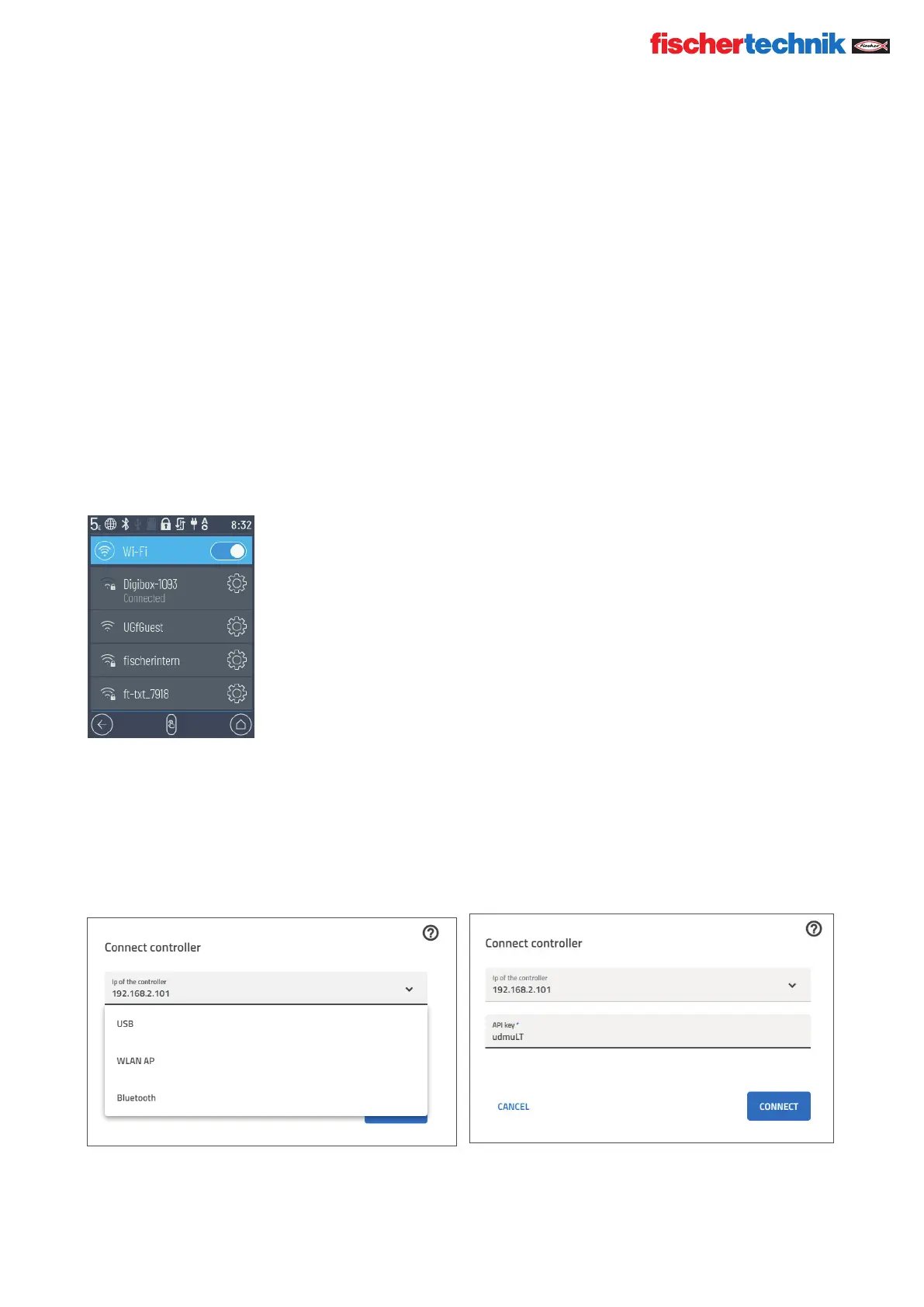
› Select the appropriate SSID / Wi-Fi network in Settings / Network / Wi-Fi. Then, enter the network key and
“Connect.”
› To connect from a PC to the Controller in the same Wi-Fi network, enter the IP address of the Controller (INFO/
WI-FI/IP ADDRESS) and the API key (SETTINGS/API KEY) in the Robo Pro Coding software.
In the Robo Pro Coding software:


 To Next Page
 Loading...