6
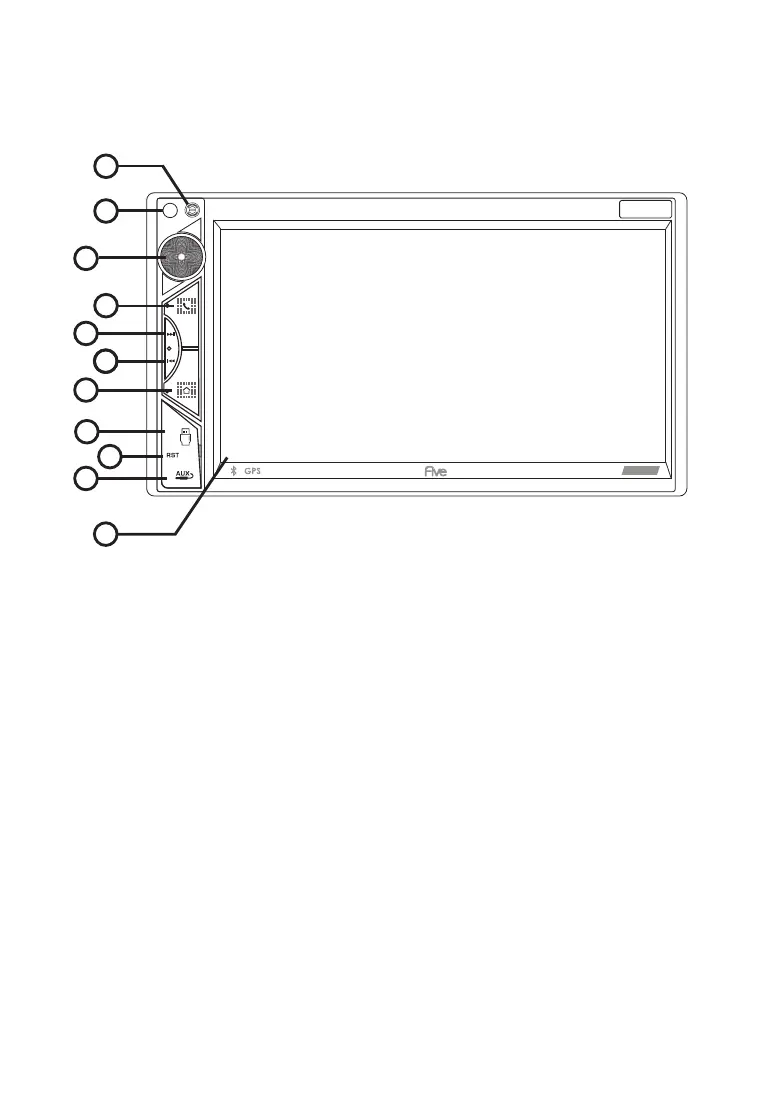
F 7 2 0 A F R O N T P A N E L
D E S C R I P T I O N
11
2
3
4
5
6
7
8
9
10
1
1. Microphone (used for Bluetooth)
2. Encoder - volume control
3. Bluetooth communication button, answer incoming calls
4. Scroll forward button in Multimedia mode / skip to next radio station
in radio mode
5. Backward button in Multimedia mode / skip to previous radio station
in radio mode
6. Menu - button to go to the main menu screen
7. USB slot
8. Reset - button to reset the receiver
9. AUX - audio input
10. Touch screen
11. IR receiver (for models with remote control).
F720A


 To Next Page