Device keyboard
Input on the virtual keyboard is done in the same way as on the physical one.
To change the language, press or hold:
The Radio settings menu provides the user with the ability to configure the basic modes according
to personal preference.
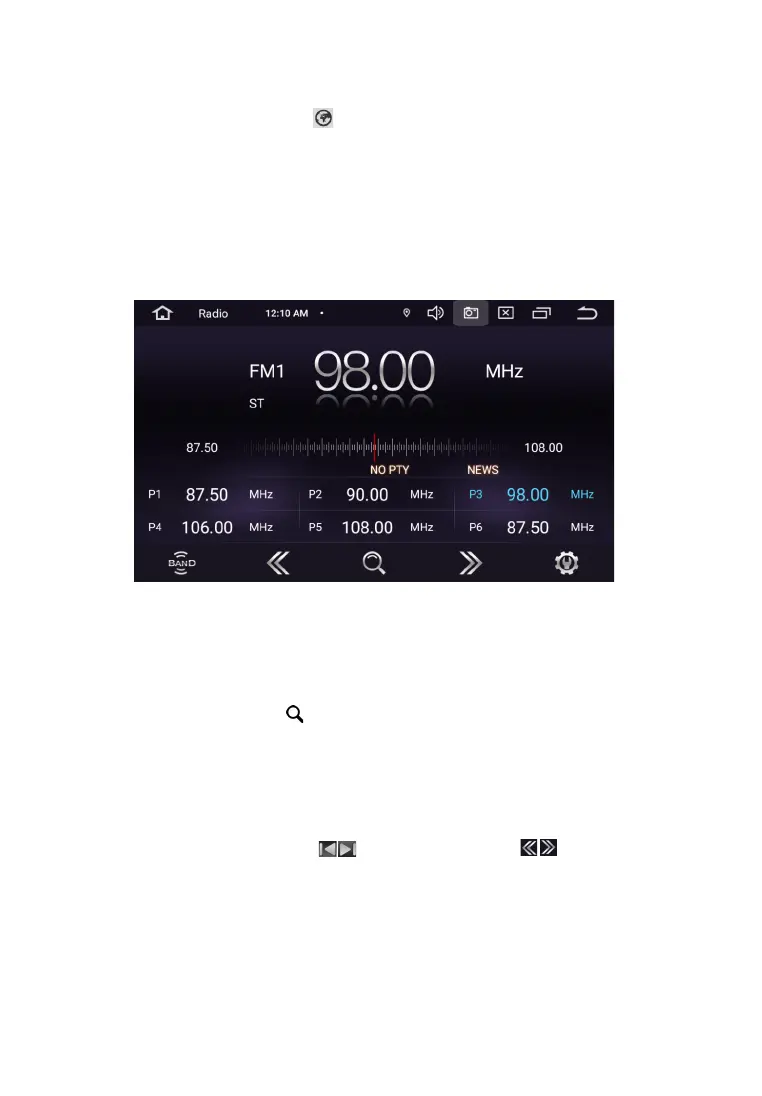
Automatic station search
To start searching, touch the icon The receiver starts scanning from the beginning of the range.
At the end of the scan, the stations found will be stored in the memory cells. To stop scan, touch one
of the number icons 1-18 at the bottom of the display, while the frequency on the display stops
flashing. In each of the FM1 / FM2 / AM subbands, you can save - 18 stations. In total, you can store up
to 30 stations (18 FM stations and 12 AM stations).
Manual setting
For manual configuration, use the icons When you press the icons for a long time,
you move along the scale of the range in increments of 0.1 MHz (for the America region). To stop,
click on the icon again. In this way, an accurate tuning to the desired radio station.
To store a tuned station in memory, press and hold the number button (1-6).
10
R A D I O
This receiver is equipped with a high quality radio that supports reception in band FM/AM with
automatic band scanning, frequency indication the received radio station, etc.


 To Next Page