www.flammainnovation.comShenzhenFlammaInnovationCo.,Ltd
25
FXLOOP
Fx200hasanintegratedFXLOOP,forconnectingtoexternalpedalorfour-cable-method.
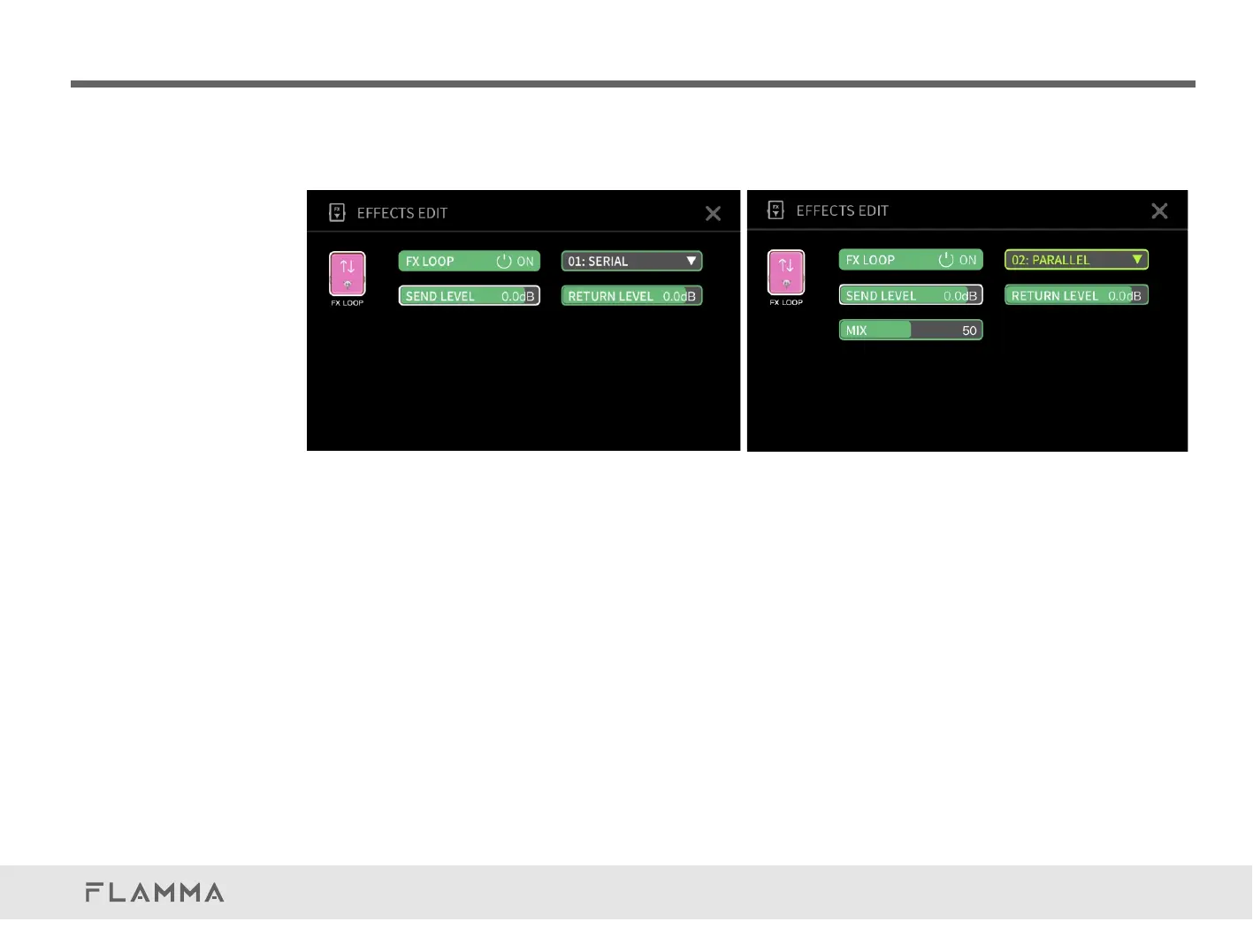
Intheeditingpage,selecttheFXLOOPmodule,andclicktoentertheparameterpage.
ClickonthepowerswitchicontoturnFXLOOPmoduleon/off.
ClicktoselectfromSERIALorPARALLELmode.
ClickanddragtheSENDLEVELtoadjusttheoutputvolumeleveloftheFXLOOP,rangefrom-60dBto6dB.It
issetto0dBasdefault.
ClickanddragtheRETURNLEVELtoadjusttheinputvolumeleveloftheFXLOOP,rangefrom-60dBto6dB.
Itissetto0dBasdefault.
InPARALLELmode,adjusttheMIXtosetupthemixrateoftheinternalsignalandtheexternalsignal,ranges
from0to100-0for100%internalsignal,100for100%externalsignal,anditissetto50asdefault.(The
volumeleveloftheinternalsignalandexternalsignalarethesame.)
Likeothermodules,youcanchangethepositionoftheFXLOOPintheeffectschain.SelectFXLOOPmodule
androtatetheVALUEtochangeitsposition.



 To Next Page