www.flammainnovation.comShenzhenFlammaInnovationCo.,Ltd
20
Looper
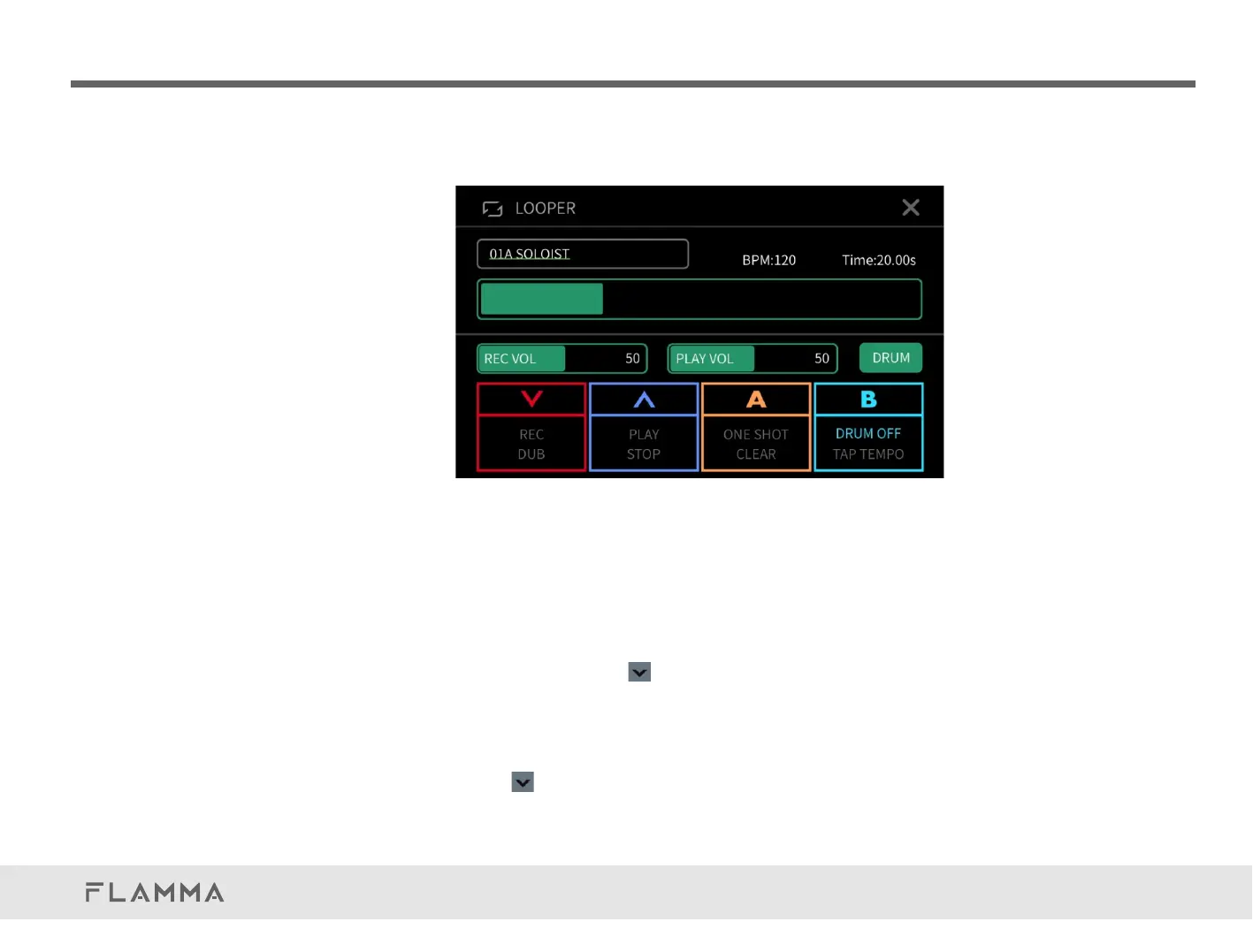
Fx200hasanintegrated52-secondstereolooper.PressandholdtheFootswitchA+Bfor2seconds
toenterlooperfunction.
Clickonthepresetnameonthetopleftcorner,thenrotateVALUEtoselectapresettone.
ClickanddragontheRECVOL,orrotateviaVALUEtoadjusttherecordingvolumelevel.
ClickanddragonthePLAYVOL,orrotateviaVALUEtoadjusttheplaybackvolumelevel.
Whenthelooperisempty,pressthebuttontostartrecordingthefirstlayer.ThefootswitchLED
indicatorwillstayRED,RECwillbehighlightedonthescreen,andtheprogressbarandtimer
willstart.
InRECmode,pressthetodubanotherlayer.ThefootswitchLEDindicatorwillturnPURPLEand
DUBwillbehighlightedonthescreen.TheprogressbarwillbeshowninPURPLE.



 To Next Page