www.flammainnovation.comShenzhenFlammaInnovationCo.,Ltd
12
QuickTour
Setuptheconnectionsfollowingtherecommendedsetupaboveaccordingtoyoursituation.
RotatetheMASTERknobtoitsminimumvalue.
Pluginthepowercord,pressthepowerswitchtoturniton;
AftertheFX200bootsupsuccessfully,rotatetheMASTERknobtoadjustthevolumelevel.
Startup
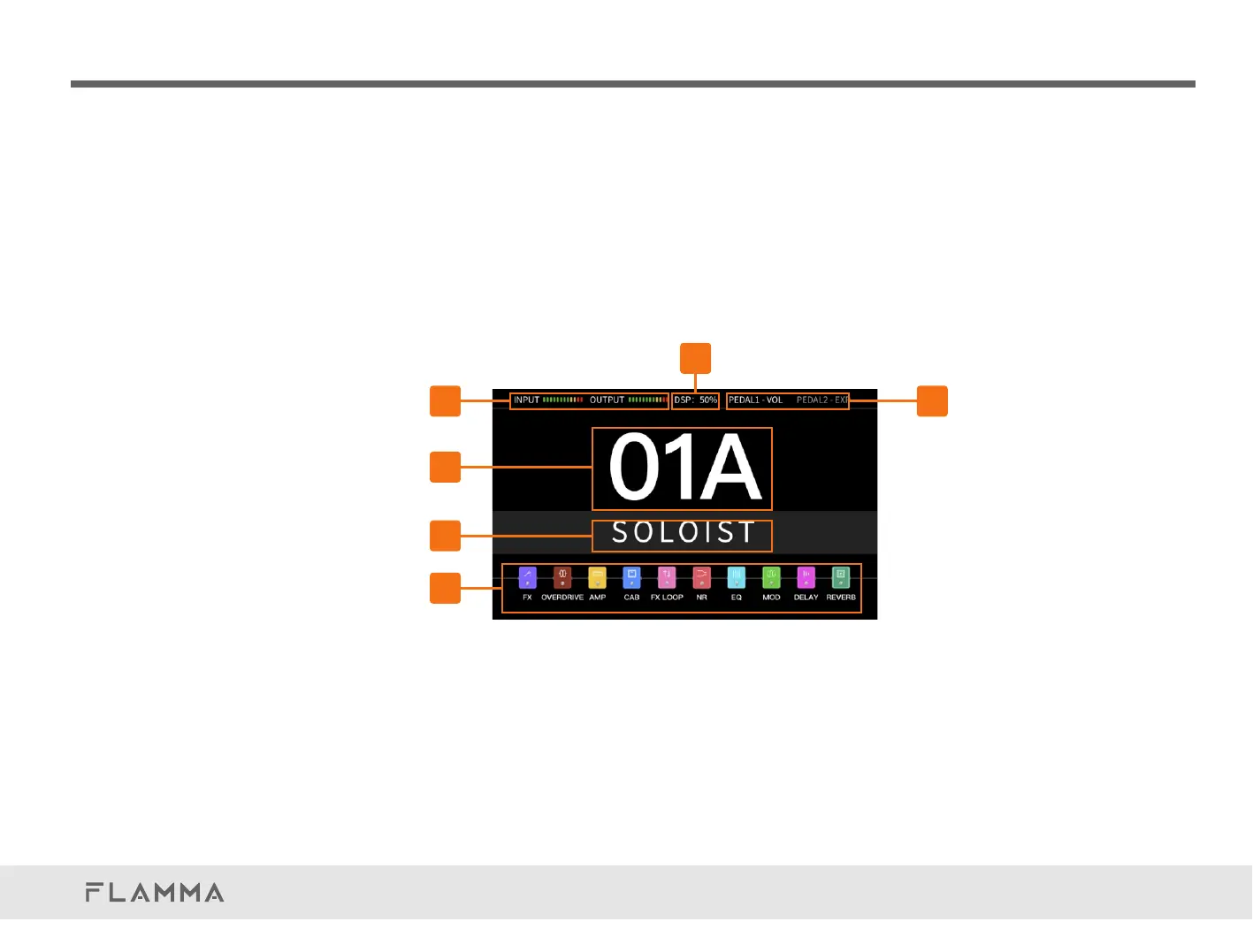
HomeDisplay
Homedisplayafterbootup.
1.Inputlevelindicator
2.DSPsourcedisplay.IndicatescurrentDSPusage.
3.Expressionpedaldisplay.ShowscurrentfunctionofPEDAL1(internalpedal)and
PEDAL2(externalpedal).
4.Numberofcurrentlyselectedpresetpatch.
5.Nameofcurrentlyselectedpresetpatch
6.Effectschain
Touchthescreentoeditparameters.
06
05
04
01 03
02



 To Next Page