FUSION USER AND
MAINTENANCE
Version: 1.0
Page: 13 of 49
Hinterbergstrasse 15
CH-6330 Cham
FTD-078
Bluetooth pairings
Obstacle database
CARP range analyzer data
Diagnostic log files
The firmware versions (PowerFLARM and Hub) do not change.
A factory reset should be applied under the following circumstances:
Installation in another aircraft and/or change of ownership
The Wi-Fi or device lock passwords have been lost
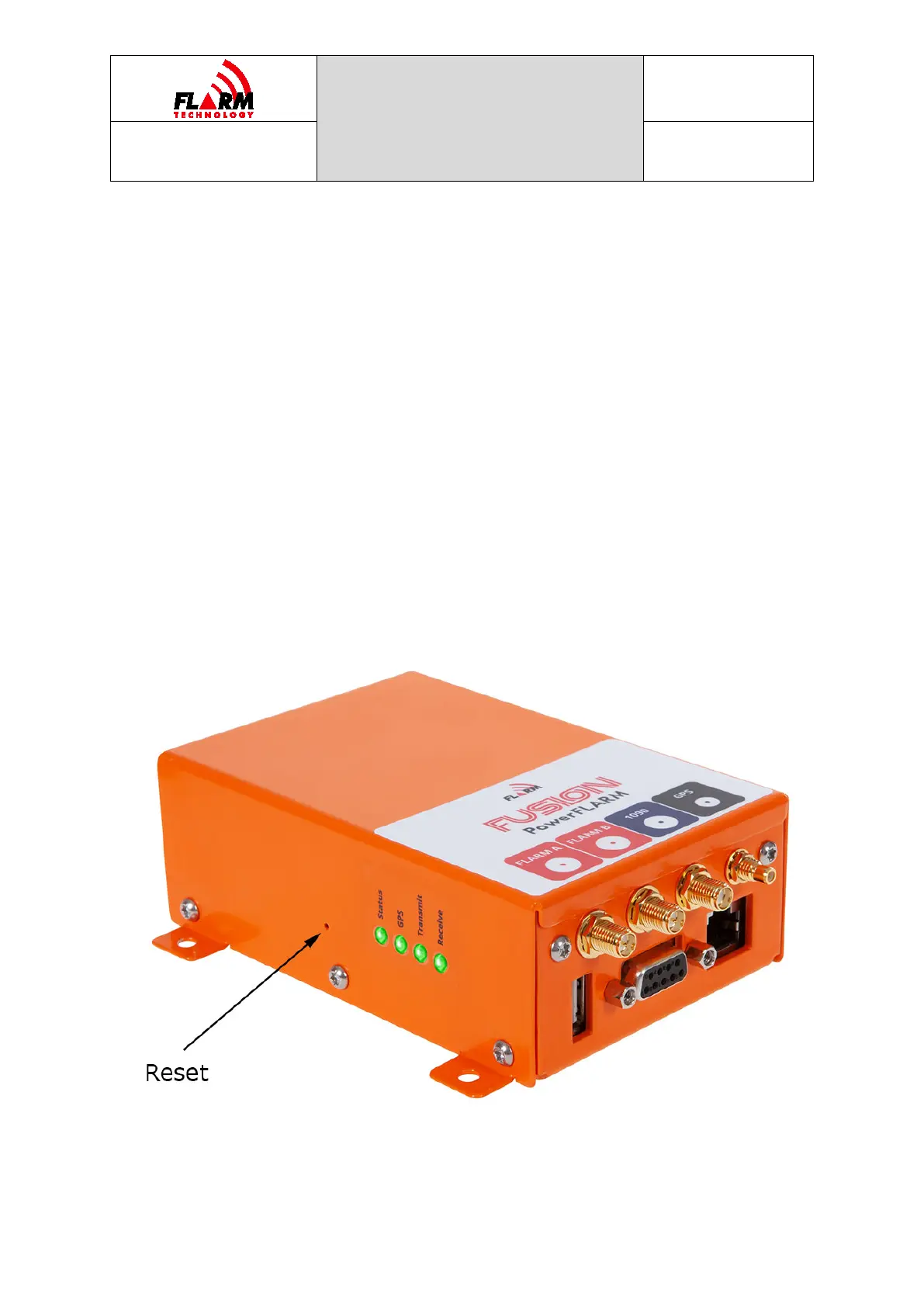
The device can be reset either via FLARM Hub (on the Tools / Support page) or by
using the hardware reset pin. To reset using the pin, push a paperclip or similar
into the hole next to the LED lights (see picture below) with the device OFF, until
the reset pin is pushed in. Hold the pin pushed in while powering on the device.
Hold the pin pushed in for at least 2 seconds and then withdraw the paperclip. The
device will revert to factory configuration during startup.


 To Next Page