FUSION USER AND
MAINTENANCE
Version: 1.0
Page: 18 of 49
Hinterbergstrasse 15
CH-6330 Cham
FTD-078
Next, open a web browser and enter the address http://10.10.10.10/. This will
bring up the Status Page.
FLARM Hub web address (URL):
http://10.10.10.10/
The status page contains another QR code which can be used to connect additional
devices by scanning it (see Section 3.3.5). This QR code always contains the
current settings for Wi-Fi network name and password.
Note: Internet is not available over the Wi-Fi connection. If asked when
connecting, select to use the connection even if no internet is available.
Note: FLARM Hub is not available over TLS/SSL (https).
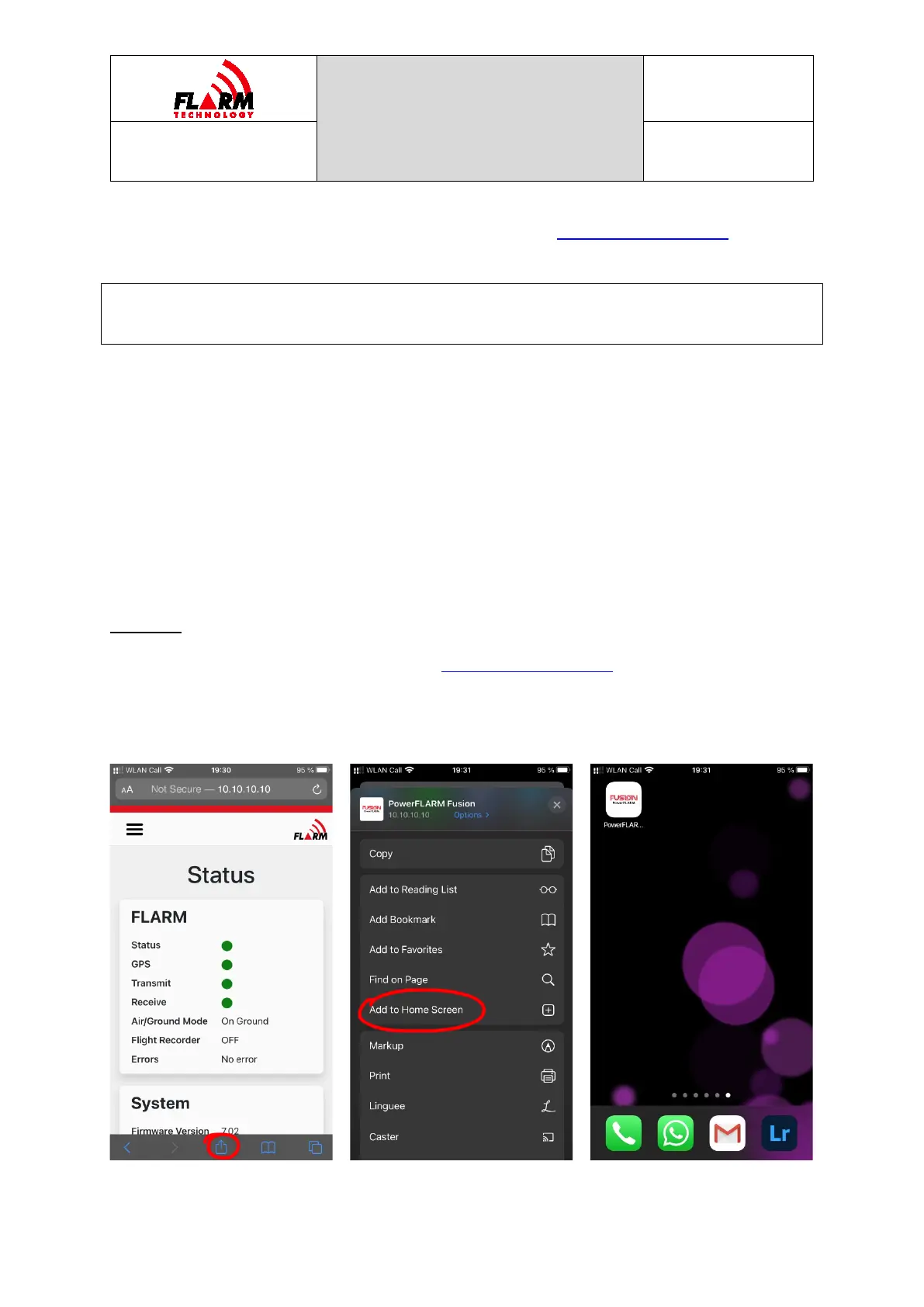
On mobile devices, it is recommended to create a bookmark for FLARM Hub on the
springboard (home screen):
On iOS:
1. Open FLARM Hub in Safari (visit http://10.10.10.10/ and make sure you are
on the Status page)
2. Click the Share button at the bottom of the screen
3. Select “Add to Home Screen”


 To Next Page