07
ToolsPreheatBuild
Setting Status About
Filament Level Home Manual
HOME
<
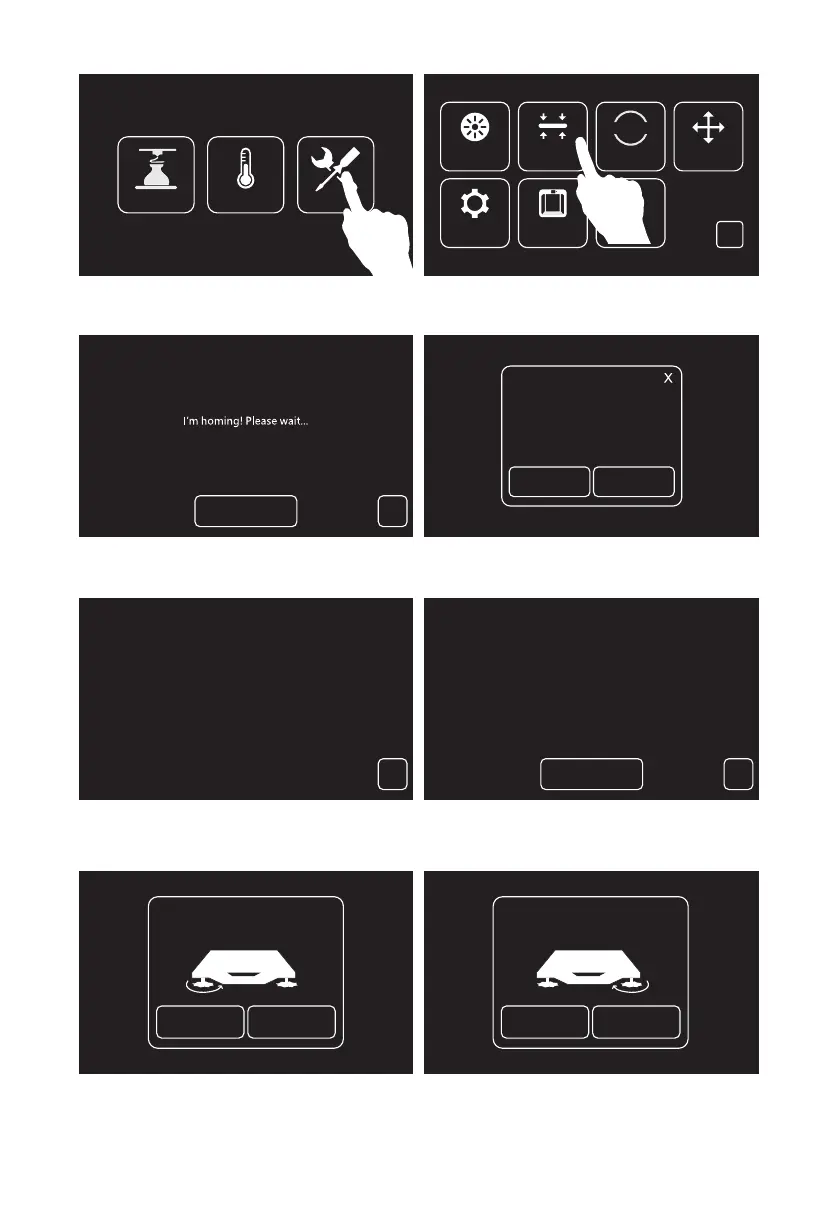
1. Tap[Tools], tap[Level]to level the build plate.
2. Wait for the extruder and the build plate moving, after moving completed, choose to use which
extruder to level the build plate: left or right.
3. After leveling extruder confirmed,extruder will move to the first point to verify the distance
between nozzle and build plate. If verify completed, extruder will move to the second point to
verify the distance.
4. If the distance is not appropriate, please follow the prompts to adjust again till you see [OK] button.
Repeat steps 4 to level the second and third points. Then tap [Finish] to exit.
Select the extruder
Level
Left Extruder Right Extruder
<
Please wait...Initializing
<
Wait
Verifying the distance between nozzle
and plate...
<
OK
Verify Next
Turn the nut counterclockwise 90°
Wait
Verify Next
Wait
Turn the nut clockwise 45°















 To Next Page