LEVEL DESCRIPTION
Enter master programmation mode
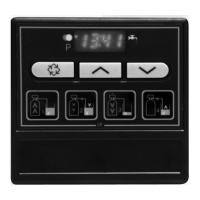
Set time date on to 12:01 and press simultaneously on the and for 5 seconds.
A L.E.D. will display to show that the valve is in programmation mode. Each programmation step can be modified.
- Use the and in order to adjust setting values.
- Press the button to advance to the next programmation stage.
Display unit
Notice: if this setting has just been changed, the valve will go around fully and come back to service mode.
Default setting: [U--1]
This setting is identified by the letter U. There are two types:
- [U - - 1] US type: the measure unit is in gallons, time display is 2x12 hours, hardness in grain.
- [U - - 2] metric type: the measure unit is litre, time display is 24 hours, hardness in m
3
x°Th.
Regenerating way
Notice: if this setting has just been changed, the valve will go around fully and come back to service mode.
Default setting : [dF]
This display is used in order to tell the card the piston type used on the valve.
- dF : down flow
- dFFF : down flow with brine fill first
- Fltr : Filter
Regeneration type
Default setting : [7--3]
This setting is identified by the number 7. This function allows the setting of the valve regeneration type. There are 3 possibilities:
- Time clock: The electronics establish that a regeneration is requested when the number of days between two regenerations
has been reached; the new cycle beginning at the preset time. The setting of the day override establishes the number of days
between two regenerations. [7--1]
- Metered immediate regeneration: The electronics establish that a regeneration is required when the softened water volume
has reached zero. The regeneration starts immediately. [7--2]
- Meter delayed regeneration: The electronics establish that a regeneration is requested when the volume of softened water
used has reached the reserve capacity of the unit. Regeneration will begin at a preset time; the system will automatically
establish a reserve capacity. [7--3]
System capacity
Not visualized in time clock mode: [7--1]
This setting is identified by the letter C. It contains an extended mode Ct, the letter t meaning a multiplication by 1000.
It enables the regulation of the system capacity in m
3
x tH°.
The system calculates the water volume that needs to be treated before a regeneration request.
In meter delayed mode, the system will establish a reserve capacity.
I.e. : 35 m
3
°tH [C-35]
Feed water hardness (H)
Not visualized in time clock mode: [7--1).
Default setting: [H-15]
This setting is identified by the letter H. It enables the regulation of the feed water hardness.
The system uses this setting and the previous one to establish softened water capacity.
I.e. : 25 °tH [H-25]
Regeneration time
Not visualized in immediate metered mode: [7--2]
It allows setting of the regeneration time. The two dots between hour and minute display do not flash in order to differentiate
with the current time display.
I.e. : regeneration at 2 :00 A.M. [2:00]
Day override
This setting is identified by the letter A. It allows to set the maximum amount of days that the system can stay in service mode
without a regeneration. This stage is compulsory for a valve in time clock mode and optional for a valve in metered mode.
I.e. regeneration every 7 days [A--7]
- Cancelled stage [AOFF]
7700 VALVE
B
1.
2.
3.
4.
5.
6.
7.


 To Next Page
 Loading...