O P E R A T I O N C H A P T E R 6
Virtual Sound Connection
Although you can use a second sound card to connect to an external digital mode program, PowerSDR
has the ability to use a virtual sound connection. To do so you will first need to download and install the
third party Virtual Audio Cable (VAC) (http://software.muzychenko.net/eng/vac.html) application from
one of many sources. VAC is neither free nor open source.
Note: PowerSDR will work correctly with VAC version 3.12 as well as version
4.02 and above. In the following we will use version 4 to illustrate, but
version 3 works essentially the same way.
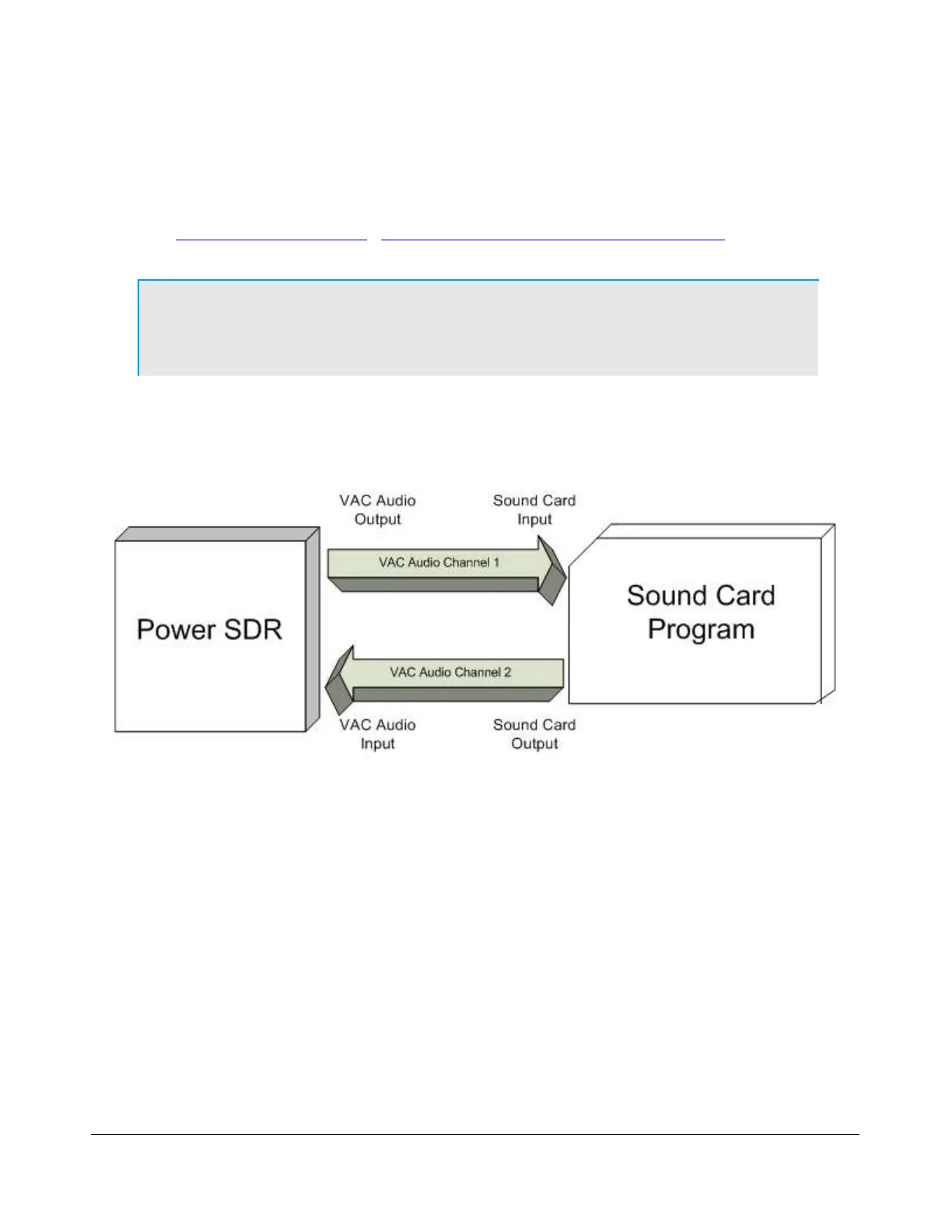
In essence VAC enables the creation of so called digital virtual audio cables between two software
applications, in our case PowerSDR and a digital mode (or sound card program) as shown in Figure
167. When setup correctly, these cables appear as input and output audio devices, as if they belonged
to a sound card.
Figure 167: VAC Connects Audio Digitally Between PowerSDR and a Digital Mode Program
Create the Virtual Audio Cables
The first step is to create the two identical virtual cables. To do so open the Virtual Audio Control Panel.
[The rest of this page has been left blank intentionally]
185 2003-2008 FlexRadio Systems



 To Next Page