Flowserve.com 19 PUIOM000650-00-UIM (EN/HL) August 2022
SEM-100 and SEM-100FT User Instructions
7. Troubleshooting guide
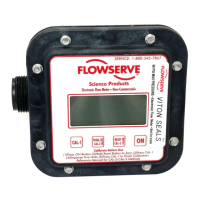
Problem: Meter reads high or low.
Solution: Check for the following:
• Ensure lines are full and there is no trapped air in the system
before calibrating.
• Pump may be sucking air due to low uid level or bad pump
inlet connection.
• Calibrating at one ow rate and operating at a different rate.
Calibrating with a different uid than what is being pumped.
Problem: Meter ashes “ERR” at the end of calibration.
Solution: Check for the following:
• Meter electronics are not sensing the rotation of the magnet.
During calibration, if the CAL-1 or CAL-2 text does not blink
while uid is being pumped, rotation is not being sensed.
Disassemble meter and clean out or replace the meter
chamber (SEM-10 KIT)
• Volume dispensed during calibration is too small or too large.
The meter must be calibrated with 9.5 liters – 265 liters
(2.5 gallons – 70 gallons)



 To Next Page