287/289
Users Manual
28
Measuring Temperature
XW Warning
To avoid the potential for fire or electric shock, do
not connect the thermocouple to electrically live
circuits.
The Meter uses an 80BK-A Integrated DMM Temperature Probe
or other type-K temperature probe for measuring temperature.
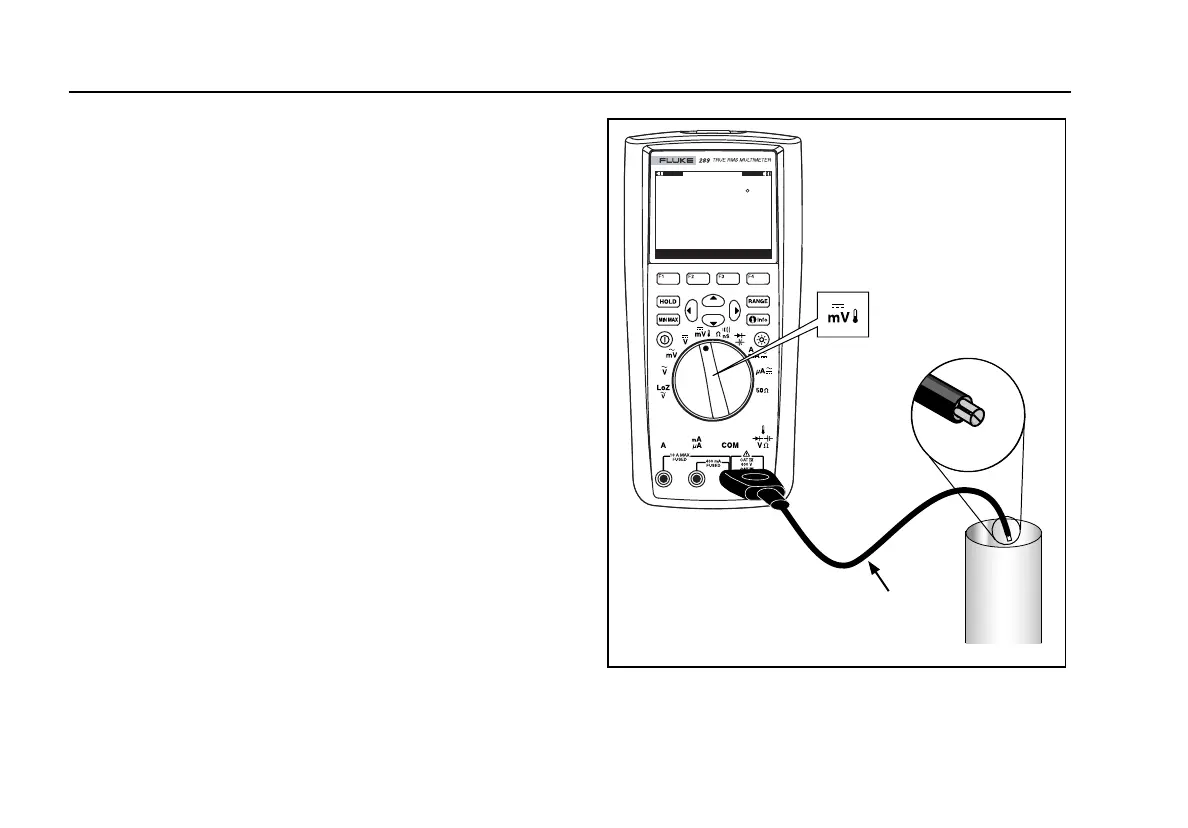
To measure temperature, set up the Meter as shown in
Figure 14. Press the softkey labeled Menu and move the menu
selector to the menu item labeled Temp. Press the softkey
labeled F for temperature in Fahrenheit or C for Celsius.
Note
A Meter classified as “SI” will not have an F selection.
The primary display normally shows temperature or the message
“Open Thermocouple”. The open thermocouple message may be
due to a broken (open) probe or because no probe is installed
into the input jacks of the Meter. Shorting the W terminal to
the COM terminal will display the temperature at the Meter
terminals.
Note
R is disabled when the Meter is in the Temperature
function.
Menu
C
+8.0 Offset
Save Offset Setup
26.5
8:10pm
06/13/07
80BK Type K
Thermocouple
Probe
Vent
or
Pipe
est17.eps
Figure 14. Temperature Measurement




 To Next Page