EasyManua.ls Logo

Fluke 360 - User Manual

Fluke 360
10 pages
Print Icon
To Next Page IconTo Next Page
Loading...
®
October 2007
© 2007 Fluke Corporation. All rights reserved. Specifications are subject to change without notification.
All product names are trademarks of their respective companies.
1
360
AC Leakage Current Clamp Meter
Calibration Information
Introduction
This document provides the following information for the 360 AC Leakage Current Clamp Meter
(hereafter referred to as the Meter or UUT):
Safety information
Symbols
Specifications
Maintenance
Performance Tests
Replacement Parts List
Product Warranty Statement
For complete operating instructions, refer to the 360 Instruction Sheet.
Contacting Fluke
To order parts, or for warranty service, contact Fluke as follows:
USA: 1-888-99-FLUKE (1-888-993-5853)
Canada: 1-800-36-FLUKE (1-800-363-5853)
Europe: +31 402-675-200
Japan: +81-3-3434-0181
Singapore: +65-738-5655
Anywhere in the world: +1-425-446-5500
Or, visit Fluke's Web site at www.fluke.com
.
To register your product, go to register.fluke.com
.

Other manuals for Fluke 360

Question and Answer IconNeed help?

Do you have a question about the Fluke 360 and is the answer not in the manual?

Summary

Introduction

Safety Information

Provides essential safety guidelines for operating the meter.

Contacting Fluke

Safety Information

Specifications

Safety Specifications

Electrical Specifications

AC Current Measurement

Maintenance

Battery Replacement

Step-by-step guide for replacing the meter's battery.

Performance Tests

Accuracy Tests

Steps to verify the meter's accuracy against specifications.

Calibration Adjustment

Calibration Adjustment Steps

Details the specific steps and settings for calibrating the meter.

Summary

Introduction

Safety Information

Provides essential safety guidelines for operating the meter.

Contacting Fluke

Safety Information

Specifications

Safety Specifications

Electrical Specifications

AC Current Measurement

Maintenance

Battery Replacement

Step-by-step guide for replacing the meter's battery.

Performance Tests

Accuracy Tests

Steps to verify the meter's accuracy against specifications.

Calibration Adjustment

Calibration Adjustment Steps

Details the specific steps and settings for calibrating the meter.

Overview

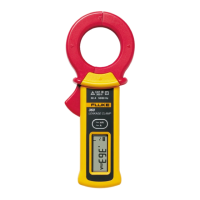
The Fluke 360 AC Leakage Current Clamp Meter is a device designed for measuring AC leakage current. This document serves as a calibration information guide, providing details on safety, specifications, maintenance, performance tests, replacement parts, and warranty.

Function Description:

The Fluke 360 is an AC leakage current clamp meter. Its primary function is to measure AC current, specifically leakage current. It also includes additional functions such as data hold and auto power off. The device is designed for use in fixed-equipment installations, such as distribution panels, feeders, short branch circuits, and lighting systems in large buildings, with a CAT III 300 V rating.

Important Technical Specifications:

  • Measurement Functions: AC current.
  • Display (LCD): Digital reading of 3200 counts and a 32-segment bar graph. It also includes "OL" over-range indication and a low-battery symbol.
  • Range Selection: Automatic.
  • Sampling Rate: Digital reading at 2 times per second; bar graph at 12 times per second.
  • Operating Temperature and Humidity Range: 0 °C to 50 °C (32 °F to 122 °F) with a maximum humidity of 80% RH (non-condensing).
  • Storage Temperature and Humidity Range: -20 °C to 60 °C (-4 °F to 140 °F) with humidity ranging from 20% to 70% RH (non-condensing).
  • Temperature Coefficient: ±0.05% of measuring range / °C (< 18 °C or > 28 °C).
  • Measuring Range: 0 to 50 A.
  • Effect of External Magnetic Fields: 0.0005% typical value (in terms of the magnitude of current in adjacent wires).
  • Maximum Conductor Size: 40 mm (1.6 in).
  • Maximum Circuit Voltage: 300 V rms.
  • Power Consumption: 6 mW maximum.
  • Automatic Power Off: Approximately 10 minutes after the last switch operation. A beeper sounds 15 seconds before power off.
  • Power Supply: CR2032 lithium battery.
  • Battery Life: Approximately 90 hours of continuous operation.
  • Dimensions (W x H x D): 70 mm x 176 mm x 25 mm (2.8 in x 6.9 in x 1.0 in).
  • Weight (including battery): Approximately 200 g (0.44 lb).
  • Safety Category Rating: CAT III 300 V per IEC/EN61010-1, and 61010-2-032 Pollution Degree 2, indoor use.
  • EMC: EN61326-1.
  • Effect of Radiated Immunity: Rated accuracy + 4.0% in an electromagnetic field of 3 V/m.
  • Operating Altitude: 2,000 m (6,562 ft).
  • Accessories: C75 soft carrying case.
  • AC Current Measurement Accuracy (50/60 Hz) ± (% of reading + digit):
    • 3 mA range (0.001 mA resolution): 1% + 5.
    • 30 mA range (0.01 mA resolution): 1% + 5.
    • 30 A range (0.01 A resolution): 0 to 50 A: 1% + 5.
    • 60 A range (0.1 A resolution): 50 to 60 A: 5% + 5.
  • Maximum Allowable Current: 60 A rms.
  • Zero Correction: Fractions smaller than approximately 0.01 mA are calibrated to zero.

Usage Features:

  • Safety Information: Emphasizes reading operating instructions, adhering to safety codes, inspecting the meter before use, disconnecting from conductors before battery replacement, avoiding use in wet or hazardous atmospheres, and not using near noise-emitting equipment or where sudden temperature changes may occur. It also warns against using the meter on circuits with voltages greater than 300 V CAT III, working around bare conductors, and using caution with voltages above 60 V dc or 30 V ac.
  • LCD Test: A procedure to verify the clarity and contrast of all display segments during startup.
  • Data Hold Function: Allows users to freeze the displayed reading. The D•H symbol appears on the display when activated.
  • Accuracy Tests: Procedures to verify the meter's accuracy against its specifications, valid for one year after calibration at an operating temperature of 18 °C to 28 °C. Requires a calibrator and specific wire coils.

Maintenance Features:

  • Basic Maintenance: Includes cleaning, checking battery charge, and replacing depleted batteries.
  • Cleaning: Periodically wipe the case with a damp cloth and mild detergent. A caution is provided against using abrasives or solvents. Dust and debris can be removed from jaw mating surfaces by blowing air.
  • Battery Replacement: The battery symbol appears on the display when voltage drops. A warning is given to remove the meter from measurable conductors before replacing the battery. The procedure involves turning off power, unscrewing the battery cover, replacing the CR2032 lithium battery with correct polarity, and re-securing the cover.
  • Calibration Adjustment: A detailed procedure for adjusting the meter's calibration. This involves removing face and serial number decals, connecting wire coils to a calibrator, setting calibrator output, clamping the UUT around the coils, and adjusting specific potentiometers (VR1, VR5, VR6, VR7) to bring display readings within specified limits. If the UUT fails to meet expected results, Fluke Service should be contacted for repair.
  • Replacement Parts: A list of available replacement parts, including decals, case components, battery, and battery contacts, with corresponding Fluke part numbers. Instructions for ordering replacement parts are provided.

Fluke 360 Specifications

General IconGeneral
BrandFluke
Model360
CategoryMeasuring Instruments
LanguageEnglish

Related product manuals