EasyManua.ls Logo

Fluke MicroScanner Pro - User Manual

Fluke MicroScanner Pro
28 pages
Print Icon
To Next Page IconTo Next Page
Loading...
TM
MicroScanner Pro
Users Manual
(English)
November 2001, Rev. 2, 9/03
© 2001-2003 Fluke Corporation. All rights reserved.
All product names are trademarks of their respective companies.
Fluke Microtest Microscanner Pro Specs
Provided by www.AAATesters.com

Other manuals for Fluke MicroScanner Pro

Question and Answer IconNeed help?

Do you have a question about the Fluke MicroScanner Pro and is the answer not in the manual?

Summary

Introduction

Features

MICROSCANNER PRO Kit Content

Lists the items included in the MicroScanner Pro kit, such as the tester, adapters, battery, and manuals.

Registration

Safety Information

Warnings

General warnings about handling the unit and potential risks during operation or repair.

Caution

Advises on input voltage limitations and conditions under which tests cannot be performed safely.

Contacting Fluke Networks

Battery

The Keypad

Operating Mode

Calibration Mode Operation

Setting the NVP percentage

Explains how to set the Nominal Velocity of Propagation (NVP) for accurate cable length measurements.

Changing the Display from Meters to Feet

Details how to switch the displayed units of cable length between meters and feet during calibration.

MICROSCANNER PRO Tests

Wiremap

Tests twisted-pair cabling for proper wiring, including opens, shorts, and crossed pairs.

Patch Cable Wiremap

Describes how to use the Wiremap function to test patch cables by connecting both ends to the unit.

Length Measurement

Measures the full length of twisted pair or coaxial cables and detects open, shorted, or hub connections.

Network Link Indicator

Helps find and identify active network hubs and confirms connection status by indicating link pulses.

Workstation Identification

Explains how the MicroScanner Pro identifies workstations and displays the connection to a PC.

Pair Length

Shows how to display detailed pair information and measure the length of individual conductor pairs.

Coaxial Cabling

Details how to measure the length and identify the termination state of coaxial cables using the COAX upgrade kit.

Office Identifier Function

Enables finding cable drop terminations from a distribution panel by identifying office locations via numbered adapters.

Toner

Describes the cable tracing function that uses tones to track cables hidden in walls, ceilings, or floors.

Technical Specifications

Dimensions

Provides the physical dimensions of the MicroScanner Pro unit and its accessories.

Weight

Lists the weight of the MicroScanner Pro unit and its accessories.

Power Source

Specifies the type of battery required to power the MicroScanner Pro.

User Interface

Details the components of the user interface, including the display and keypad.

Environmental

Lists the operating and storage temperature and humidity ranges for the device.

Applications

Outlines the types of cables and networks the MicroScanner Pro is designed to test.

Test Interface

Describes the main and loopback modular 8 connectors and their functions.

Calibration Specifications

Explains the user-selectable NVP and NVP calculation based on known cable length.

TDR Accuracy

Specifies the accuracy of Time Domain Reflectometry (TDR) length measurements.

Length Specifications

States the maximum measurable length for twisted pair and coaxial cables.

Office Identifier Specifications

Specifies the maximum length for identifying office locations using the Office Identifier function.

Summary

Introduction

Features

MICROSCANNER PRO Kit Content

Lists the items included in the MicroScanner Pro kit, such as the tester, adapters, battery, and manuals.

Registration

Safety Information

Warnings

General warnings about handling the unit and potential risks during operation or repair.

Caution

Advises on input voltage limitations and conditions under which tests cannot be performed safely.

Contacting Fluke Networks

Battery

The Keypad

Operating Mode

Calibration Mode Operation

Setting the NVP percentage

Explains how to set the Nominal Velocity of Propagation (NVP) for accurate cable length measurements.

Changing the Display from Meters to Feet

Details how to switch the displayed units of cable length between meters and feet during calibration.

MICROSCANNER PRO Tests

Wiremap

Tests twisted-pair cabling for proper wiring, including opens, shorts, and crossed pairs.

Patch Cable Wiremap

Describes how to use the Wiremap function to test patch cables by connecting both ends to the unit.

Length Measurement

Measures the full length of twisted pair or coaxial cables and detects open, shorted, or hub connections.

Network Link Indicator

Helps find and identify active network hubs and confirms connection status by indicating link pulses.

Workstation Identification

Explains how the MicroScanner Pro identifies workstations and displays the connection to a PC.

Pair Length

Shows how to display detailed pair information and measure the length of individual conductor pairs.

Coaxial Cabling

Details how to measure the length and identify the termination state of coaxial cables using the COAX upgrade kit.

Office Identifier Function

Enables finding cable drop terminations from a distribution panel by identifying office locations via numbered adapters.

Toner

Describes the cable tracing function that uses tones to track cables hidden in walls, ceilings, or floors.

Technical Specifications

Dimensions

Provides the physical dimensions of the MicroScanner Pro unit and its accessories.

Weight

Lists the weight of the MicroScanner Pro unit and its accessories.

Power Source

Specifies the type of battery required to power the MicroScanner Pro.

User Interface

Details the components of the user interface, including the display and keypad.

Environmental

Lists the operating and storage temperature and humidity ranges for the device.

Applications

Outlines the types of cables and networks the MicroScanner Pro is designed to test.

Test Interface

Describes the main and loopback modular 8 connectors and their functions.

Calibration Specifications

Explains the user-selectable NVP and NVP calculation based on known cable length.

TDR Accuracy

Specifies the accuracy of Time Domain Reflectometry (TDR) length measurements.

Length Specifications

States the maximum measurable length for twisted pair and coaxial cables.

Office Identifier Specifications

Specifies the maximum length for identifying office locations using the Office Identifier function.

Overview

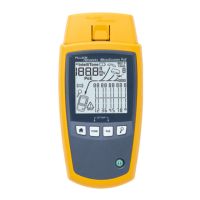
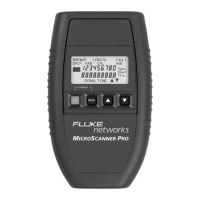
The Fluke Microtest MicroScanner Pro is an all-in-one network tester designed for verifying twisted pair and coaxial cables, measuring cable length and distance to faults using Time Domain Reflectometry (TDR), and identifying active networks and hubs. It is a versatile tool for network technicians and installers.

Function Description

The MicroScanner Pro offers several key functions to assist in network testing and troubleshooting:

  • Wiremap Testing: This function checks twisted-pair cabling for proper wiring. It identifies shield continuity, opens, shorts, crossed pairs, split pairs, and reversed pairs. The test results are displayed numerically, showing detected wires at the MicroScanner Pro jack and the actual wiring. This function requires the use of a Wiremap Adapter at the far end of the cable.
  • Length Measurement: The Length function measures the full length of both twisted pair and coaxial cables. For twisted pair cables, it also determines if the cable is open, shorted, or connected to a hub. The accuracy of length measurement is ±4% or ±2 feet, whichever is greater, with NVP uncertainty being an additional error factor.
  • Network Link Indicator: This feature helps locate and identify active 10/100 hubs and confirms the hub to which the MicroScanner Pro is connected. It can blink the hub's status indicator, aiding in locating a specific channel in a busy wiring closet. The device detects the type of hub (10, 100, or 10/100) and indicates its full or half-duplex capabilities with 'F' or 'H' letters.
  • Office Identifier: The Office Identifier function helps locate the termination of twisted pair and/or coax cable drops from a distribution panel. By inserting numbered Office Identifier adapters into wall outlets, the MicroScanner Pro can identify the corresponding office locations at the distribution panel.
  • Toner: The Toner function is a cable tracing utility that assists in tracking hidden cables in walls, ceilings, floors, or patch panels. It generates four distinct multi-tone signals that can be received by a cable tracer (such as a Fluke Networks MicroProbe or IntelliTone Probe). Users can select one of four tone sequences, displayed as numbers 1-4 on the LCD, to guide them in tracing the cable path.

Usage Features

The MicroScanner Pro is designed for ease of use with a straightforward interface:

  • Keypad Navigation: The device features a simple keypad with ON/OFF, MODE, and arrow keys. When turned on, it performs an LCD power-up test and then resumes the last executed test mode. It automatically turns off after 10 minutes if no cable is detected or no key is pressed, conserving battery life. The arrow keys are used to quickly change pairs or adjust values when indicators are shown on the display.
  • Mode Selection: Pressing the MODE key allows users to cycle through the available test modes: WIREMAP, OFFICE IDENTIFIER, LENGTH, and TONER.
  • Calibration Mode: To ensure accurate length measurements, the MicroScanner Pro can be calibrated. This mode is accessed by turning the device OFF, then holding the MODE key while pressing the ON key. In Calibration Mode, the Nominal Velocity of Propagation (NVP) is displayed along with the overall cable length. NVP, which represents how fast a signal travels down a cable relative to the speed of light, can be adjusted in 1% increments using the arrow keys. The cable length will automatically adjust with NVP changes. Cables used for calibration must be between 50 feet (15 meters) and 1500 feet (457 meters) long; lengths less than 50 feet will display "FAULT."
  • Unit of Measurement: During Calibration Mode, the displayed length can be switched between meters and feet by pressing the MODE key.
  • Storing Calibration Factors: Once the desired cable length or NVP is displayed, pressing the ON/OFF key terminates Calibration Mode and stores the new calibration factor for future length measurements.
  • Patch Cable Wiremap: The Wiremap function can also be used to verify patch cables by plugging both ends into the MAIN and LOOP BACK jacks on the MicroScanner Pro.
  • Coaxial Cabling: When using the COAX upgrade kit, the MicroScanner Pro can measure the full length of 50 and/or 75 Ohm coaxial cables (e.g., RG-6) and identify their termination state. This involves attaching the supplied COAX adapter to the MAIN jack and connecting the cable to the adapter.
  • Grounding for Toner Function: To enhance the signal during toning, a grounding plug can be inserted into the ground jack located next to the MAIN and LOOPBACK jacks. Any grounding cable with a standard insulated phone tip plug can be used.

Maintenance Features

  • Battery Management: The MicroScanner Pro operates on a 9 Volt Alkaline battery. A low battery condition is indicated by a battery icon on the screen. Using the device with a low battery may affect test accuracy. If the MicroScanner Pro is to be stored for more than one month, the battery should be removed to prevent potential damage. It's important to note that the device will not function properly with a 9 Volt Carbon Battery.
  • Product Registration: Registering the product with Fluke Networks provides access to valuable information, including product updates, troubleshooting tips, and other support services. Registration can be done online or by mailing/faxing a printed form.
  • Technical Support: Before contacting technical support, users are advised to have the hardware and software version numbers available. These can be accessed by turning the device OFF and then simultaneously pressing the ON and MODE keys.
  • Safety Precautions: Users are warned not to open the unit or attempt repairs in case of malfunction; the device should be sent back to the distributor for repair or replacement. The MicroScanner Pro is designed to withstand input voltage conditions from normal telephony applications (48 VDC at less than 80 mA or 24 VAC for keysets), but tests cannot be performed when hazardous conditions exist on the inputs.

Fluke MicroScanner Pro Specifications

General IconGeneral
DisplayBacklit LCD
Wiremap SupportYes
Length MeasurementYes
Tone GeneratorYes
TDRYes
Measurement TypesLength, Wiremap
ConnectorsRJ45, RJ11
Power SourceBattery
Operating Temperature0°C to 50°C
Storage Temperature-20°C to 60°C
Weight340 g
Cable TypesCopper, Fiber

Related product manuals