9
5.
System Interface
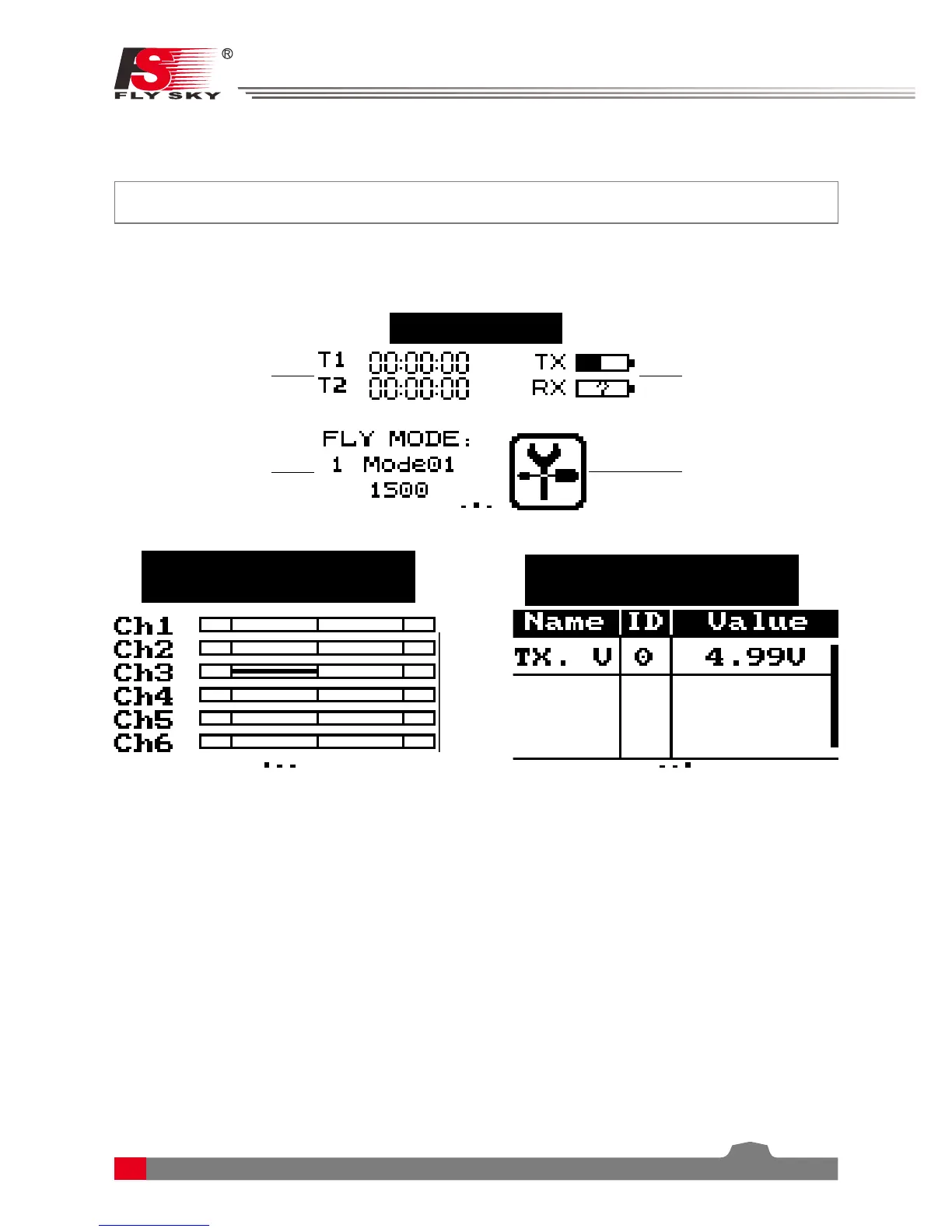
The system interface displays useful information about your model, including timers, fly mode and TX/RX
status.
5.1 Home Screen
The main interface displays model.
Fly Mode Status
+ Fly Mode Setup
Menu
Timers + Timer
Menu
TX/RX Battery
Status + Battery
Main Menu
Start page
Swipe to the right to display the
servo interface
Swipe to the left to display
the sensors
5.2 Timers
This function can set up to 2 timers at the same time.
Usually used to keep track of total flight time.
Setup:
To enter the timer function touch T1/T2 on the main screen. The system has 2 timers available, both can be
assigned to a switch and have 3 different settings.
Setup:
1. Select a mode.
• Up: The up timer starts from zero and counts up.
• Down: The down timer starts from a pre selected time and counts down.
• D/U(Down then up): The D/U timer starts from down to 0 from a preset time, then starts counting up
again.
2. If necessary set a pre defined time by selecting the
[Setup]
option. Select the correct decimal and use the
onscreen arrow keys to change the value.



 To Next Page