8. DIY Customization
The system can be reconfigured to change joystick placement, knob response etc.
8.1 Throttle Bracket Installation
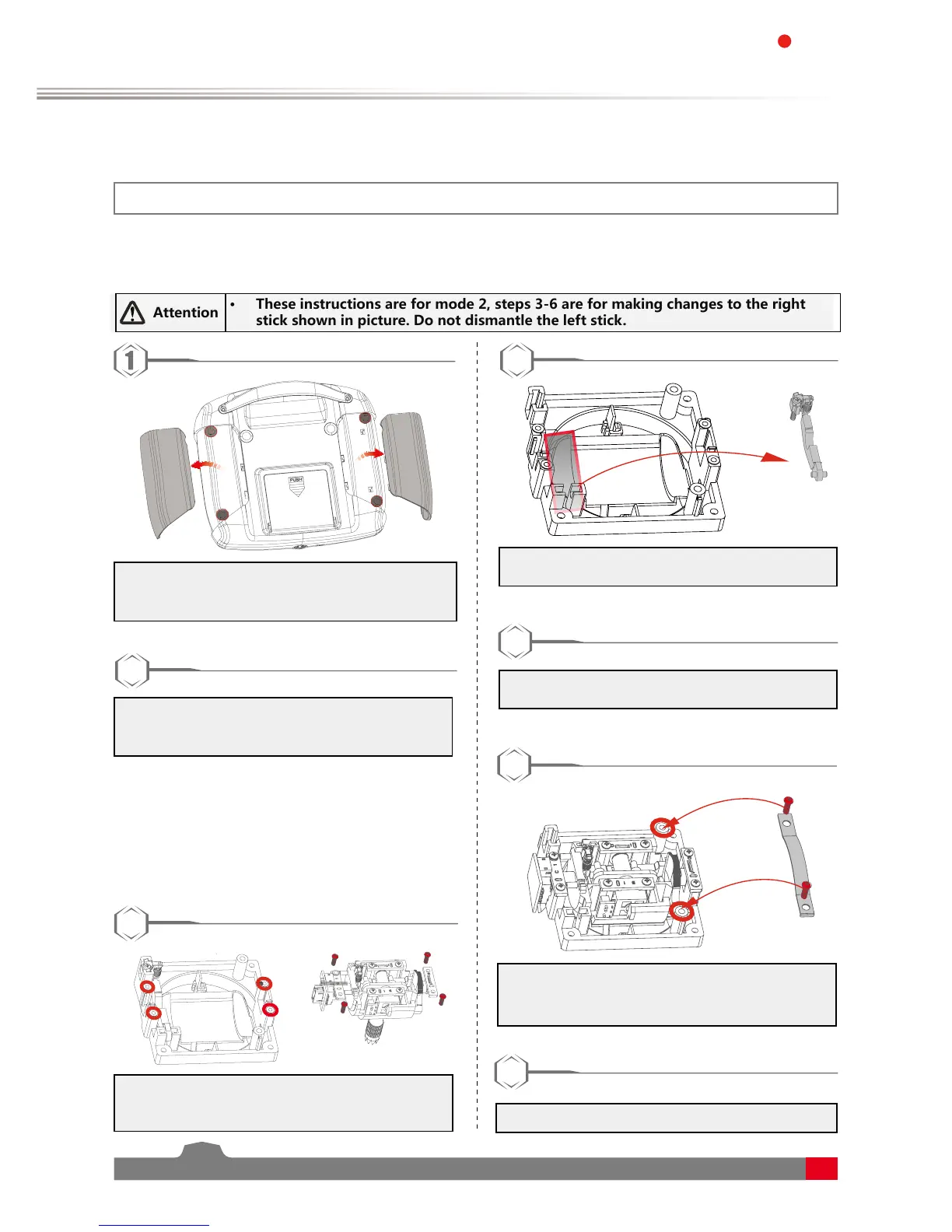
The gimbals can have their self centering function deactivated or activated, to do so follow the steps below:
1. Use tweezers to remove the left and right hand
grips. Then use a screwdriver to remove the 4
screws marked in red.
2
2. Carefully pull the front and back covers apart.
There are 2 cables connecting the back and
front.
3. Loosen the assembly screws shown in fig.4
and remove the plate. Be careful to ensure no
damage to cables.
4. Remove the bottom of the seat assembly of
the spring hook assembly.
3
• The throttle spring installation, swapping
gimbals, knob bracket installation and knob
spring installation requires that the transmitter
be disassembled and reassembled. The
disassembly instructions will only be provided
here, not for each change.
5. Secure the assembly back in its original
position with the 4 screws.
6
6. Secure the bracket using the screws provided.
• If the screws are too tight or too loose the
mechanism may not work as expected.
7. The assembly process is now complete.
7
Attention
• These instructions are for mode 2, steps 3-6 are for making changes to the right
stick shown in picture. Do not dismantle the left stick.



 To Next Page