15
7. System Settings
This chapter covers system functions.
This function is for binding a transmitter and receiver.
For more information please refer to【4.2 Binding】.
7.1 RX Bind
This function is for selecting and resetting models.
Setup:
1. Select
[Models]
From the system menu and use the left and right
arrow icons to change between models.
2. To reset a model to factory default press
[Reset Model]
.
• Model reset can not be undone.
The system has two output modes, PWM and PPM. To change between the modes touch the desired mode,
the currently selected mode will have a black dot.
7.3 Output Mode
7.2 Models
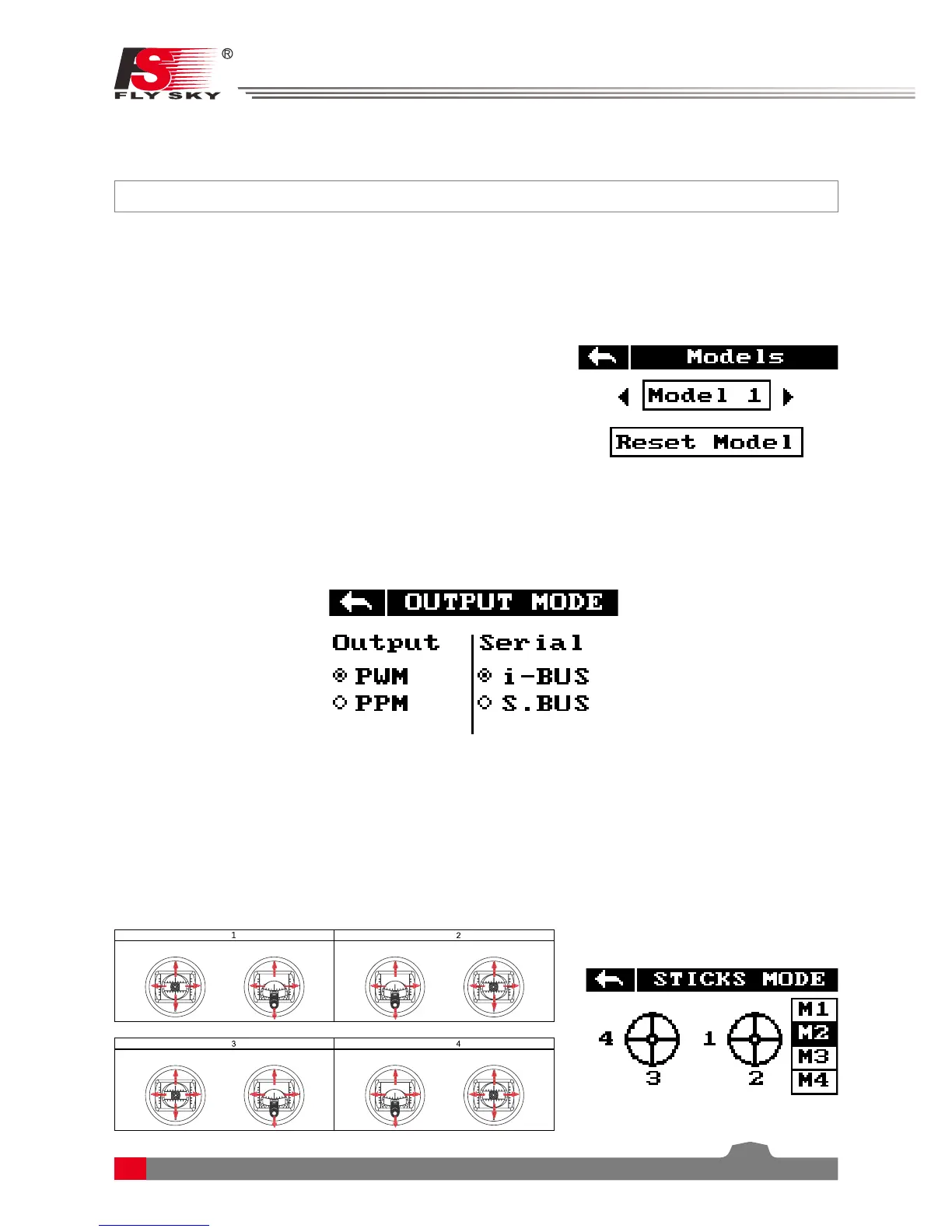
The system has 4 stick modes , to change the mode touch M1, 2, 3 or 4 on the right hand side of the screen.
The currently selected mode is highlighted in black. Changing between modes 2/4 and 1/3 will necessitate
changing the throttle gimbals position. The user will have to open up the product, see
[8.3 Swapping Gimbals]
for details.
7.4 Sticks Modes
[PWM]:
PWM output 1-6 channels outputting on the receivers 1-6 pins.
[PPM]:
Up to 8 channels outputting via PPM on the receivers channel 1 pins. Pins 2-6 have no output.
Elevator



 To Next Page