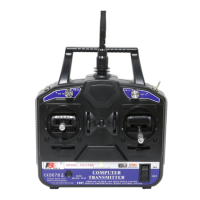
Controls
The T6 channel arrangement is:
CH 1 ailerons
CH 2 elevator
CH 3 throttle
CH 4 rudder
CH 5 aux
CH 6 aux
The T6 has 2 switches on either side of the carry handle. They are designated
SW. A and SW. B. They can be assigned to different functions. These functions
are:
NULL: Deactivated
DR: Dual Rates
ThroCut: Throttle Cut
They can also be assigned to any of the three mixes. The switches can also be used
to switch a mix on or, off. If you are using the T6 on an electric powered model, I
would suggest you assign one of the switches as “Throttle Cut” for your safety.
The T6 has 2 variable knobs on the left and right sides of the face of the Tx.
These are designated VR(A), and VR(B). They can be assigned to CH 5, or
CH 6 through any of the three mixes.
The Tx has 2 gimbals with trim tabs for fine tuning you model in flight.
There is a “Bind/Range Test” button in the lower left corner. This is used to bind
the receiver (Rx) to your Tx. To preform a range test. Turn on the Tx and then
power on the model. Step away from the model approximately 30 yds. Press and
hold the “Bind/Range Test” button while an assistant observes operation of the
model. For safety concerns do not activate the throttle while range testing.
Other than the “On/Off” switch the Tx has a tricolor LED. The LED shows
green for fully charged batteries, yellow for slightly discharged batteries, and red
for discharged batteries. Fly your model with caution when the LED shows
yellow, and never fly you model when the LED shows red.



 To Next Page