FIRMWARE UPDATE
This procedure may only be carried out by an authorised technical service and, under no circumstances may it be
manipulated by the end user. In this case, the warranty of the appliance will be immediately void, exempting the
manufacturer from any liability that this may entail.
PARAMETERS
The list of parameters accessed through this icon can be manipulated by the end user of the device. FM recommends
NOT ALTERING ANY OF THESE VALUES without first Consulting the authorised technical service in your area
(https://fmindustrial.es/es/sat). If the end user modifies or alters any of these values, the warranty of the device will be
immediately void and FM will not be liable for the consequences of such actions.
HACCP
In order to download HACCP data, you must FIRST insert a STORAGE DEVICE into the USB slot provided in your
device and enabled for this purpose. The location of this connection is specified in section 6.2 of this document.
This device has the capability to record HACCP data, which enables the assessment of hazards and the
establishment of control systems focused on prevention.
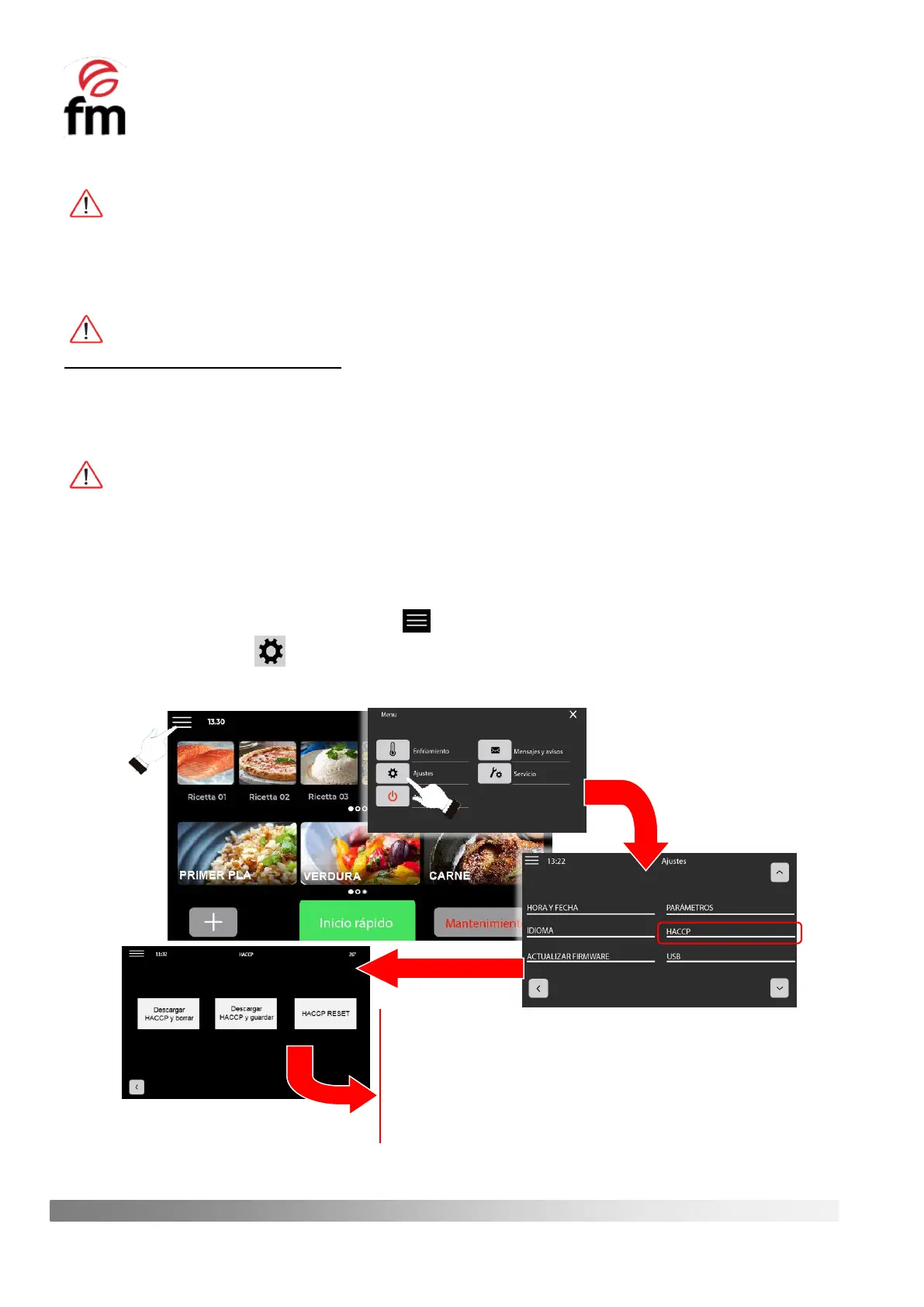
To access the HACCP register, perform the following steps:
1. Make sure that the device is switched on and no operation is in progress.
2. From the home screen, click on the icon .
3. Click on the icon to access the settings menu and then click on “HACCP”.
4. Choose the desired option from the three options displayed and accept to start downloading.
Download HACCP and delete: stores the current record in the removable
memory device and deletes this record from the oven’s memory.
Download HACCP and save: stores the current log in the removable memory
device and no log is deleted from the oven’s memory.
HACCP RESET: deletes the data record from the oven memory. For this
option, no removable memory device is required, as there is no option to save
the data to it.



 To Next Page