6.6.5 “COOLING” action (access from "main menu recipes")
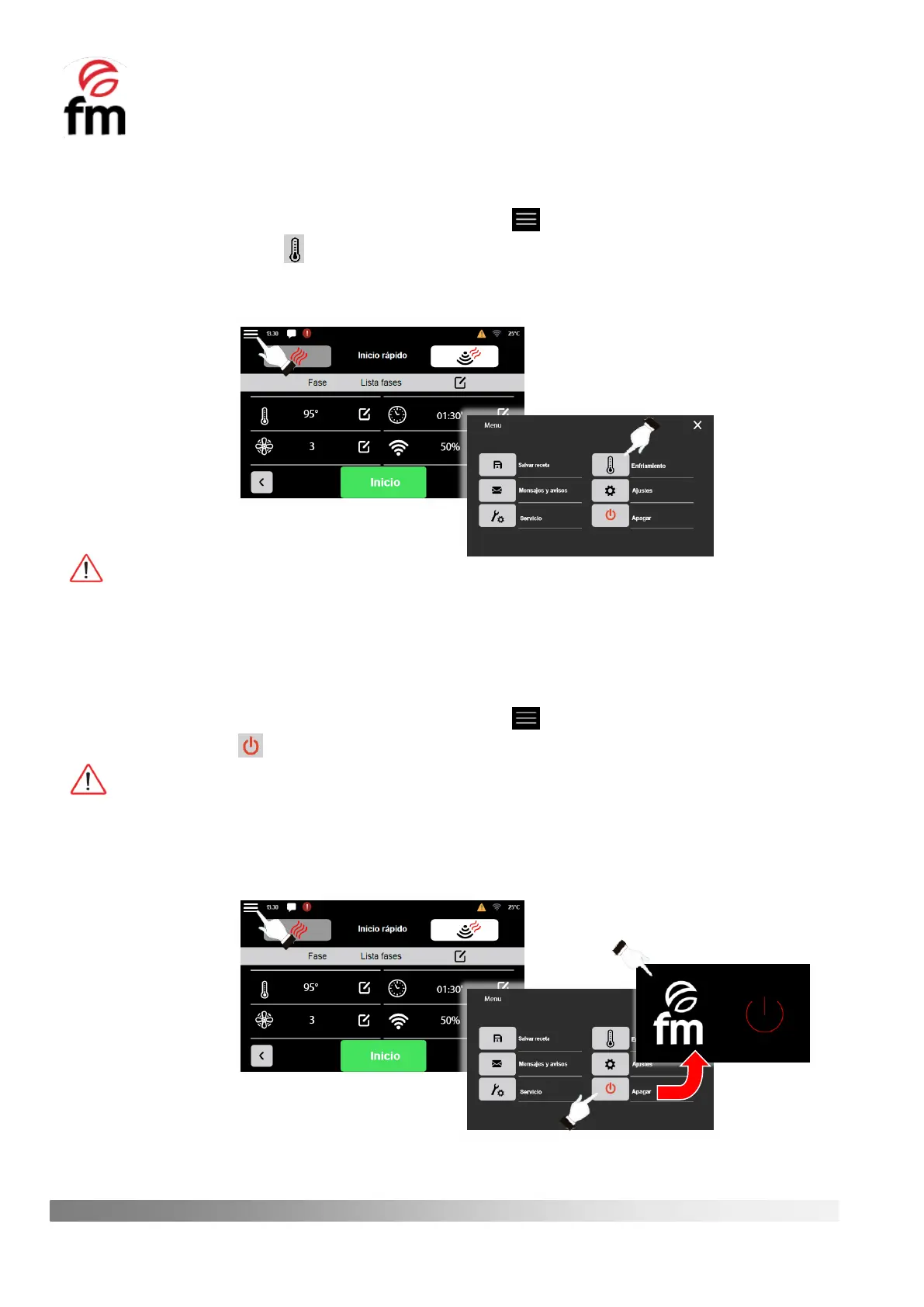
1. Make sure that the device is switched on and no operation is in progress.
2. From the recipe parameters configuration screen, click on the icon.
3. Click on the “COOLING” icon. The process will be activated as son as the door of the device is openes.
Likewise, the turbine will remain running until the temperature of the interior chamber is equal to or below 70ºC
or the door is closed again.
The cooling process remains active until the door of the appliance is closed again or the temperature of the interior
chamber is 45ºC or lower.
6.6.6 “OFF” action / STAND-BY mode (access from the “main menu recipes”)
1. Make sure that the device is switched on and no operation is in progress.
2. From the recipe parameters configuration screen, click on the icon.
3. Click on the “OFF” icon.
In this shutdown mode, the auxiliary cooling system of the device will also remain running, so it is COMPLETELY
NORMAL to hear the sound of the fan motor of the auxiliary cooling system.
4. To exit the stand-by mode and access the initial screen, simply press any area of the stand-by screen to access
the home screen of the oven again.



 To Next Page