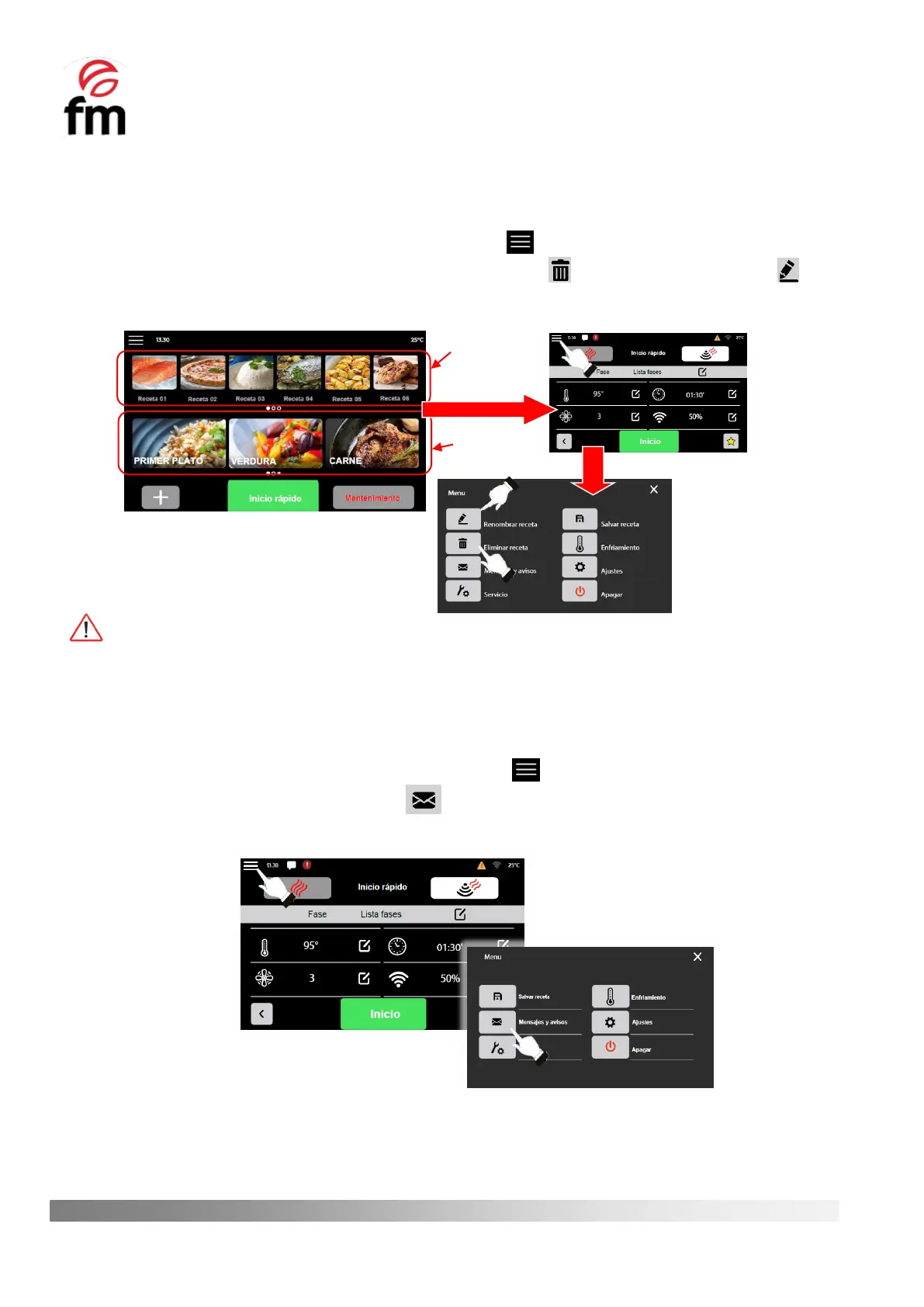
To delete or rename a previously saved recipe, perform the following steps:
1. Make sure that the device is switched on and no operation is in progress.
2. From the home screen, select the recipe you wish to delete. To do this, if it is not included in the list of favourite
recipes, go to the category containing the recipe you wish to delete.
3. From the recipe parameter configuration screen, click on the icon to access the main menu of options.
4. In the main options menu window, click on the “DELETE RECIPE” icon or the “RENAME RECIPE” icon,
depending on the action you wish to take.
The actions “DELETE/RENAME RECIPE” will appear in the main options menu of a recipe if the recipe has been
previously saved in the recipe library of the device.
6.6.4 “MESSAGES AND ALERTS” action (access from "main menu recipes")
1. Make sure that the device is switched on and no operation is in progress.
2. From the recipe parameters configuration screen, click on the icon.
3. Click on the icon “MESSAGES AND ALERTS” . This way, you will have access to an up-to-date overview of
the latest alarms and events that have occurred while using the device.



 To Next Page