11
Examples of Usage
The Clarett 8Pre is an excellent choice for numerous recording and monitoring applications.
Some typical congurations are shown below.
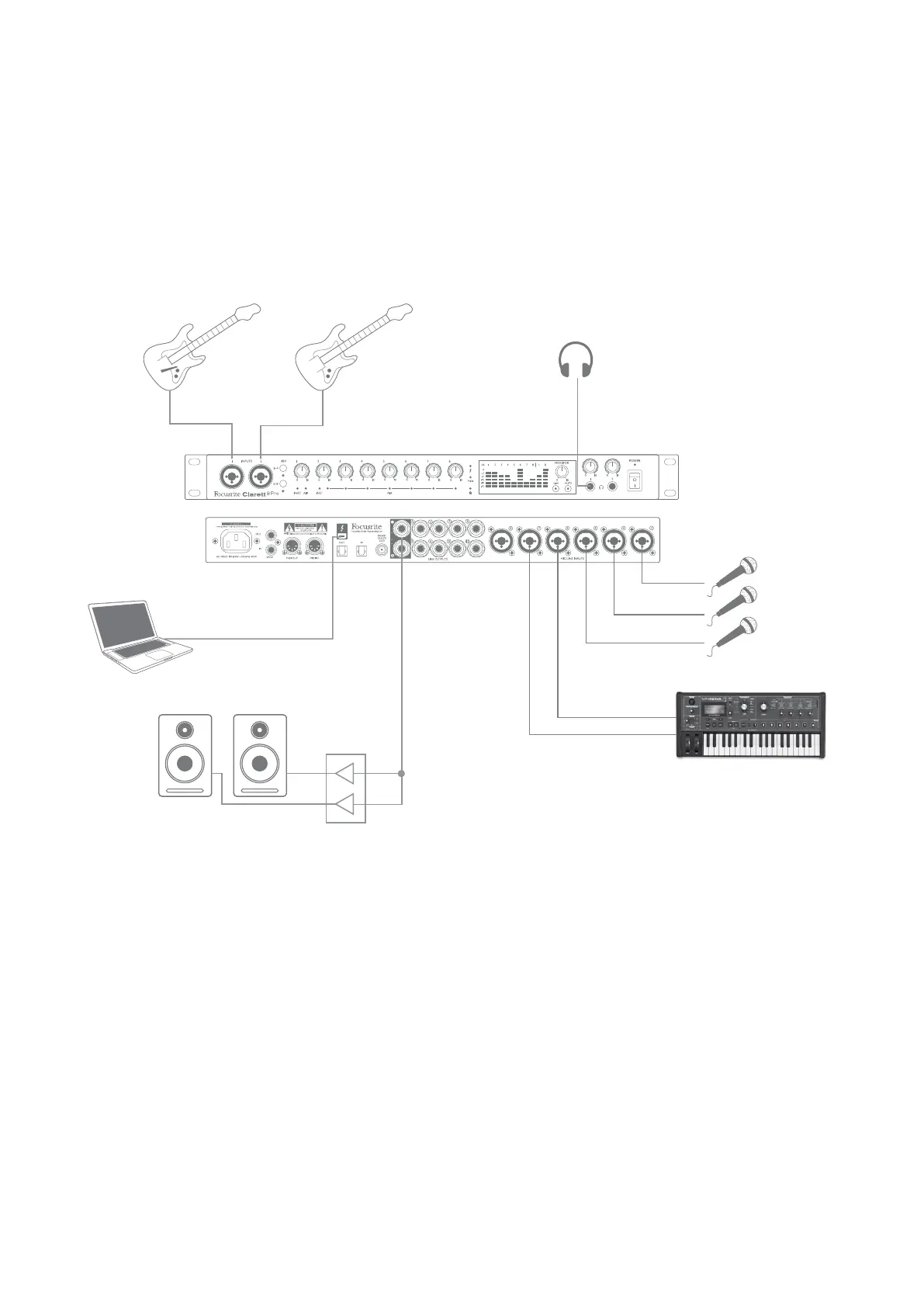
1. Recording a band
Bass GuitarGuitar
(Front Panel)
(Rear Panel)
Engineer’s Headphones
Stereo Keys
This setup illustrates a typical conguration for multitrack recording with DAW software on your
computer.
A selection of sources – microphones, two guitars and a keyboard – are shown connected to the
Clarett 8Pre’s inputs. Note that only Inputs 1 and 2 can be congured to accept instruments directly,
so we have chosen to plug the guitars into Inputs 1 and 2. Ensure INST mode is selected for Inputs 1
and 2 from Focusrite Control, and the INST LEDs are illuminated.
The connection to the computer running DAW software is via a Thunderbolt™ cable. This will carry
all the input and output signals between the DAW and the Clarett 8Pre. Once the audio setup is
correctly congured in the DAW, each input source will be automatically routed to its own DAW track
for recording.














 To Next Page