23
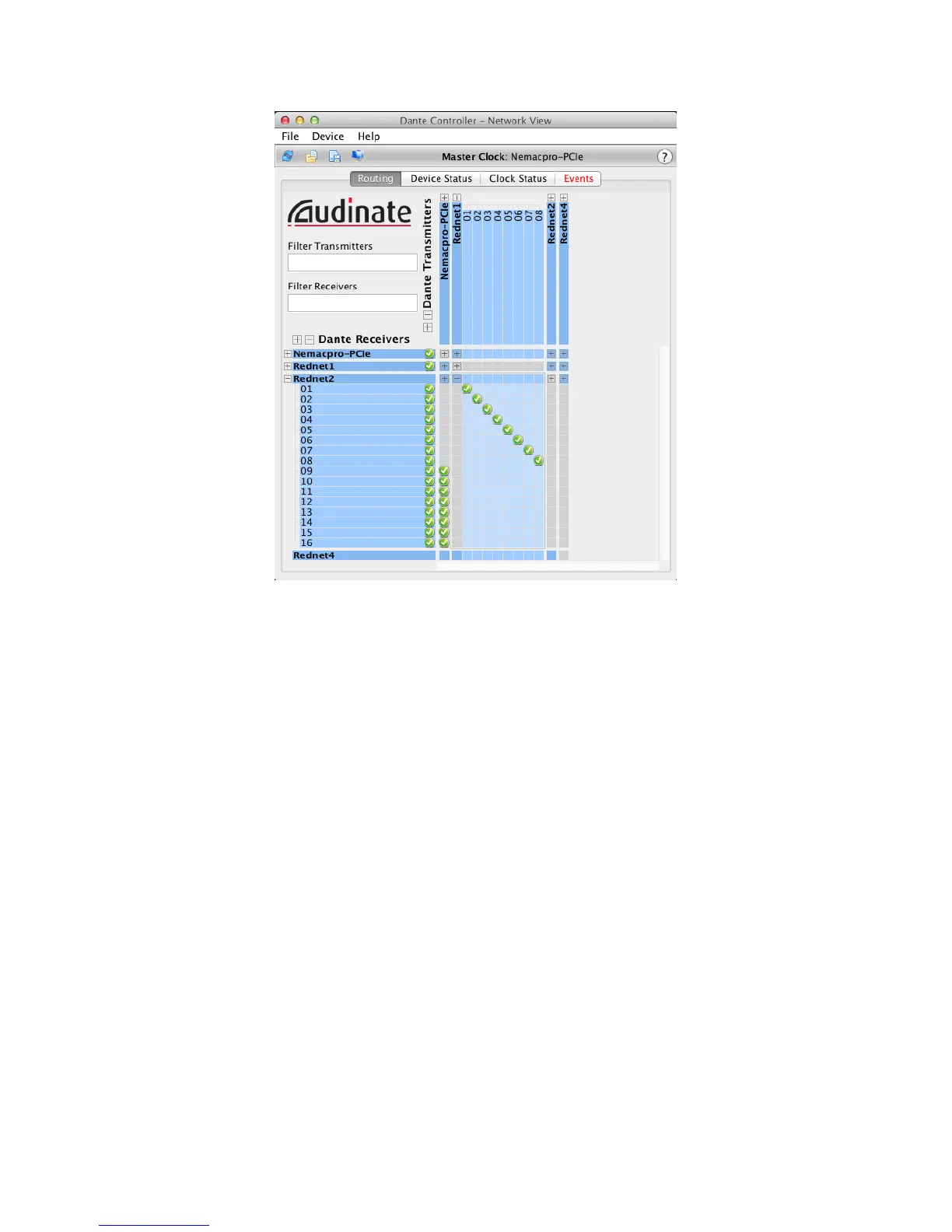
The Dante Controller window has four tabs; Routing, Device Status, Clock Status and Events.
The Routing tab is where custom audio routings can be set up.
The routing page is arranged as a matrix, with audio inputs listed horizontally (‘Dante Transmitters’)
and audio outputs listed vertically (‘Dante Receivers’). The ‘+’ symbol against each RedNet device
may be clicked to expand the full set of inputs or outputs; Note that in the case of an input-only
interface (e.g., RedNet 4), no outputs are listed. Clicking the ‘+’ symbol against the horizontal/
vertical titles Dante Transmitters and Dante Receivers simultaneously expands all audio inputs
and outputs respectively; clicking the ‘-’ symbol collapses them. In addition to the RedNet devices
on the network, all 128 inputs and 128 outputs available through the RedNet PCIe card are listed.











 To Next Page