16
Connecting Scarlett Solo to loudspeakers
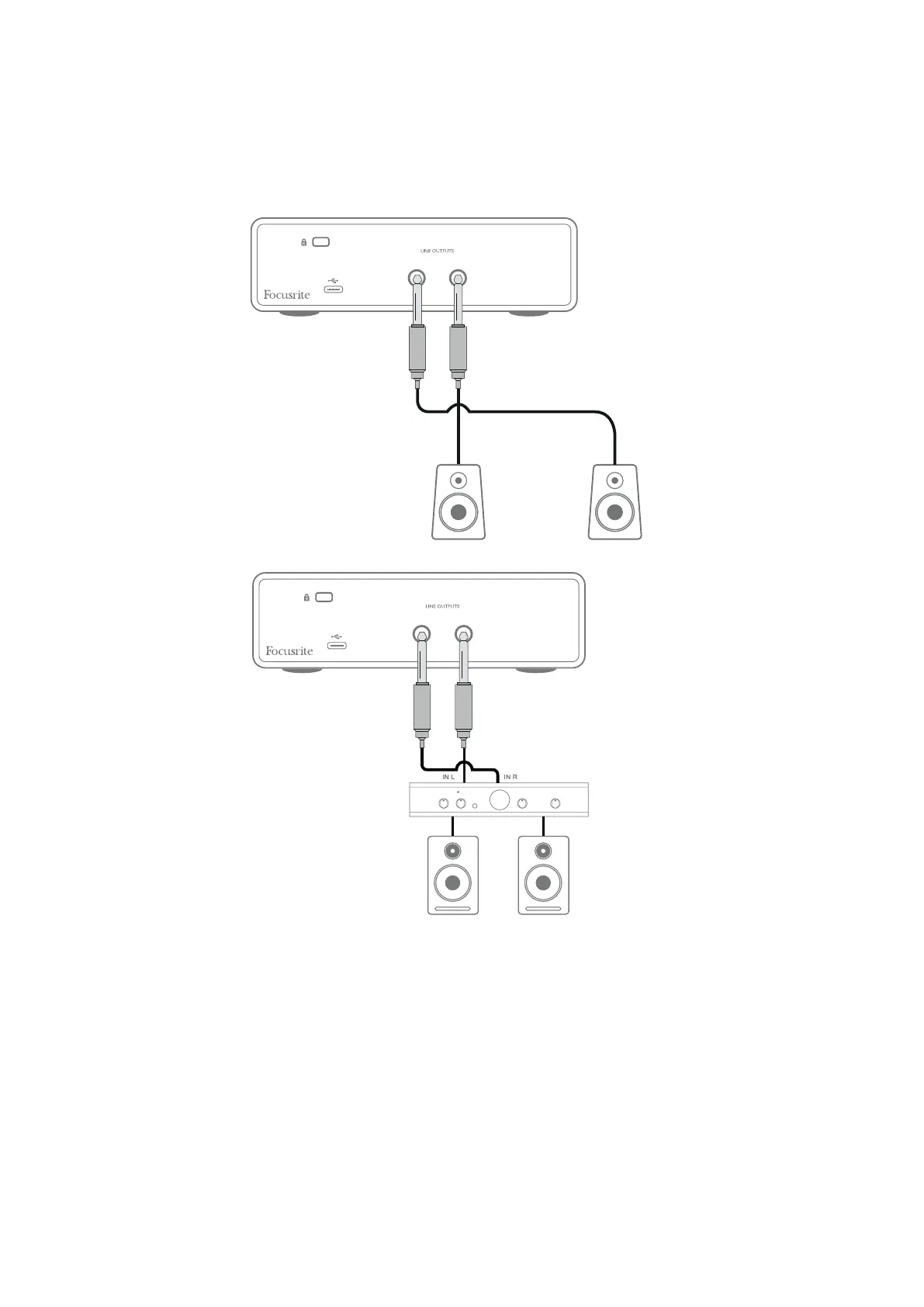
You can use the ¼” jack outputs on the rear panel to connect monitor speakers. Active monitors
have internal ampliers with a volume control, and can be connected directly. Passive loudspeakers
require a separate amplier; the rear panel outputs should be connected to the amplier’s inputs.
RIGHT LEFT
RIGHT LEFT
The line outputs are 3-pole (TRS) ¼” (6.35 mm) jack sockets, and are electronically balanced. Typical
consumer (Hi-Fi) ampliers and small powered monitors will have unbalanced inputs, either on
phono (RCA) sockets, or via a 3.5 mm 3-pole jack plug intended for direct connection to a computer.
In either case, use a suitable connecting cable with jack plugs at one end.
Professional power ampliers will generally have balanced inputs; we recommend using balanced
cables to connect these to the outputs of the Scarlett Solo.
NOTE: You run the risk of creating an audio feedback loop if loudspeakers are active at the same time
as a microphone! We recommend you always turn off (or turn down) monitoring loudspeakers while
recording, and use headphones when overdubbing.
Connecting active speakers
Connecting passive speakers









 To Next Page