Read below to see all of the capabilities of the machine and how to perform basic
and advanced functions.
NOTE, the first 2-3 measurements after installing a brand new unit, may not
measure correct values. It will normally take 2 measurements to get correct
values after the very first set-up.
Functions and Graph Screens
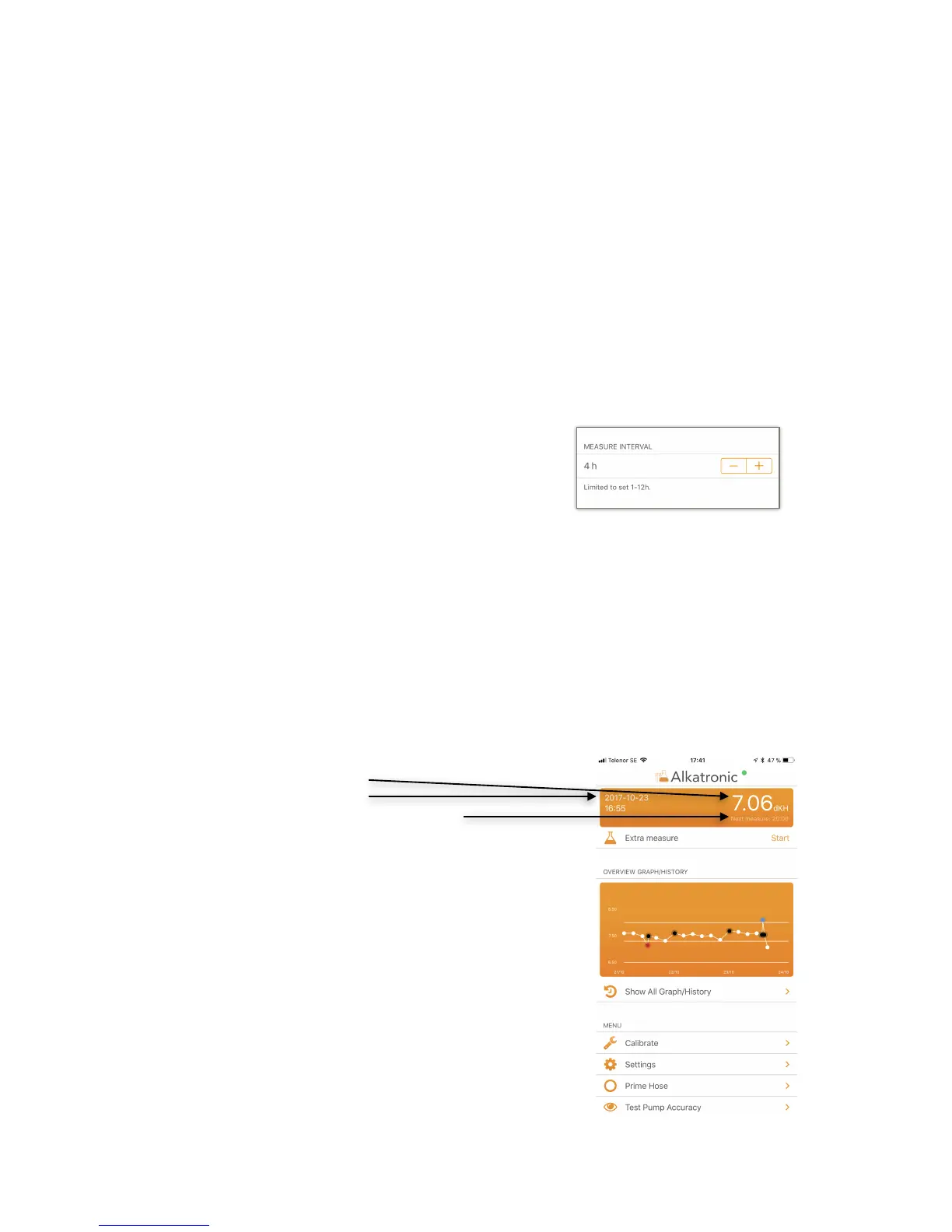
Measurement interval
The machine automatically measures dkH(
according to an hour interval you decide. You can set(
measurement intervals between 2h-12h. Go to the
home screen, select settings, and then set your
desired interval with the +/- buttons. This value is the
time between 2 measurements. "
HOME-screen
Home-screen is the first view you see when opening the app. At the top you always
see:"
"
• Latest measured value "
• When it was measured "
• When the next measurement will be"
Below this you will see a graphic history of the last 3
days. ”Overview graph/history”."
This graph has two lines showing the settled reference
value (see below). The white dots are measurements. If
the dKH is above or below the settled reference value,
the dots will be blue or red respectively, telling us that
here the machine has also performed an action to
correct a deviating dKH. Click on the ”Show!
All Graph/History” to see what type of actions the
machine performed, and also get more values in list
form. "
(
If a dot is black, the value was preceded by a wash out
of a suspected error measurement. The black dot and


 To Next Page