C SERIES USER’S MANUAL
13
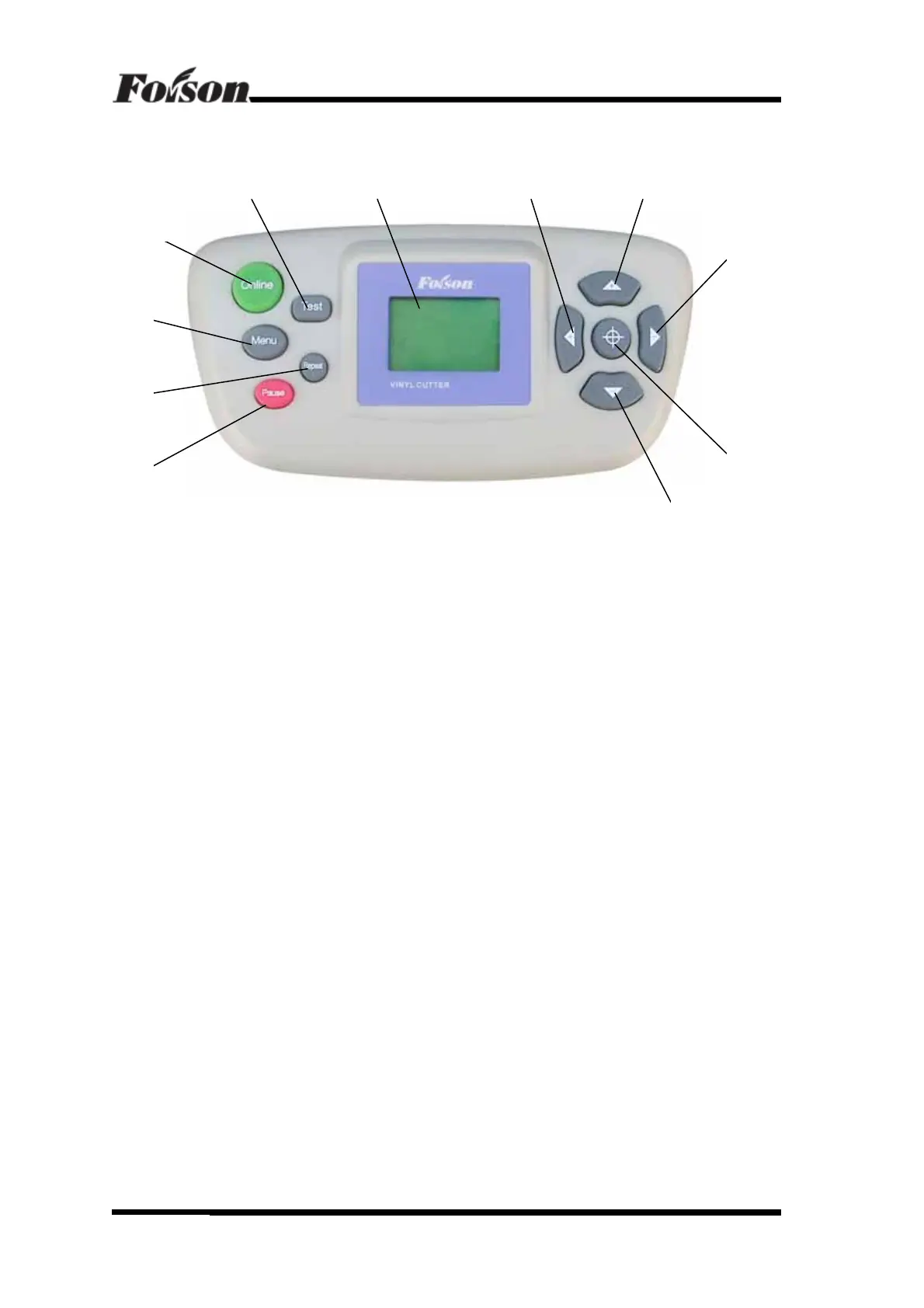
4.3 Control Panel
1、LCD(LCD)Display
2、Paper Feeding Button:it is X direction button under offline; it is value“-”under
parameter menu.
3、Original Setting Button: Press such button to fix the coordinate point under offline.
4、Rightward Button:it is Y direction button under offline; it is value“-”under
parameter menu.
5、Paper Withdrawal Button:it is X direction button under offline; it is value“+”under
parameter menu.
6、Leftward Button: it is Y direction button under offline; it is value“+”under parameter
menu.
7、Pause Button: Switch to pause/resume model under online working.
8、Repeat Button:to repeat last job.
9、Menu Button: Switch to online and menu model.
10、Online Button: Switch to online and offline model.
11、Testing Button: (Press for a short time) to upper and down the knife; or (press for a
long time) to test a rectangle itself.
Control Panel
561 11
10
9
8
7
4
3
2



 To Next Page