Undercounter Dispenser and Ice machine 7UC100A/7UD100A 9
Maintenance/Cleaning Mode –––––––––––––––––––––––––––––––––––––––––
Cleaning Mode (Dispensing Disabled) - Use when cleaning surface
Entering Cleaning Mode disables the User Interface and allows you to clean
the outside of the dispenser without accidentally dispensing water or ice.
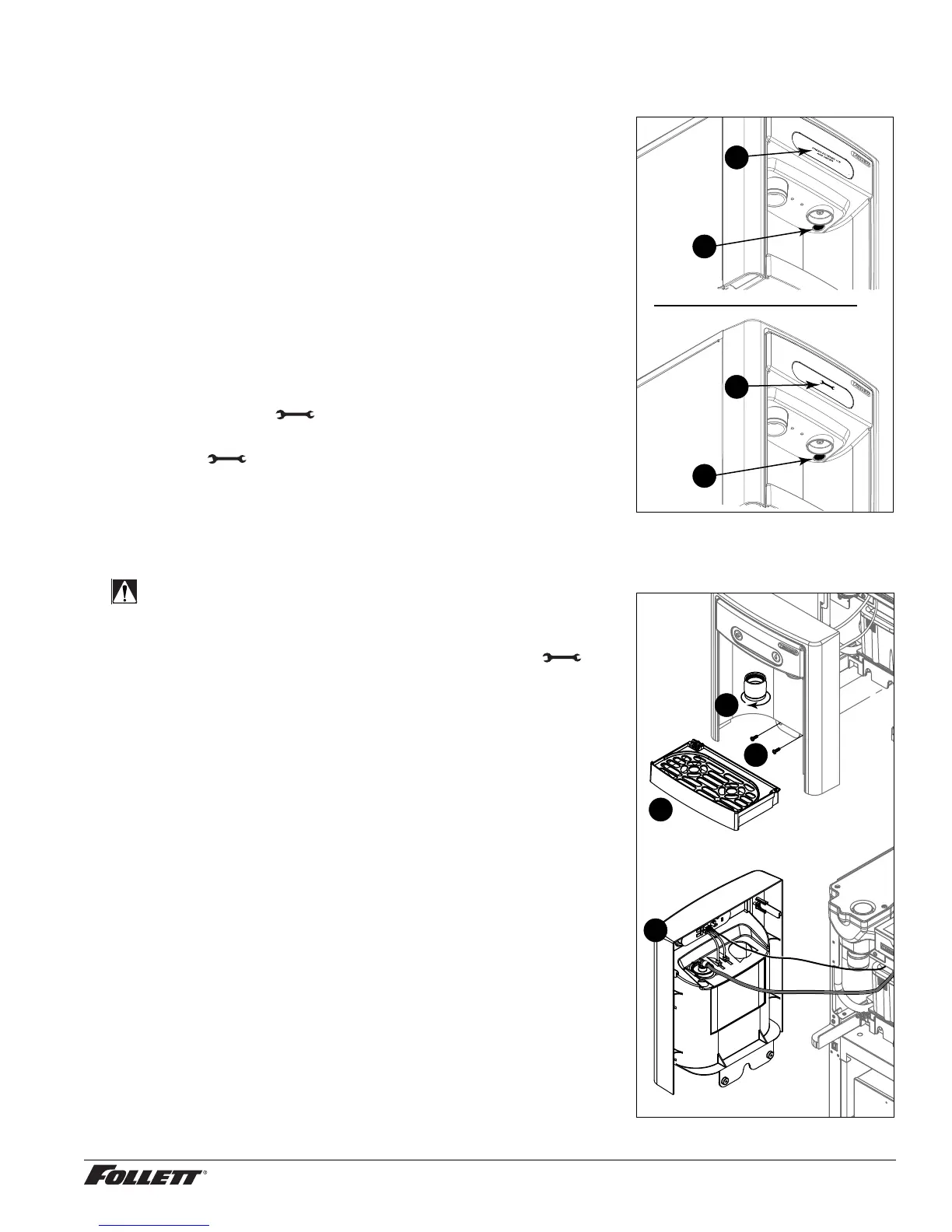
1. To enter Cleaning Mode, press and immediately release the
maintenance/clean switch (Fig. 5.1) so that only "FRESH
FILTERED ICE AND WATER" displays in the user interface
(Fig.5.2).
2. To exit Cleaning Mode, press and immediately release the
maintenance/clean switch so that the ice and water icons also
display in the user interface.
Maintenance Mode (All Operation Disabled) - Use when cleaning ice
machine
Entering Maintenance Mode disables all operations and allows you to safely
clean and/or sanitize the ice machine and dispenser.
1. To enter Maintenance Mode, press and hold the maintenance/clean
switch (Fig. 5.3) until displays in the user interface (Fig.5.4).
2. To exit Maintenance Mode, press and hold the maintenance/clean
switch until no longer displays in the user interface.
Note: Entering and exiting Maintenance Mode will reset the six-month
periodic maintenance reminder.
Fig. 5
4
3
2
1
Accessing Internal Components ––––––––––––––––––––––––––––––––––––––
CAUTION!
Except for routine cleaning and sanitizing, only quali ed
technicians should attempt to service or maintain this equipment.
1. Press and hold the maintenance/clean switch (Fig. 5.1) until
displays in the user interface (Fig. 5.2).
2. Remove (unscrew) chrome ice dispenser chute (Fig. 6.1).
3. Remove the drip tray (Fig. 6.2).
4. Remove the two screws (Fig. 6.3) on the front panel (behind the
drip tray).
5. Remove and set aside the front panel (Fig. 6.4) - do not
disengage the plug on the back of the User Interface or the
tubing at the water dispenser chute (if so equipped).
Fig. 6
1
2
3
4



 To Next Page