FoMaKo
Focus Your Streaming www.fomako.net
6
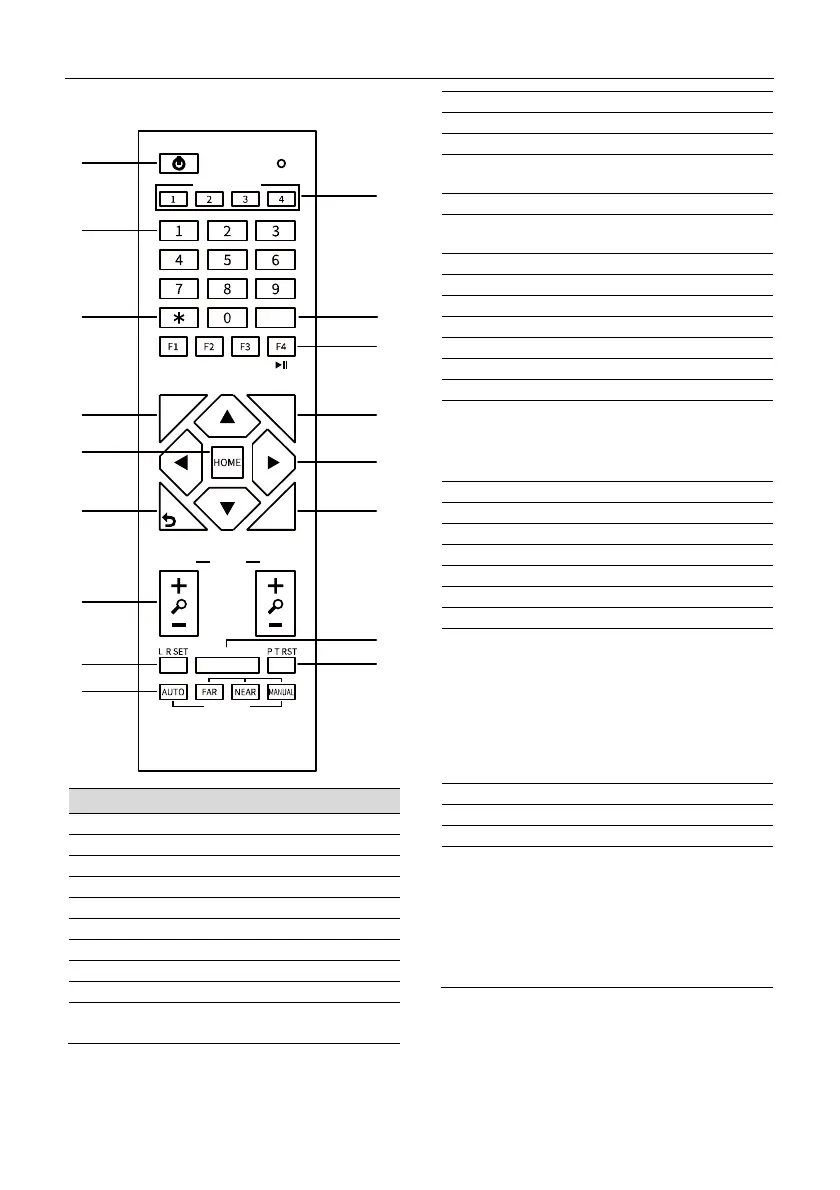
4.6 Remote Control
Key Description
1. Standby Key
Press to enter standby mode
2. Number Key
Press to set preset or call preset
3. *Key
Use with other keys
4. PRESET Key
Set preset: [PRESET] + Number key (0-9)
5. HOME Key
Confirm selection or press to turn PTZ back to
the middle position
6. Return Key
Press to return to the previous menu
7. ZOOM Key
SLOW: Zoom In [+] or Zoom Out [-] slowly
FAST: Zoom In [+] or Zoom Out [-] fast
8. L/R SET Key
Standard: Simultaneously press L/R SET + 1
Reverse: Simultaneously press L/R SET + 2
9. FOCUS Key
Auto/Manual/Far/Near focus
10. CAMERA SELECT Key
Press to select and control the camera
11. # Key
Use with other keys
12. IR Remote Control Key
[*]+[#]+[F1]: Address 1
[*]+[#]+[F2]: Address 2
[*]+[#]+[F3]: Address 3
[*]+[#]+[F4]: Address 4
13. RESET Key
Clear preset position: [RESET] + Number key (0-9)
14. PTZ Control Key
PTZ moved according to the arrow indicates
15. MENU Key
Press to enter or exit OSD Menu
16. BACKLIGHT Key
Backlight ON/OFF: Press repeatedly to enable or
disable the backlight compensation.
NOTE:
Effective only in auto exposure mode.
If there is a light behind the subject, the
subject will become dark, press the backlight
key to enable the backlight compensation.
Press again to disable this function.
17. P/T RST (PTZ Reset) Key
PTZ starts to self-test after pressed it
Shortcut Set
[*]+[#]+[1]: OSD menu default English
[*]+[#]+[3]: OSD menu default Chinese
[*]+[#]+[4]: Display current IP address
[*]+[#]+[6]: Quickly recover the default
[*]+[#]+[8]: View the camera version
[*]+[#]+[9]: Quickly set up inversion
[*]+[#]+[MANUAL]: Restore default IP address
1
2
3
4
5
6
7
8
9
10
11
12
13
14
15
16
17
#
PRESET
CAMERA SELECT
STD REV
RESET
MENU
SLOW
BACKLIGHT
FOCUS
ZOOM FAST
/ /


 To Next Page