Quick
Start
Add Cameras to Your Network
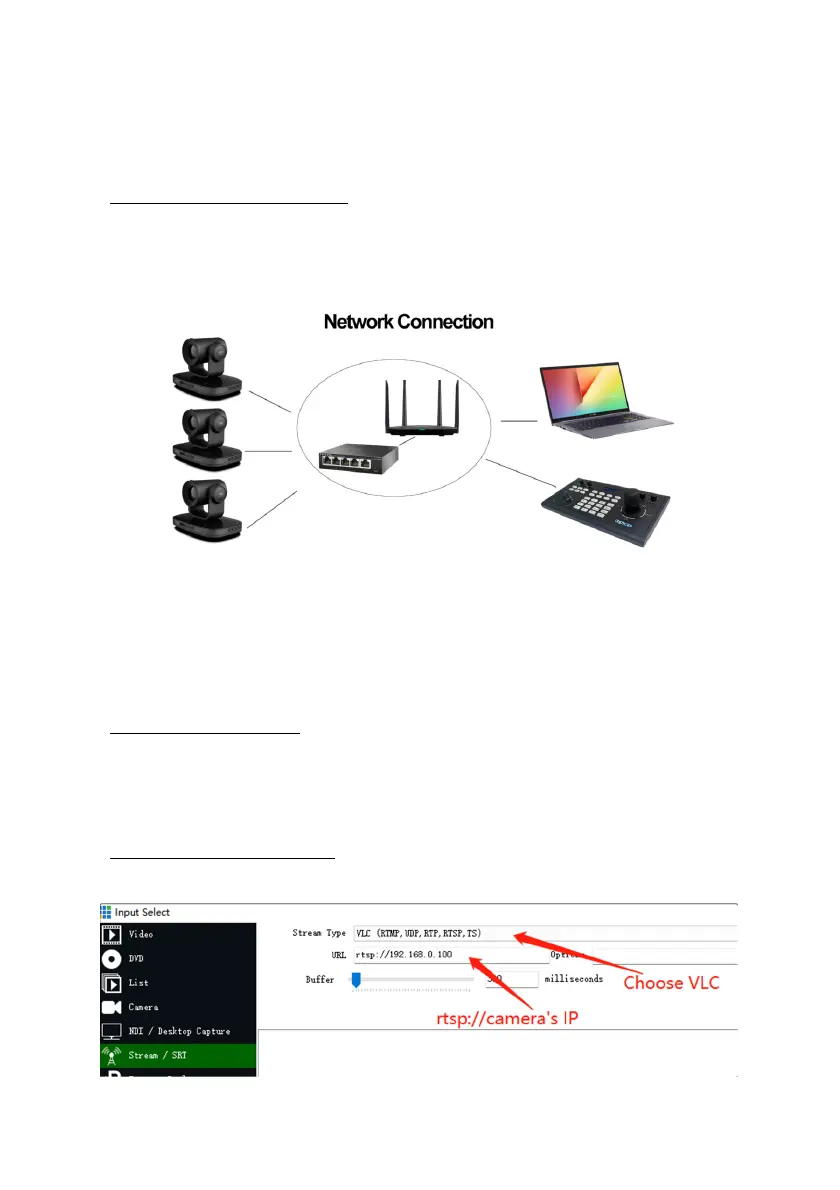
Please do the connections as the following. You must have a router in your network, then router will
assign IP address for the cameras automatic. If you don’t have router in your network, cameras can’t get
IP address from your network.
Camera’s screen will show
its IP address, you can visit camera’s webpage by camera’s IP address.
Tips: When you login the camera’s webpage, you’d better change the IP from “Dynamic IP Address” to
“Fixed IP Address”, then camera will keep currently IP ,or when camera rebooted, router rebooted,
router will assign a new IP address for the camera.
Visit Camera’s Webpage
Please use web browser such as: Google Chrome, Firefox or Safari to Visit camera’s IP address
User name: admin Password: admin
IP Streaming to Vmix or OBS
Tips: recommend to use VLC streaming in Vmix and OBS, it has lower latency.


 To Next Page