FoMaKo
Focus Your Streaming www.fomako.net
12
5) Hue
Hue of image: 0~14 (Default value is 7).
6) Flip
Turn On/Off the Flip function.
7) Mirror
Turn On/Off the Mirror function.
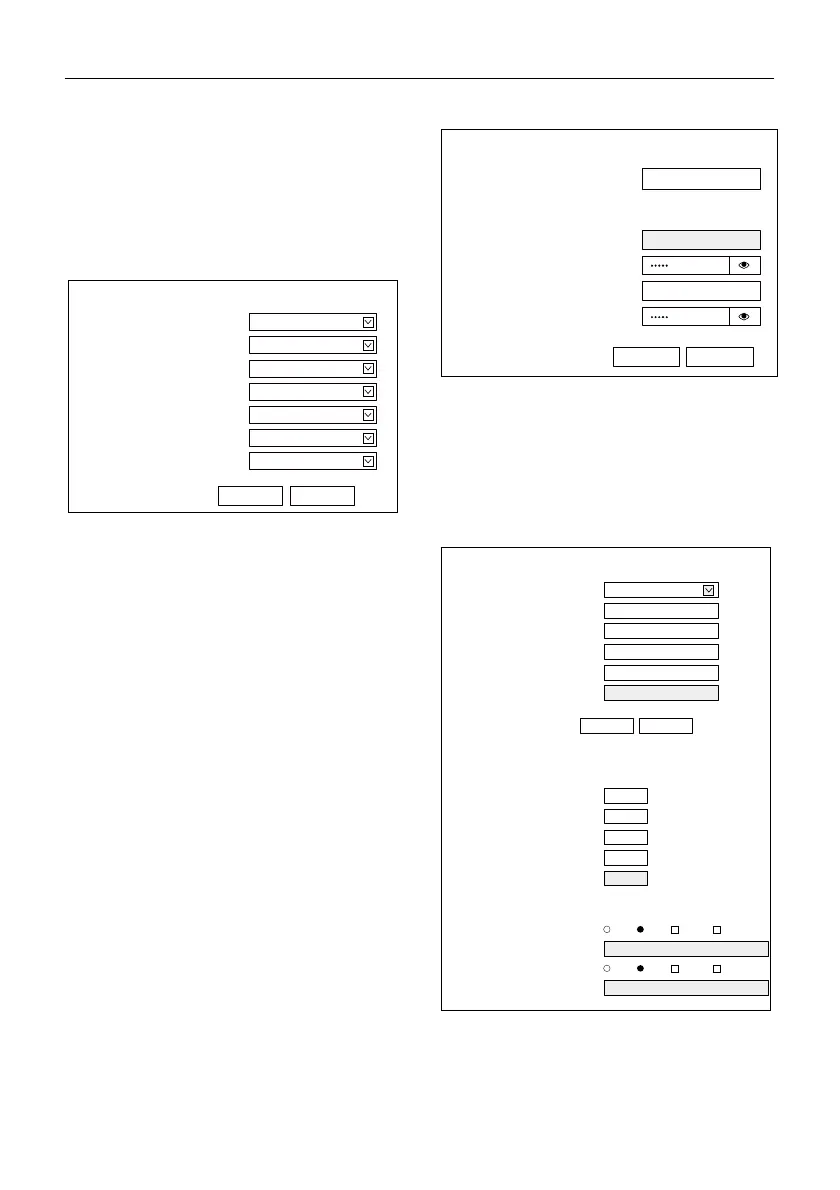
6.5 Audio Settings
1) Audio Switch
E
nable or disable audio switch.
2) Audio Type
Optional items: AAC.
3) Sample Rate
Optional items: 44.1K, 48K.
4) Bit Rate
Optional items: 96K, 128K.
5) Input Type
Optional items: LINE IN, MIC.
6) Input Vol
The volume of the channel.
7) ADTS Options
Optional items: On, Off.
6.6 System Settings
1) Reboot
Click the “Reboot” button, system restart.
2) Username and Password
The user can modify the password (letters and
Numbers only).
6.7 Network Settings
Submit Cancel
Audio Settings
On
Audio Switch
AAC
Audio Type
96K
Bit Rate
20
Input Vol
dB
48K
Sample Rate
LINE IN
Input Type
Off
ADTS Options
Initialize
Reboot
Reboot
User
UserName
admin
Passwd
guest
Guest
Passwd
Submit Cancel
IP Configuration Type
Fixed IP Address
IP Address
192.168.100.88
Subnet Mask
255.255.255.0
Gateway
192.168.100.1
DNS Address
8.8.8.8
MAC Address
D4:E0:8E:A9:73:45
Submit Cancel
Lan Settings
RTSP Port
554
TCP Port
5678
UDP Port
1259
Sony Visca
52381
HTTP Port
80
Port Settings
RTMP(S) Settings
First Stream On Off Video Audio
MRL
rtmp://192.168.100.138/live/stream0
Second Stream
MRL
rtmp://192.168.100.138/live/stream1
On Off Video Audio


 To Next Page