21
Your device stores the 1000 most recent test results along with respective dates
and times in its memory. To enter the device memory, start with the device
switched off.
To review all test results, do the following:
1. Press and release MAIN button or . The “ ” icon appears on the screen.
2. Press or repeatedly to review other test results stored in the device.
Press and hold MAIN, the meter will be turned off.
Note:
To avoid contaminating the control solution, do not directly apply the control
solution onto a strip.
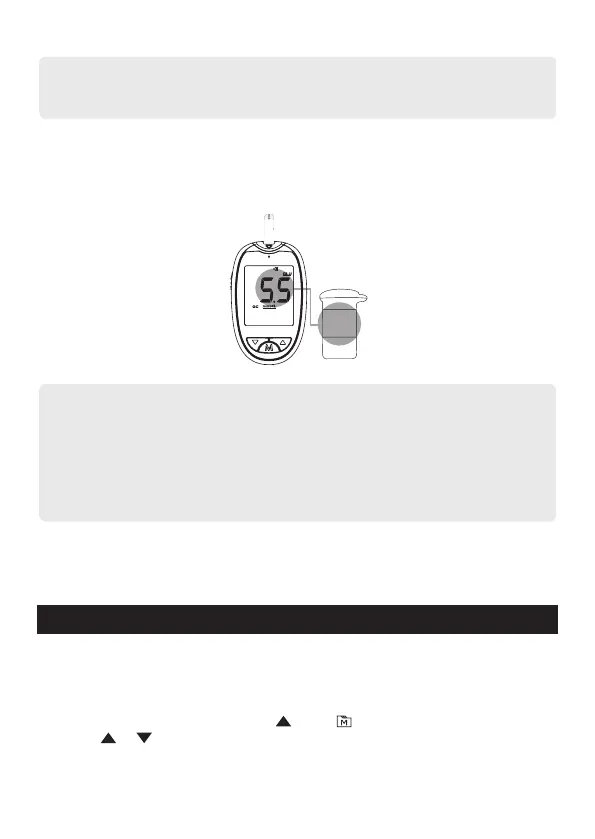
4. Read and compare the result. After counting down to 0, the test result of the
control solution will appear on the display. Compare this result with the range
printed on the test strip vial or individual foil pack and it should fall within this
range. If the test result is out of range, read the instructions again and repeat
the control solution test.
Note:
• Control solution test results are stored in the memory.
• The control solution range printed on the test strip vial or individual foil pack
is for control solution use only. It is not the recommended range or reference
values.
• Refer to the Maintenance section for important information about your control
solutions.
Out-of-range results:
If you continue to get results that fall outside the range printed on the test strip
vial, it means that the meter and strips might not be working properly. Please
contact your local customer service or place of purchase for assistance.
Reviewing Test Results
6.5~8.8
BG
B
BG
B
G
BG
B
BG
B
G
BG
BG
BG
B
G
BG
BG


 To Next Page