30
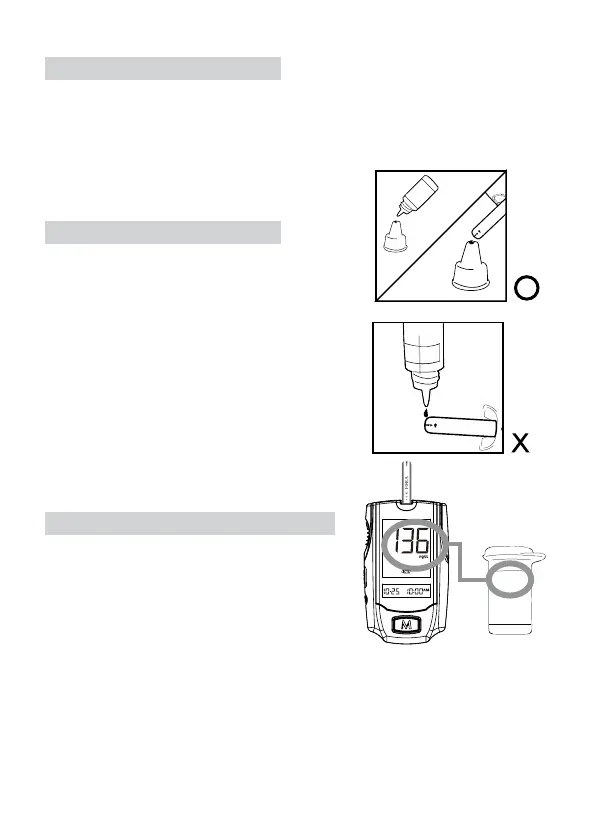
Shake the control solution vial well. Remove the
cap from the control solution bottle. Place cap
on at surface. Squeeze the vial, discard the rst
drop, and wipe off the dispenser tip to prevent con-
tamination. Squeeze the vial again to get another
drop and apply the drop to the top of cap.
While holding the monitor, move the absorbent
hole of the test strip to touch the drop of control
solution. Then the drop will be automatically drawn
into the test strip. Make sure the conrmation
window is completely lled. The meter begins to
count down.
Out-of-range results
If test results falls outside the range printed on the test strip vial, check the sec-
tion “Problem in Operation” in troubleshooting guide and repeat the test. If you
continue to get out-of-range results, it means that the system may not be working
properly. Do NOT test your blood. Contact the Customer Care Line at
1-888-307-8188, 1-866-469-2632
To avoid contaminating the control solution with
the content of the test strip, you have to place a
drop of control solution on a clean surface. Do
not directly apply control solution into a strip.
STEP 3. Obtain Control Solution
STEP 4. Apply Control Solution
STEP 5. Read and Compare the Result
109~165



 To Next Page